

Keeping track of customer information gets harder as a business deals with more questions, chats,…
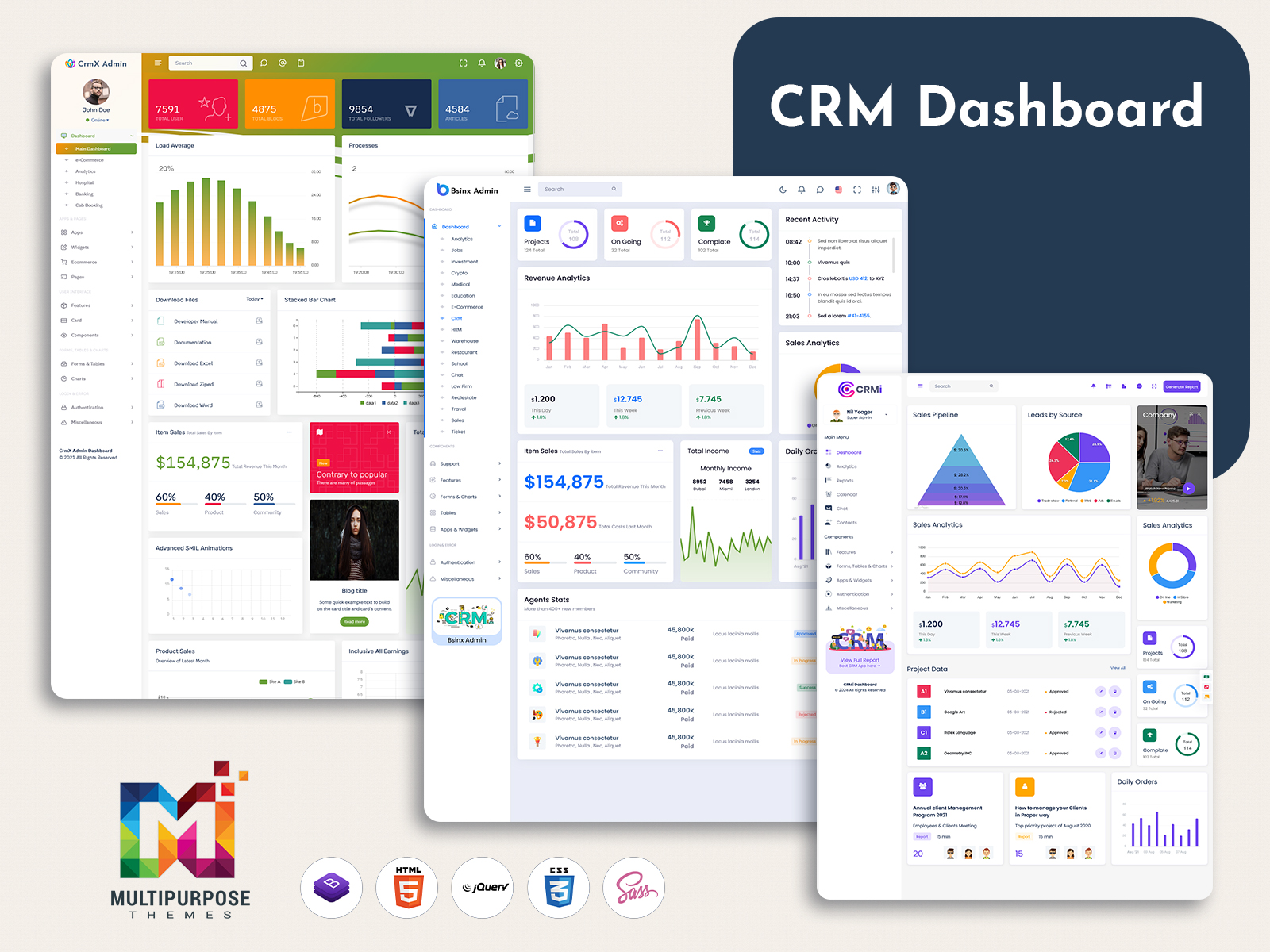
Improve Business Workflow with a Smart CRM Data Dashboard Design
Reading Time: 6 minutes
Customer relationship management has changed significantly as businesses now rely on digital systems to manage leads, customer communication, sales activities, and performance tracking from one place. A modern CRM Data Dashboard helps businesses organize this process through a centralized interface where teams can monitor opportunities, analyze customer behavior, and improve decision-making. Instead of handling information across scattered tools, companies can use dashboards that bring operations together in one structured environment.
Watch Full Video
A well-designed CRM Software Dashboard does more than show numbers. It transforms raw business information into visual insights that help sales teams, support departments, and managers take action faster. From tracking customer journeys to measuring revenue growth, dashboards simplify complicated workflows. This creates better coordination between teams while improving productivity in everyday operations.
Businesses today also focus heavily on usability, and this is whereCRM Web Design Dashboard becomes important. A thoughtful design makes data easy to understand through charts, reports, activity panels, and customizable widgets. Combined with a scalable CRM Bootstrap Dashboard, companies can build responsive platforms that work smoothly across devices while maintaining performance and flexibility.
Understanding the Role of CRM Software Dashboard
The role of a CRM Software Dashboard is to act as a command center for customer-focused operations. It gives teams a complete view of leads, deals, support requests, campaign performance, and customer engagement from one platform. Instead of switching between systems, users can access everything through one interactive dashboard that supports faster responses and smarter planning.
A professional CRM Web Design Dashboard also supports collaboration by allowing different departments to work with shared information. Sales representatives can monitor pipelines, managers can evaluate targets, and service teams can review customer interactions without delays. This visibility reduces confusion, improves communication, and creates a more organized business environment.
Another major role of CRM Data Dashboard Design is turning information into strategy. Rather than only storing records, dashboards help interpret trends, forecast opportunities, and identify risks. When built with a responsive CRM Bootstrap Dashboard, the system becomes adaptable for startups, enterprises, and growing businesses looking for scalable management solutions.
Importance of CRM Data Dashboard Design
The importance of CRM Data Dashboard Design lies in how it helps businesses understand and use data effectively. Good dashboard design is not only about appearance. It determines how easily users can read metrics, access customer insights, and make informed decisions. A structured layout improves visibility and keeps essential information available without complexity.
A strong CRM Web Design Dashboard improves operational efficiency by presenting performance indicators in a simple and organized way. Teams can monitor conversions, track follow-ups, and review customer activity without searching through large volumes of information. This saves time while supporting better actions across departments.
For businesses aiming to scale, an effective CRM Software Dashboard becomes an essential management tool. It supports decision-making, reduces reporting effort, and creates a smoother workflow. When supported by a modern CRM Bootstrap Dashboard, the design also delivers mobile responsiveness and long-term usability for evolving business needs.
Essential Features of CRM Bootstrap Dashboard
A modern CRM Bootstrap Dashboard includes features designed to support sales processes, customer management, and operational visibility. Lead management is one of the core components, helping businesses track prospects from initial contact to conversion while maintaining organized pipelines.
Analytics and reporting tools are also critical within a CRM Software Dashboard. Visual reports, revenue tracking modules, and customer activity summaries allow teams to monitor performance continuously. These insights help businesses identify opportunities and improve planning based on real data.
Another valuable feature in a CRM Web Design Dashboard is automation support. Task reminders, workflow triggers, activity logs, and communication tracking reduce manual effort while improving consistency. Combined with flexible CRM Data Dashboard Design, these features create a platform built for both productivity and growth.
Role of Bootstrap 5 in CRM Dashboard Development
Bootstrap 5 plays a major role in creating modern dashboard interfaces by supporting responsive layouts and flexible UI structures. In a CRM Bootstrap Dashboard, this framework helps developers build professional interfaces that adjust smoothly across desktop, tablet, and mobile devices.
Performance and customization are major reasons Bootstrap 5 supports advanced CRM Web Design Dashboard development. Its component library allows faster creation of tables, cards, forms, charts, and navigation structures that improve user experience without overcomplicating design.
For businesses using a CRM Software Dashboard, Bootstrap 5 also supports scalability. As platforms grow with additional modules and features, the framework allows consistent styling and structured expansion. This strengthens s while maintaining usability and speed.
Benefits of Using CRM Dashboard
1.Better Customer Visibility
A CRM Software Dashboard gives businesses a complete view of customer interactions, purchase history, communication records, and engagement trends. This visibility helps teams understand customer needs more clearly and deliver better experiences. It also supports personalized communication and stronger relationship management.
2.Improved Workflow Efficiency
A well-built CRM Bootstrap Dashboard reduces manual work by organizing tasks, reminders, and process tracking within one system. Teams spend less time managing scattered information and more time focusing on productive activities. This improves internal efficiency and supports smoother operations.
3.Stronger Decision Making
With intelligent CRM Data Dashboard Design, businesses can analyze trends, sales movement, and customer behavior through actionable insights. Leaders can make faster strategic decisions based on live information rather than assumptions or delayed reports.
4.Enhanced Team Collaboration
A centralized CRM Web Design Dashboard allows departments to work using shared data. Sales, support, and management teams can stay aligned, reducing communication gaps while improving coordination across workflows.
5.Scalable Business Management
As operations expand, a modern CRM Software Dashboard can grow with the business. It supports additional users, new modules, and larger datasets while maintaining structure and usability.
How CRM Dashboard Improves Sales Performance
A powerful CRM Software Dashboard helps sales teams monitor opportunities in real time and manage pipelines more effectively. Reps can track deal progress, prioritize prospects, and focus attention on opportunities with stronger conversion potential.
A well-structured CRM Data Dashboard Design also improves forecasting by showing trends, targets, and performance indicators in one view. Managers gain better visibility into team productivity and can optimize strategies using measurable insights.
Through automation, activity monitoring, and responsive CRM Bootstrap Dashboard interfaces, sales teams work faster and respond more efficiently. This contributes to improved conversion rates, stronger follow-up management, and higher revenue performance.
Advantages of CRM Software Dashboards
1.Centralized Data Access
A CRM Web Design Dashboard keeps critical information available in one place, reducing dependency on disconnected systems. This improves control and supports faster execution.
2.Real-Time Performance Monitoring
Businesses can use CRM Data Dashboard Design to track metrics continuously instead of waiting for manual reporting. This improves responsiveness and supports proactive management.
3.Better Customer Retention
Through stronger visibility into customer behavior, a CRM Software Dashboard helps businesses improve service quality and maintain long-term relationships.
4.Faster Process Automation
A modern CRM Bootstrap Dashboard supports automation features that reduce repetitive work and improve consistency across sales and support processes.
5.Smarter Growth Planning
Dashboards provide insights that help businesses identify opportunities, optimize resources, and support sustainable expansion with data-backed planning.
Usage of CRM Dashboards
A CRM Software Dashboard is widely used across industries including retail, healthcare, finance, SaaS, education, and consulting. Businesses use these dashboards to manage customer interactions, track performance, and support relationship-driven growth.
Sales organizations rely on CRM Web Design Dashboard solutions for opportunity management and forecasting. Marketing teams use them to monitor campaigns and customer engagement, while support departments benefit from service tracking and response management.
With scalable CRM Bootstrap Dashboard architecture and modern CRM Data Dashboard Design, these platforms adapt to both small businesses and large enterprises seeking efficient digital management tools.
Security in CRM Dashboard Platforms
Security is a major part of every CRM Software Dashboard because customer data requires strong protection. Secure authentication, role-based permissions, and encrypted access help protect sensitive information.
A reliable CRM Web Design Dashboard also supports audit logs and controlled access management, allowing organizations to monitor activity while reducing risk. These capabilities improve governance and support compliance needs.
Modern CRM Bootstrap Dashboard development also focuses on secure coding practices, regular updates, and scalable protection measures. This strengthens trust while supporting safe business operations.
Future of CRM Web Design Dashboards
The future of CRM Web Design Dashboard platforms is becoming more intelligent, personalized, and automation-driven. Businesses are moving toward dashboards powered by predictive analytics, smarter reporting, and deeper customer intelligence.
Future CRM Data Dashboard Design trends will focus on cleaner user experiences, adaptive interfaces, and data visualization built for faster interpretation. These improvements will make dashboards more strategic than operational.
As innovation grows, the CRM Software Dashboard will continue evolving through AI integration, automation tools, and scalable CRM Bootstrap Dashboard frameworks designed for modern digital businesses.
Conclusion
A powerful CRM Web Design Dashboard is no longer just a management tool. It has become an essential business system for organizing relationships, improving sales performance, and supporting data-driven growth. From smart CRM Data Dashboard Design to scalable CRM Bootstrap Dashboard development, these solutions help businesses operate with better visibility, efficiency, and control. For companies seeking stronger customer management and long-term growth, investing in a modern CRM Software Dashboard creates measurable value.
FAQs
1. What is a CRM Web Design Dashboard?
A CRM Web Design Dashboard is a digital interface used to manage customer relationships, sales activities, reports, and operational insights through one centralized platform.
2. Why is CRM Data Dashboard Design important?
It improves data visualization, supports faster decisions, simplifies analysis, and helps teams understand business performance through organized and interactive reporting.
3. What does a CRM Software Dashboard include?
It commonly includes lead management, sales tracking, reports, automation tools, customer records, activity monitoring, and performance analytics modules.
4. Why use a CRM Bootstrap Dashboard?
A CRM Bootstrap Dashboard offers responsive design, scalable structure, modern UI components, and flexible customization for web-based business applications.
5. How does CRM dashboard improve sales?
It improves pipeline visibility, follow-up tracking, forecasting, team productivity, and helps convert opportunities through smarter process management.
6. Are CRM dashboards secure?
Yes, modern dashboards support encryption, permissions, authentication controls, monitoring tools, and secure access features for protecting business data.
7. What is the future of CRM dashboards?
Future CRM dashboards will include AI insights, predictive analytics, automation, personalized interfaces, and advanced data-driven management capabilities.

Related Posts


This Post Has 0 Comments