Healthcare facilities. Store a lot of information which needs to be properly organized and protected.…
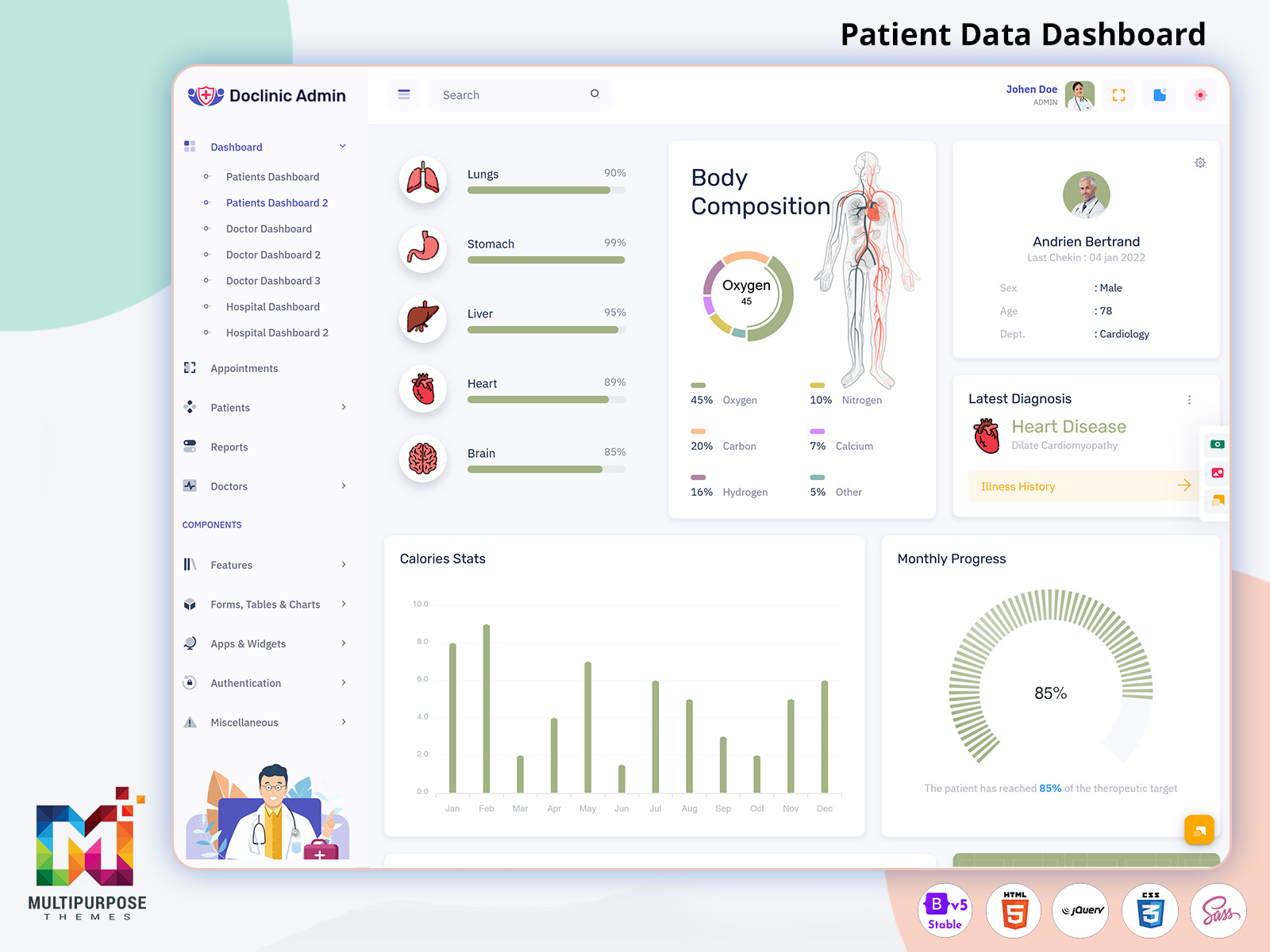
Patient Data Dashboard for Heart Rate, Reports and Health Tracking Systems in 2026
Reading Time: 8 minutes
The modern healthcare industry is rapidly shifting toward digital systems where data accuracy and real-time access are essential for better patient care. A Patient Data Dashboard helps hospitals and clinics manage health information in a structured way through a centralized interface. It combines Patients Records, Patient Data Dashboard, and Patients Dashboards to provide a complete view of patient activities. Doctors and staff can easily access reports, charts, and medical updates without delays.
Watch Full Video
A well-designed Patient Dashboard Template improves workflow efficiency by organizing Patient Report Page details, scheduling, and monitoring tools in one place. Integrated with Dashboard UI concepts, it connects smoothly with Doctor Dashboard, Doctor Dashboard Template, Hospital Admin dashboard, and Hospital admin template systems. This creates a unified environment where hospital dashboard solutions and Hospital Dashboard Template designs support better decision-making, improved accuracy, and faster medical response for patient care management.
Heart Rate Monitoring in Smart Patient Dashboard
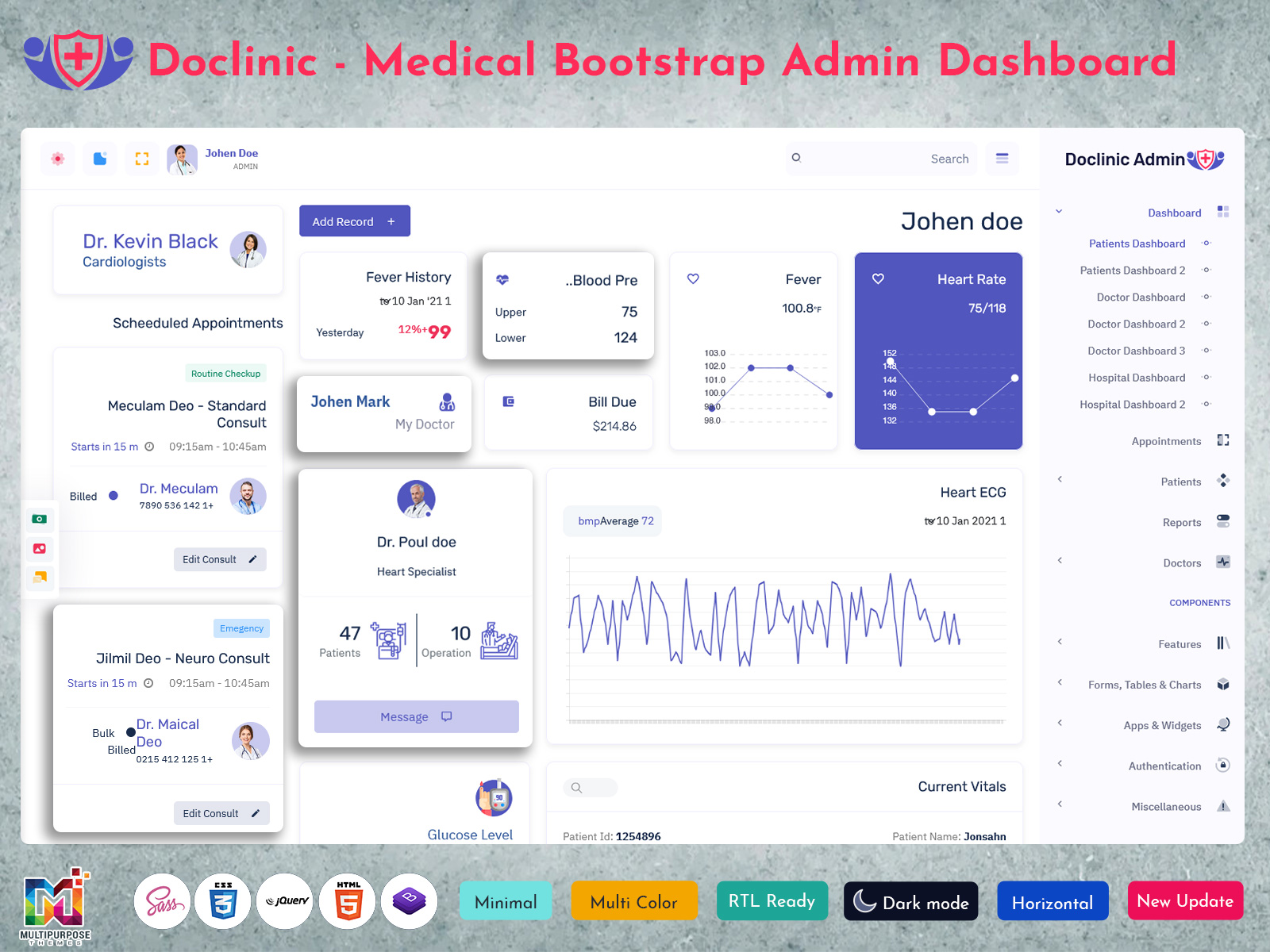
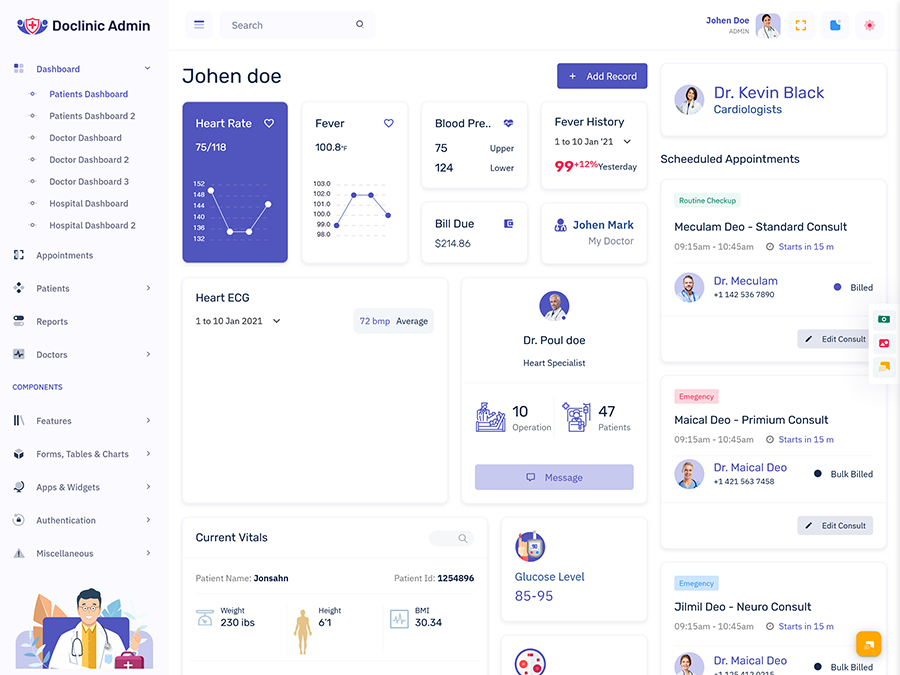
Heart rate monitoring is an important part of modern digital healthcare systems where continuous patient tracking is required for better diagnosis and treatment planning. A Patient Dashboard allows doctors to view real-time heart rate data in a structured format using a Patient Data Dashboard. This helps medical professionals understand patient condition instantly without going through complex reports. By integrating Patients Records and Patients Charts dashboard Template, healthcare teams can monitor heart performance trends and detect abnormalities at an early stage, improving overall patient safety and response time.
In advanced healthcare platforms like Doctor Dashboard and Hospital admin dashboard systems, heart rate data is displayed through a clean Dashboard UI for better readability. A Patient Dashboard Template or Hospital Dashboard Template ensures that critical information is always accessible in one place. This integration with Doctor Admin Template and Hospital Admin template improves coordination between departments and supports faster medical decisions. It also enhances accuracy in patient monitoring and reduces the chances of missing important health indicators.
Functional Highlights of Digital Patient Dashboard Systems
1. Patient Vital Monitoring Module
A Patient Dashboard continuously tracks essential health indicators such as heart rate, blood pressure, temperature, and oxygen levels. This real-time monitoring helps doctors quickly understand patient conditions using Patient Data Dashboard and improves response time during emergencies.
2. Complete Medical Records Integration
This module centralizes all Patients Records including diagnosis history, prescriptions, lab results, and treatment plans. It supports seamless access through Hospital admin dashboard and Doctor Dashboard Template, ensuring smooth coordination between medical teams.
3. Smart Appointment Management System
Patients List Dashboard and scheduling tools help organize consultations, follow-ups, and doctor availability. This feature reduces waiting time and improves patient flow across Hospital Dashboard Template and Doctor Dashboard systems.
4. Advanced Medical Reporting Dashboard
Patient Report Page and Patient Report Dashboard provide structured medical insights with visual analytics. Doctors can review test results, health trends, and treatment progress using Dashboard UI and Patients Charts dashboard Template.
5. Secure Healthcare Data Control System
This module ensures safe handling of sensitive medical information with role-based access. It integrates Doctor Admin Template and Hospital Admin template to protect Patient Data Dashboard and maintain high-level security standards in healthcare systems.
VIEW DEMO BUY NOW
Fever Tracking and Temperature Analysis System
Fever tracking is an essential part of a Patient Dashboard that helps monitor body temperature changes over time for early detection of infections and health issues. Using a Patient Data Dashboard, healthcare professionals can view temperature readings in real time and compare them with Patients Records to understand patient conditions better. This system helps doctors identify abnormal patterns quickly and take timely action, improving overall treatment accuracy and patient safety in clinical environments.
A well-structured Patient Dashboard Template integrates fever history with Patients Charts dashboard Template for visual analysis of temperature trends. Through Dashboard UI and Hospital Dashboard Template systems, doctors can easily review past fever records on a Patient Report Page. This improves decision-making and supports continuous health monitoring. When connected with Doctor Dashboard Template and Hospital admin dashboard platforms, it ensures smooth data flow between departments and enhances efficiency in patient care management.
Blood Pressure Monitoring for Health Stability Insights
Blood pressure monitoring in a Patient Dashboard helps healthcare professionals track cardiovascular health in a structured and continuous manner. Using a Patient Data Dashboard, doctors can view systolic and diastolic readings in real time and compare them with historical Patients Records for better clinical understanding. This module supports early detection of hypertension or sudden pressure fluctuations, allowing timely medical intervention and improved patient safety in hospital environments.
A modern Patient Dashboard Template presents blood pressure data through clear visual formats in Patients Charts dashboard Template and Patient Report Page sections. Integrated with Dashboard UI and Hospital Dashboard Template systems, it allows easy tracking of patient stability trends over time. When connected with Doctor Dashboard Template and Hospital admin dashboard platforms, it ensures smooth communication between departments and improves overall accuracy in treatment planning and long-term patient health management.
Advantages of Digital Patient Dashboard Systems
1. Faster Clinical Decision Support
A Patient Dashboard helps doctors access real-time health information such as vitals, reports, and history from Patient Data Dashboard systems. This reduces delays in diagnosis and supports quicker treatment decisions across Hospital Dashboard Template environments.
2. Improved Patient Data Organization
All Patients Records are stored in a structured format inside a Patient Dashboard Template. It simplifies record handling in Hospital admin dashboard and ensures easy access through Doctor Dashboard Template and Patient Report Page systems.
3. Better Medical Reporting Accuracy
Patient Report Dashboard and Patients Charts dashboard Template provide clear visual insights of medical conditions. This improves accuracy in analysis and helps doctors track progress effectively using Dashboard UI systems.
4. Enhanced Hospital Workflow Efficiency
Integration with Hospital admin template and Doctor Dashboard improves coordination between departments. It streamlines appointments, reports, and patient tracking through Patients List Dashboard and hospital dashboard systems.
5. Strong Data Security and Access Control
A Patient Dashboard ensures secure handling of sensitive information. With Doctor Admin Template integration, only authorized users can access Patient Data Dashboard and medical reports, improving trust and safety in healthcare systems.
VIEW DEMO BUY NOW
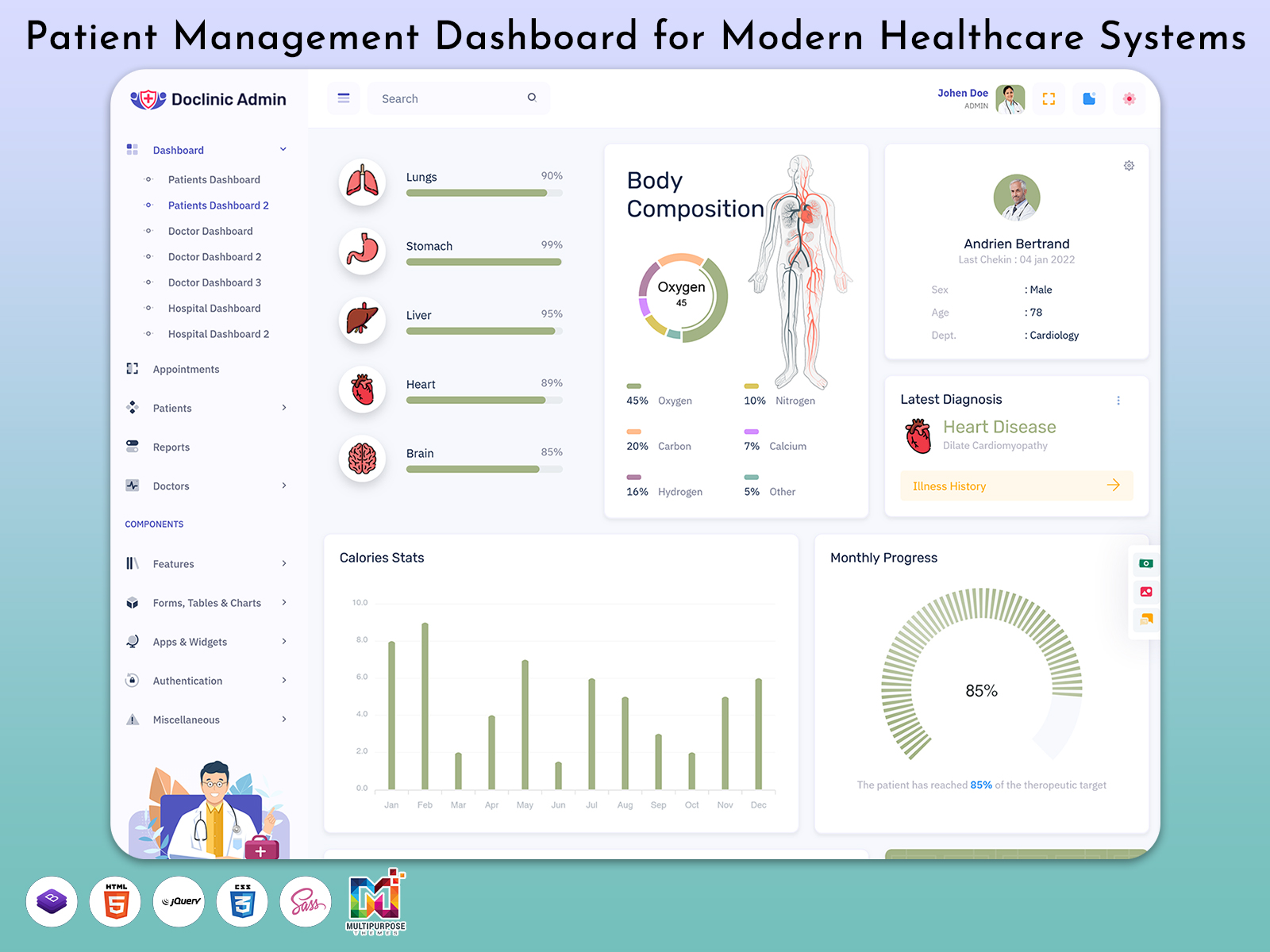
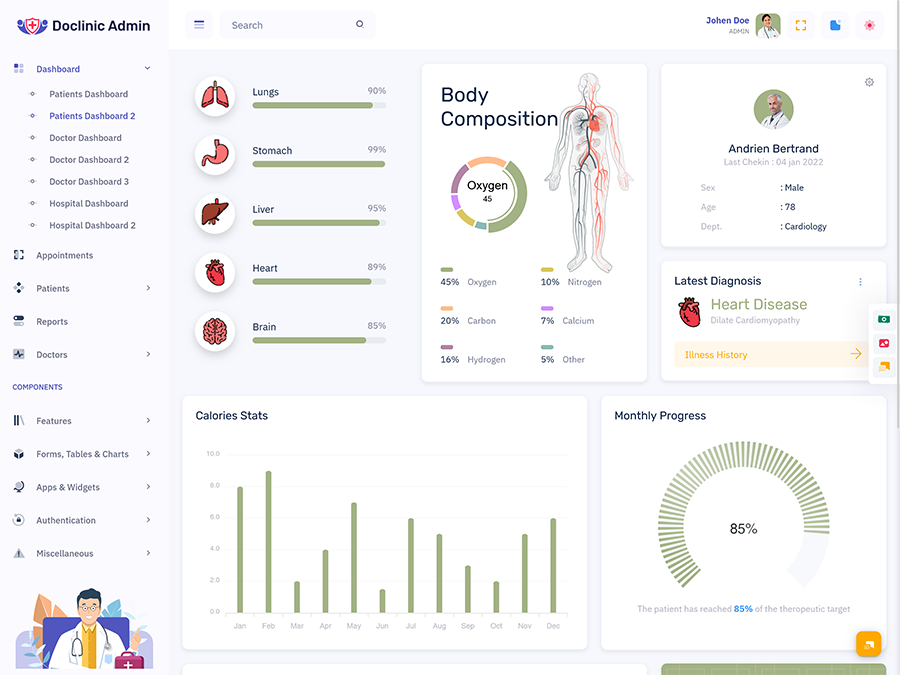
Body Composition Analysis for Fitness and Health Tracking
Body composition analysis in a Patient Dashboard helps healthcare professionals evaluate key fitness indicators such as body fat, muscle mass, hydration levels, and overall physical condition. Using a Patient Data Dashboard, doctors can track these metrics over time and compare them with Patients Records for better understanding of a patient’s health progress. This module supports preventive care by identifying risks related to obesity, malnutrition, or metabolic imbalance at an early stage.
A well-structured Patient Dashboard Template presents body composition insights through visual reports and Patients Charts dashboard Template for easy interpretation. Integrated with Dashboard UI and Patient Report Page systems, it allows doctors to review health trends in a simplified format. When connected with Doctor Dashboard Template and Hospital Dashboard Template platforms, it improves clinical decision-making, enhances patient fitness monitoring, and supports long-term wellness planning within healthcare environments.
Latest Diagnosis Section for Real-Time Medical Updates
The latest diagnosis section in a Patient Dashboard provides real-time updates on patient health conditions, helping doctors stay informed about current medical status without delay. Through a Patient Data Dashboard, healthcare professionals can quickly access newly updated reports, test results, and clinical findings. This ensures that every change in a patient’s condition is immediately reflected in the system and connected with existing Patients Records for accurate monitoring and treatment planning.
A modern Patient Dashboard Template displays diagnosis updates in a structured format through Dashboard UI and Patient Report Page sections. Integrated with Patient Report Dashboard and Patients Charts dashboard Template, it helps visualize medical progress clearly for better interpretation. When combined with Doctor Dashboard Template and Hospital Dashboard Template systems, this module improves communication between departments, ensures faster response to critical cases, and enhances overall efficiency in hospital and clinical decision-making processes.
Scheduled Appointments Management for Patient Care
Scheduled appointments management in a Patient Dashboard helps organize patient visits in a structured and time-efficient way. It allows healthcare staff to view upcoming consultations, follow-ups, and doctor availability through a centralized Patient Data Dashboard. By connecting with Patients List Dashboard and Patients Records, hospitals can reduce scheduling conflicts and ensure smooth patient flow throughout the day, improving overall service efficiency.
A modern Patient Dashboard Template presents appointment data through a clear Dashboard UI, making it easy to track booking status and consultation timings. Integrated with Patient Report Page and Hospital Dashboard Template systems, it enhances coordination between departments and reduces waiting time for patients. When linked with Doctor Dashboard Template and Hospital admin dashboard platforms, this module ensures better planning, improved communication, and more organized healthcare operations across medical facilities.
Conclusion
A modern Patient Dashboard plays a crucial role in improving healthcare management by bringing all patient-related information into one structured system. From vital tracking like heart rate, fever, and blood pressure to detailed Patients Records and Patient Report Dashboard insights, everything becomes easily accessible for doctors and hospital staff. This improves accuracy in diagnosis, reduces manual workload, and ensures faster medical response in critical situations.
With the help of Patient Dashboard Template, Doctor Dashboard Template, and Hospital Dashboard Template systems, healthcare organizations can manage operations more efficiently. Integration with Dashboard UI, Hospital admin dashboard, and Doctor Admin Template ensures smooth coordination between departments. Overall, a well-designed Patient Data Dashboard enhances patient care quality, improves hospital workflow, and supports smarter healthcare decision-making in modern medical environments.
FAQs
1. What is a patient dashboard in healthcare systems?
A Patient Dashboard is a digital system used in hospitals and clinics to manage Patient Data Dashboard, Patients Records, and medical reports in one place. It helps doctors monitor health conditions and improve decision-making through organized healthcare data systems. You can explore ready solutions at MultiPurpose Themes.
2. What features are included in a patient dashboard template?
A Patient Dashboard Template includes heart rate tracking, fever monitoring, blood pressure records, Patient Report Page, and Patients Charts dashboard Template. It also supports appointment tracking and integrates with Hospital Dashboard Template systems. Modern templates are available at MultiPurpose Themes.
3. How does a patient dashboard help doctors and hospitals?
A Patient Dashboard helps doctors access real-time health data, Patients Records, and Patient Report Dashboard insights quickly. It improves workflow and communication using Hospital admin dashboard and Doctor Admin Template systems. You can find similar designs at MultiPurpose Themes.
4. What is the difference between patient dashboard and hospital dashboard?
A Patient Dashboard focuses on individual patient data like reports and vitals, while a hospital dashboard manages overall operations. Both use Dashboard UI, Hospital admin template, and tracking tools for healthcare management. Solutions are available at MultiPurpose Themes.
5. What is a patient report dashboard used for?
A Patient Report Dashboard displays medical reports, diagnosis history, and treatment progress. It helps doctors analyze patient health using Patients Charts dashboard Template for better decision-making. You can explore such systems at MultiPurpose Themes.
6. Can patient dashboards track real-time health data?
Yes, a Patient Dashboard tracks real-time health data like heart rate, fever, and blood pressure. This information is stored in Patient Data Dashboard systems for quick medical response. Advanced systems are available at MultiPurpose Themes.
7. Is patient dashboard useful for small clinics?
Yes, a Patient Dashboard is very useful for small clinics as it simplifies Patients Records, appointments, and reporting. It works efficiently with Doctor Dashboard Template and Hospital Dashboard Template systems. You can get templates at MultiPurpose Themes.
8. Where can I get patient dashboard templates?
You can find modern Patient Dashboard Template designs, Doctor Dashboard Template, and Hospital Dashboard Template systems at MultiPurpose Themes, offering ready-made healthcare UI solutions.
9. What is included in a patient data dashboard?
A Patient Data Dashboard includes vital health metrics, Patients Records, lab reports, and medical history. It helps doctors monitor patient health efficiently using structured dashboard systems available at MultiPurpose Themes.
10. How does a patient dashboard improve patient care?
A Patient Dashboard improves patient care by providing instant access to medical reports, vitals, and history. It helps doctors make faster decisions and improve treatment accuracy using healthcare dashboard systems from MultiPurpose Themes.

Related Posts