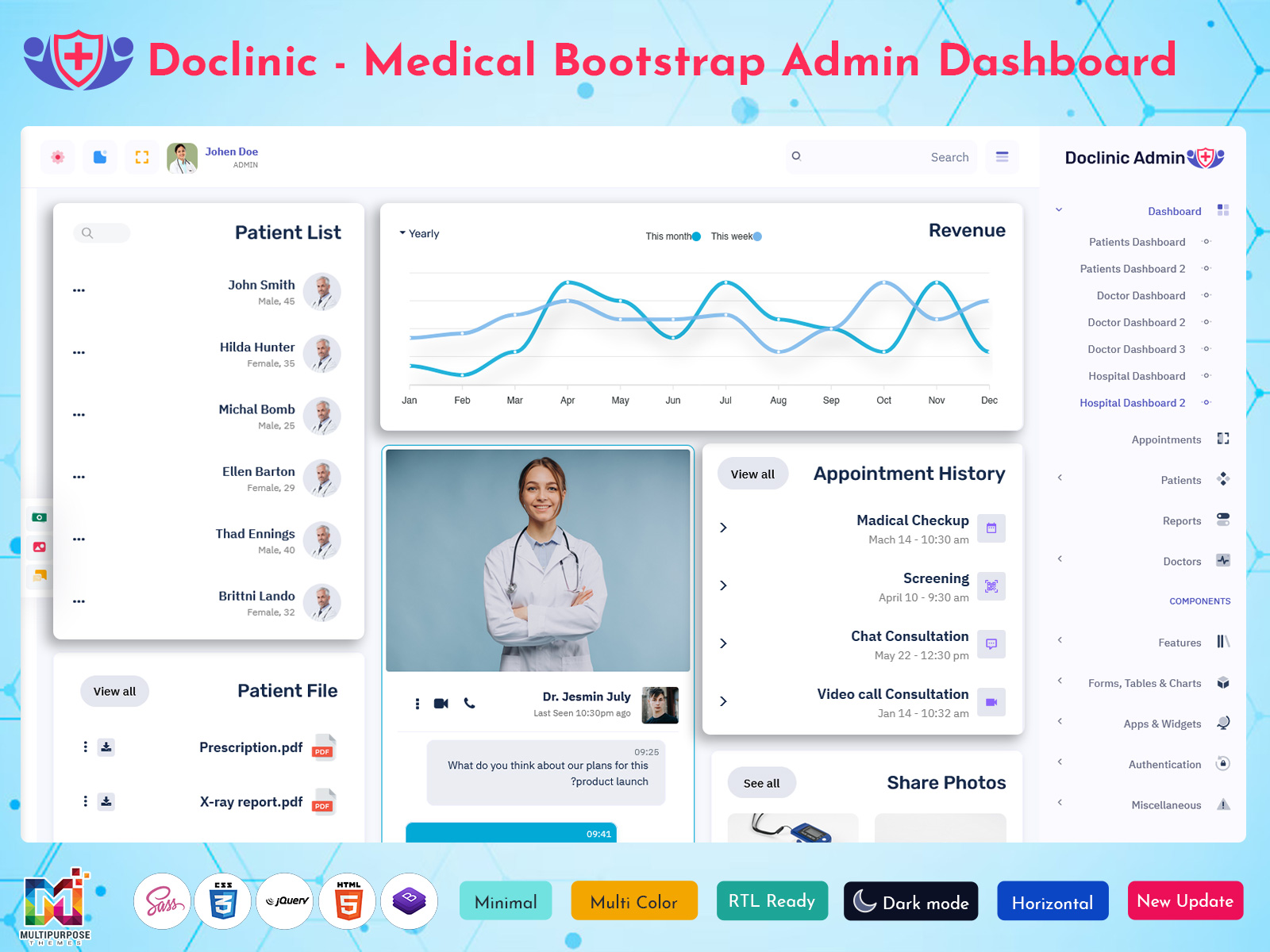
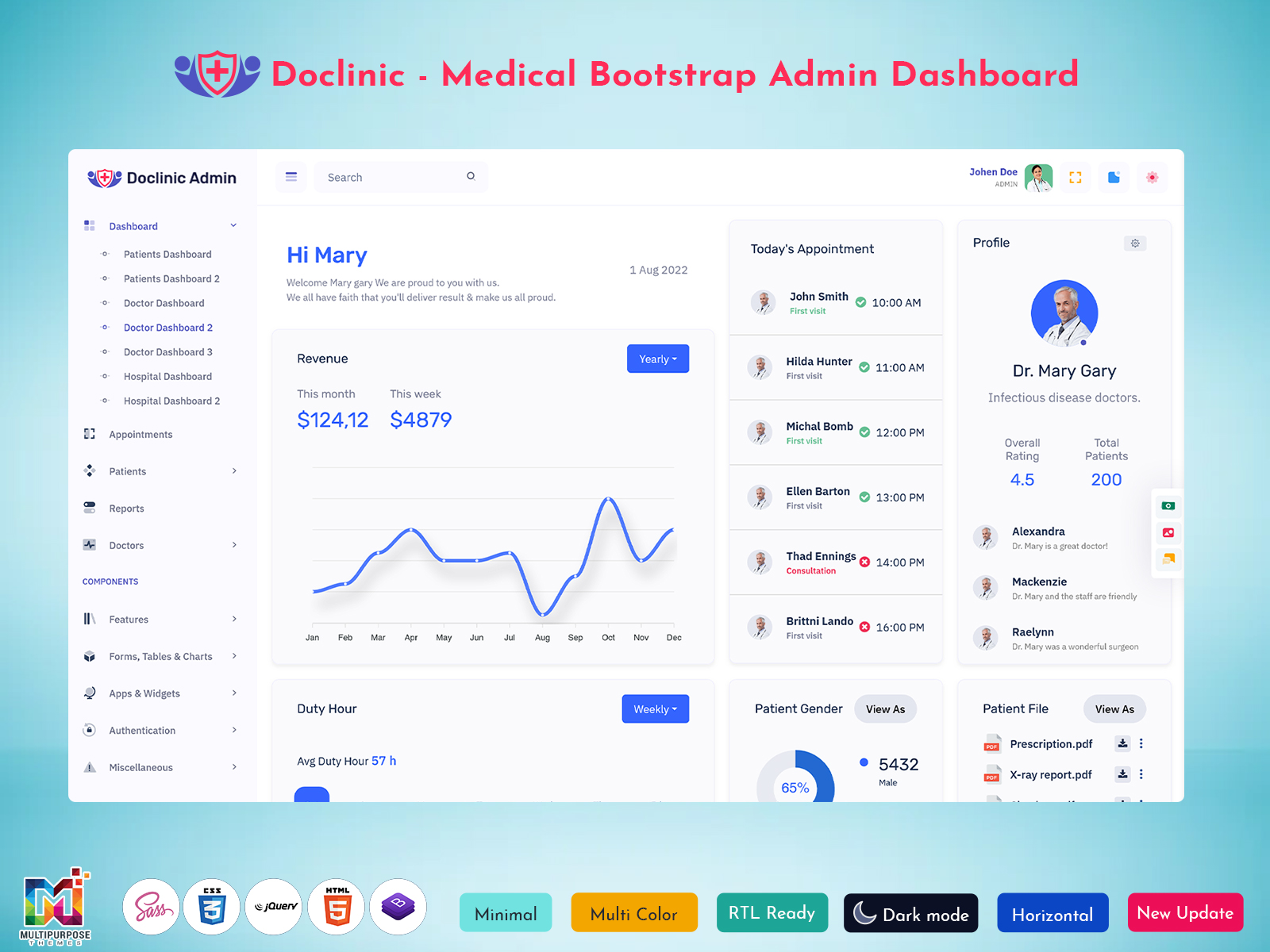
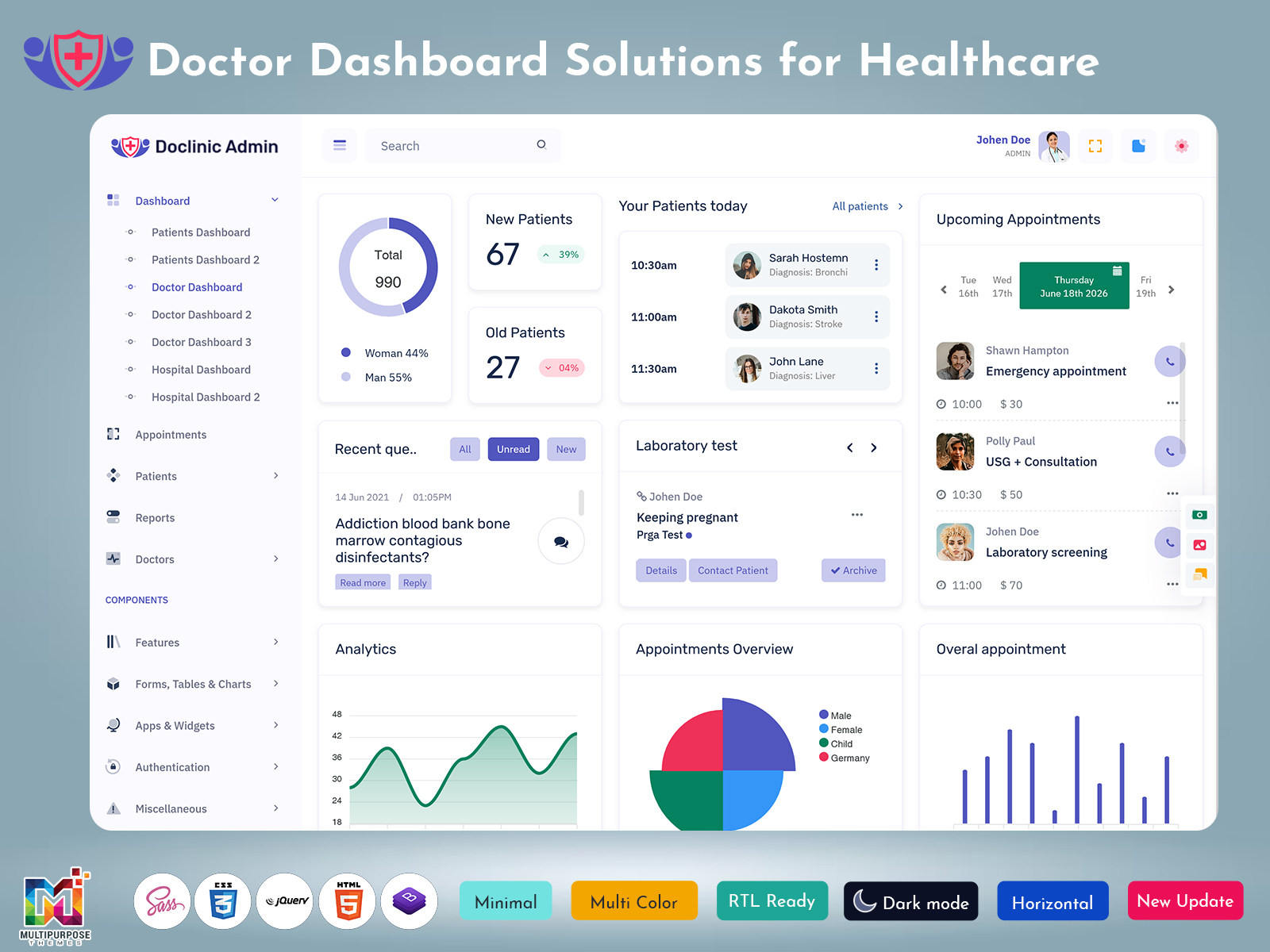
Doctor Dashboard is an online system that assists healthcare professionals in arranging and examining information…
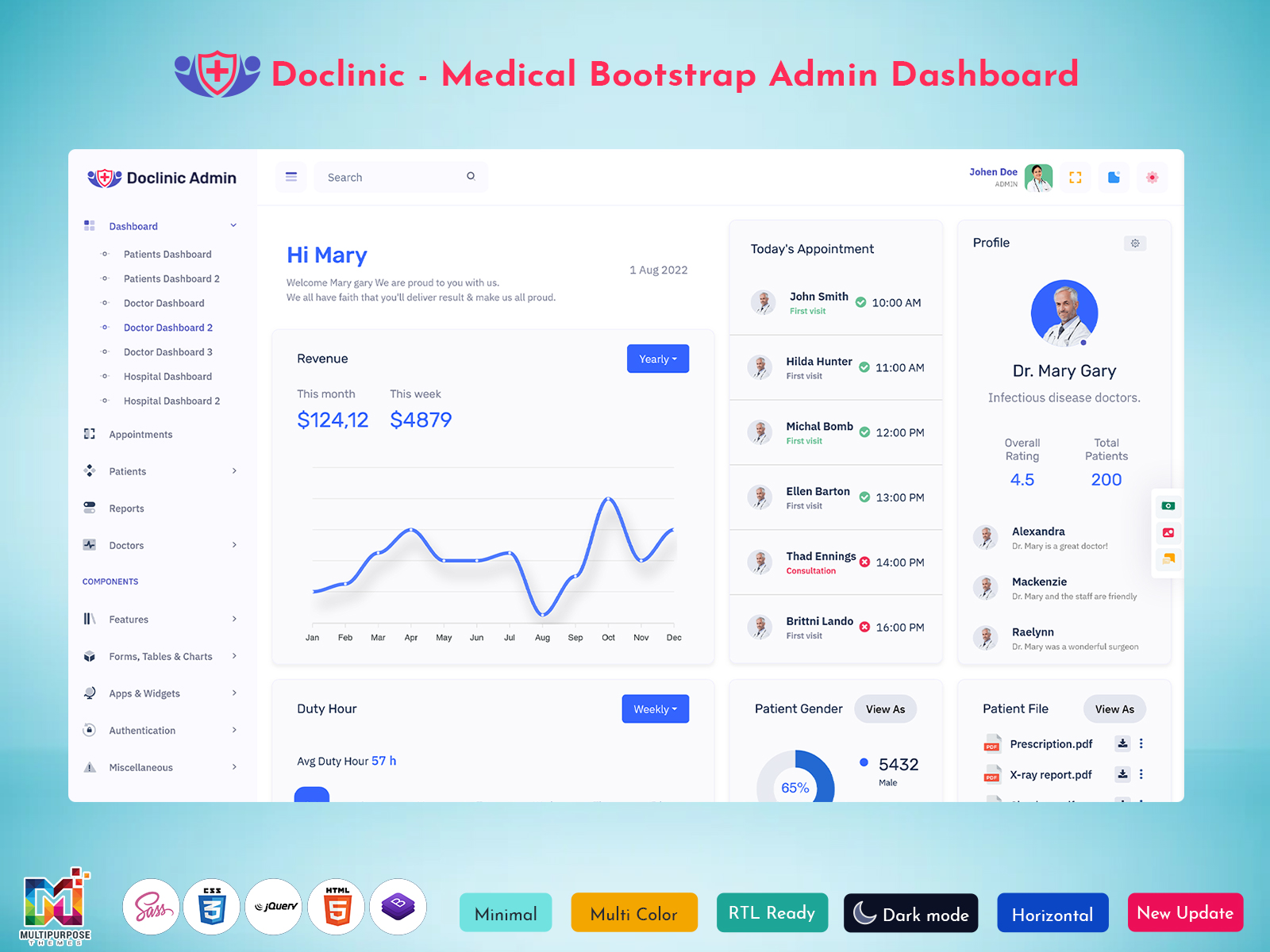
Doctor Dashboard: Practical Interface for Medical Applications
Reading Time: 11 minutes
Healthcare applications often need to address several types of information and activities. Doctors may review profiles, notes, appointments, reports or follow-up, while administrators handle staff, departments, or operations. However, without a practical interface, the workflow may become disorganized.
Watch Full Video
Doctor Dashboard offers a convenient interface for structuring information and managing the activities related to medical institutions. It should not merely display statistics or be added to an existing website. Instead, a functional dashboard should facilitate the arrangement and comprehension of information in a particular context.
Doctor Dashboard Bootstrap Template offers developers a concept for building their clinic management software, hospital applications, telemedicine tools or private practice systems. It implements a general interface for an admin dashboard, which can be modified to match the requirements of the chosen medical field.
Doctor Dashboard: What is it exactly?
Doctor Dashboard is the interface that lets users look at information that is connected to the topic of their application. Doctor Dashboard gives users a view of all details, about their application. It typically stores records, displays the data about consultations, schedules, and notes, and provides access to staff, departments, and other activities of a healthcare institution. The actual content depends on the application’s purpose and the intended audience.
The organization of Doctor Dashboard largely determines its further utility. The system should be built to give users access, to the information they need to do their jobs well. For example doctors who are reviewing a patient’s history before an appointment will get more out of a clean simple interface. On the hand administrators who handle appointments manage doctors and oversee operations will need more advanced tools. It’s important that all records, statistics and other details are available.. If they are shown in a messy or confusing way that can make things harder instead of easier.
Medical Doctor Admin Template offers a solid front-end basis for building a medical application. It displays the required pages, blocks, and instruments with a consistent layout that helps developers build the actual interface for their intended audience. The application’s back-end, data management, medical records, security, and other tools should be engineered to comply with the requirements of the chosen field of healthcare.
Responsive Doctor Dashboard refers to an interface that restructures its layout in accordance with the display settings of a device used to view it. Content accessibility is offered across working environments, which is particularly useful for administrative tasks performed in hospitals, from various devices. At the time a responsive design should not compromise the presentation of data and the security of an application.
Modern Doctor Dashboard should prioritize a convenient presentation of records and tools. The most relevant pages, data, and actions should be easily available, whereas other records, reports, and operations should be accessed via separate sections. In this manner, the primary dashboard serves as a convenient guide to the rest of the application content.
The interface of Doctor Dashboard is not meant to replace the professional judgment of medical staff. Instead it is a framework that lets applications organize their content to match the users’ roles and needs.
I think a built dashboard can give a handy guide, for managing records and reports but it only works well if the data is accurate and the tools that back it up are well made.

VIEW DEMO BUY NOW
Organizing Medical Information without Overcomplicating the Interface
A medical application often keeps records and pages. Navigating can be tough if the layout is not consistent. A patient profile can link to a profile’s consultation notes past visits, lab tests, prescriptions and follow‑up needs. The patient profile helps keep all of those items. If items, for a profile are shown in a random order users become confused.
Doctor Dashboard can be utilized to group related records and separate those that only require occasional access. Doctor Dashboard Bootstrap Template offers pages that can become the basis for organizing patient records, consultations, staff information, and other content in accordance with the requirements of the intended audience. Moreover, the application content can be structured to offer users a clear distinction between their primary activities and their supporting operations. For instance, medical staff reviewing a patient’s profile ahead of a consultation may need a convenient overview before accessing the full contents of the records.
A similar approach applies to the workflow of administrators, who manage staff, operations, and other activities in accordance with the requirements of a medical institution. Doctor Dashboard can be utilized in building an interface that provides them with convenient access to their essential tools and displays the additional records as separate sections.
Medical Doctor Admin Template can be utilized to develop an interface that considers the roles and responsibilities of its users. The actual tools, forms, and data accessible to doctors, nurses, receptionists, and administrators should be reviewed to engineer a medical application that offers them the required level of convenience.
Essential Features of Doctor Dashboard
The following set of tools can serve as the basis for Doctor Dashboard:
1. Patient Information Workspace
A dashboard layout can be utilized to store and display patient-related records and instruments. Developers should determine what data, tools, and reports are available to the users accessing this content and organize their presentation in accordance with their intended purpose.
2. Consultation Manager
The consultation dashboard can be utilized to store and display information related to medical consultations. Its content, tools, and operations can be determined in accordance with the purpose of an application and the needs of its users.
3. Role-based Navigation Tabs
Doctors, administrators, receptionists, and nurses have different roles, which should be reflected in the interface of a medical application. Doctor Dashboard can be utilized to display the content relevant to each user. In addition, the roles of these users should have corresponding permissions, which should be engineered separately.
4. Medical Record View Pages
Doctors reviewing medical records typically need more information than the one available on a dashboard page. Medical Doctor Admin Template offers a convenient basis for building larger pages that provide the users with a convenient overview of data. Similarly, their full access to patient records can be incorporated into these pages or displayed as separate sections.
5. Schedule, Appointments, and Availability
Doctor Dashboard can be utilized to display information related to a schedule, appointments, and availability of medical staff. The content and tools can be determined in accordance with the requirements of a medical application. It is important to ensure that the instrument complies with the actual functions of a schedule.
6. Report Tables and Summaries
Doctor Dashboard can be utilized to display reports, tables, and summaries of medical data. They should only be accessible to the users with the corresponding privileges and organized in accordance with their needs.
7. Responsive Dashboard Layout
Responsive Doctor Dashboard rearranges its content based on the display settings of the device that is used to view Doctor Dashboard. I see that Responsive Doctor Dashboard must put data accessibility first while still keeping a look and protecting the security of the application.

VIEW DEMO BUY NOW
Engineering Doctor Dashboard in accordance with Medical Workflow
A Modern Doctor Dashboard should be built to make the job easier for doctors. It needs to give them clear access, to the tools and information they use most. The real value of the app comes down to how simple it’s to use. A dashboard that looks nice might draw attention. If it does not help doctors handle their daily tasks it will not be useful.
Engineering Doctor Dashboard should balance how much information is shown with how easy it’s to reach it. Showing a lot of data on one page can make it quick to find. It can also distract users from what they need to do right now. A better way is to build a structure that lets users move between pages instead of putting all records on a single dashboard. This approach gives users control. They can focus on one record at a time. It also makes the system easier to navigate. Users don’t have to scroll through a list. They can find what they need faster. It reduces confusion. The design feels cleaner. Each page shows only what is relevant. That improves the experience. It also helps with performance. Fewer records load once. The system runs smoother. This kind of structure works well for datasets. It scales better over time. Users appreciate the simplicity. They don’t feel overwhelmed. They can stay focused. This is a means of structuring data. It supports usability. It’s a way to build the app.
For instance, Doctor Dashboard can be utilized to display the overview of records, consultations, or other activities, whereas additional information can be incorporated into larger pages. Users can then navigate to these pages to review or edit individual records or access additional data. This manner, doctors reviewing a patient’s profile ahead of a consultation can benefit from convenient access to the relevant records while being able to navigate to separate sections containing more information if needed.
A similar approach can be utilized to display the access tools for doctors, nurses, administrators, and other users of a medical application. Doctor Dashboard can be structured to provide each of them with convenient access to their regular operations while keeping the other tools available but separate so that they are only accessed when necessary.
Doctor Dashboard Bootstrap Template can be used to build these pages in accordance with the requirements of the intended audience. It gives parts that can be changed to show the information, tools and numbers in a regular way. People who make software need to think about what their users want when they make this kind of screen. The more things are shown on one page the harder it can be to move between them. That is why it is important to have a way to separate the things on different pages.
Another critical aspect of Doctor Dashboard is its compliance with the requirements of its users. Healthcare applications involve a variety of users, who may need to access different records and instruments. The interface of Doctor Dashboard should be designed to consider their roles and needs.
I believe that a dashboard should not present any information without the corresponding permission. I also think that medical applications store and process data and personal data should be handled in accordance, with the relevant regulations and standards. Doctor Dashboard can be modified to ensure that the sensitive information displayed on it is only accessible to the users who should be able to review it.
Responsive Doctor Dashboard can be beneficial for users accessing a medical application on different devices. Its interface should be adjusted in accordance with the settings of their screens to ensure that its elements are clearly visible and its instruments remain easy to operate. Larger screens accommodate more information, but smaller displays, such as those of mobile devices, require a more compact layout. Developers should also pay special attention to the critical instruments and ensure that their presence and availability are not compromised on smaller viewports.
Doctor Dashboard should also differentiate between data and management instruments. Records, reports, consultations, and other data should be separated from the tools for editing, updating, or otherwise managing them. This manner, the users of a medical application will be able to navigate them intuitively without encountering unnecessary difficulties.
Doctor Dashboard Bootstrap Template can be utilized to build a convenient interface because it stores a variety of instruments accessible to developers. Bootstrap components can be incorporated into the interface to provide it with navigation panels, calendars, cards, tables, forms, and other tools. Developers should also consider the requirements of the users when engineering medical applications. The interface should be intuitive to users who access it from different devices and locations, and a responsive layout can ensure that its content remains accessible on all viewports. At the same time, a dashboard should not be overcrowded with information and tools, as this can compromise its intuitive nature.
Doctor Dashboard can also be customized to meet the requirements of different users, as healthcare applications often serve a variety of audiences. Doctors, administrators, receptionists, and nurses can have different needs, which should be prioritized when engineering their interface. Doctors, for instance, can primarily access patient records, whereas administrators can interact with staff, operations, and other instruments. Doctor Dashboard can be organized to reflect these distinctions and help users navigate their intended content intuitively.
Essential Considerations for Doctor Dashboard
The following factors should be prioritized when building a dashboard for a medical application:
1. Better Organization of Information
Doctor Dashboard can provide users with an intuitive interface that stores and displays the information they need to access in a structured manner. This manner, the unnecessary complexity of multiple dashboards, panels, and record displays can be eliminated, and their content can be organized in accordance with the needs of users.
2. Greater Intuitive Access
A consistent layout offered by Doctor Dashboard can provide users with intuitive access to the data, instruments, and tools they need. Developers should organize their content in accordance with the requirements of their intended audience so that they can manage their tasks effortlessly.
3. Distinct Roles and Permissions
Doctors, Nurses, administrators, and other users of a medical application typically serve different purposes. Doctor Dashboard can be utilized to ensure that each of them accesses the tools and data relevant to their role while being able to navigate the other content intuitively.
4. Greater Flexibility for Developers
Doctor Dashboard Bootstrap Template offers developers the opportunity to customize their interface in accordance with the needs of their intended audience. The variety of Bootstrap components can be incorporated into the tools, panels, and other interface elements to improve the user experience.
5. Better Access Across Devices
Responsive Doctor Dashboard helps the users of a medical application access the data, instruments, and tools they need across a variety of devices. Developers should pay special attention to their intuitive access on different viewports to ensure a seamless experience regardless of the resolution and display settings of a user’s device.
6. Better Separation of Activities
Doctor Dashboard can be utilized to help users of a medical application navigate their relevant tools and data while keeping the other content distinct. This manner, administrators managing doctors, staff, and operations can easily access their tools while being able to review the other information when needed.
7. Greater Extensibility in Development
Medical Doctor Admin Template provides developers with a convenient basis for building their applications. The interface can be expanded to accommodate the needs of their intended audience, and additional tools, panels, data displays, and other instruments can be added as necessary.
Why Multipurpose Themes can be Selected for Doctor Dashboard Projects
Multipurpose Themes offers admin dashboard and HTML template solutions for healthcare applications, including doctor, hospital, and patient-oriented tools. The collection includes Bootstrap-based templates that provide developers with a variety of dashboard options for building their medical applications. Doctors, patients, and administrators can access the information they need, and the front-end code can be modified to meet the requirements of their projects. The back-end, medical aspects, security, data management, access control, and other instruments should be engineered to comply with the requirements of an application.
Conclusion
Doctor Dashboard provides users with an interface that helps them store and access the information relevant to their medical application. Its value primarily depends on how it is organized to accommodate the needs of its users and distinguish their requirements.
Doctor Dashboard Bootstrap Template can be utilized as the basis for building doctor-facing, hospital, and patient-oriented applications. It can be customized to meet the requirements of a variety of healthcare settings.
A Modern Doctor Dashboard should prioritize the accessibility and intuitive arrangement of information rather than its sheer volume. Similarly, a Responsive Doctor Dashboard should be optimized for different viewports to ensure that it remains intuitive and accessible to the users of a medical application. Finally, the Medical Doctor Admin Template should be modified to support the diverse needs of administrators, doctors, nurses, and other users of a healthcare system.
VIEW DEMO BUY NOW
FAQs
1. What is the purpose of Doctor Dashboard?
Multipurpose Themes Doctor Dashboard is the interface that organizes the information relevant to the activities of a medical application. It typically stores records, displays the details of a consultation and manages appointments, reports, and other activities in accordance with the requirements of a medical institution. It facilitates the access to data, instruments, tools, and reports, but it should not replace them or serve as a substitute for professional healthcare services.
2. Can a Doctor Dashboard Bootstrap Template be used for a hospital application?
Doctor Dashboard Bootstrap Template can be utilized for building a hospital application because it can be customized in accordance with the requirements of its users. Its interface can be modified to provide doctors, administrators, nurses, and other users with the access they need.
3. What makes a Responsive Doctor Dashboard valuable?
A Responsive Multipurpose Themes Doctor Dashboard restructures its layout in accordance with the display settings of a device used to view it. It offers a greater degree of flexibility, which allows users to access the dashboard from a variety of devices.
4. Can Medical Doctor Admin Template be used for clinic management software?
Medical Doctor Admin Template can be utilized for developing clinic management software because it provides a basis for building an interface that serves its intended purpose. However, additional tools, such as the management of appointments, staff, and other instruments should be engineered separately.
5. What factors should I consider when choosing a Doctor Dashboard?
The following factors should be taken into consideration when choosing a Doctor Dashboard: layout, responsive design, available components, flexibility, browser support, documentation, and licensing. The interface should be intuitive for its intended users, and the additional requirements should be reviewed before choosing a product.
6. Can a Doctor Dashboard be used for telemedicine applications?
Multipurpose Themes Doctor Dashboard can be employed as the basis for a telemedicine application. It can be modified to manage consultations, communication tools, access to patient records, and other instruments relevant to such a project.
7. Is Doctor Dashboard suitable for different medical fields?
Doctor Dashboard can be suitable for different medical fields, but its interface should be modified in accordance with the requirements of each audience. Doctors in a general practice, dentists, administrators in a diagnostic center, and surgeons in a hospital typically have different needs, which should be prioritized when choosing or customizing a dashboard.

Related Posts