

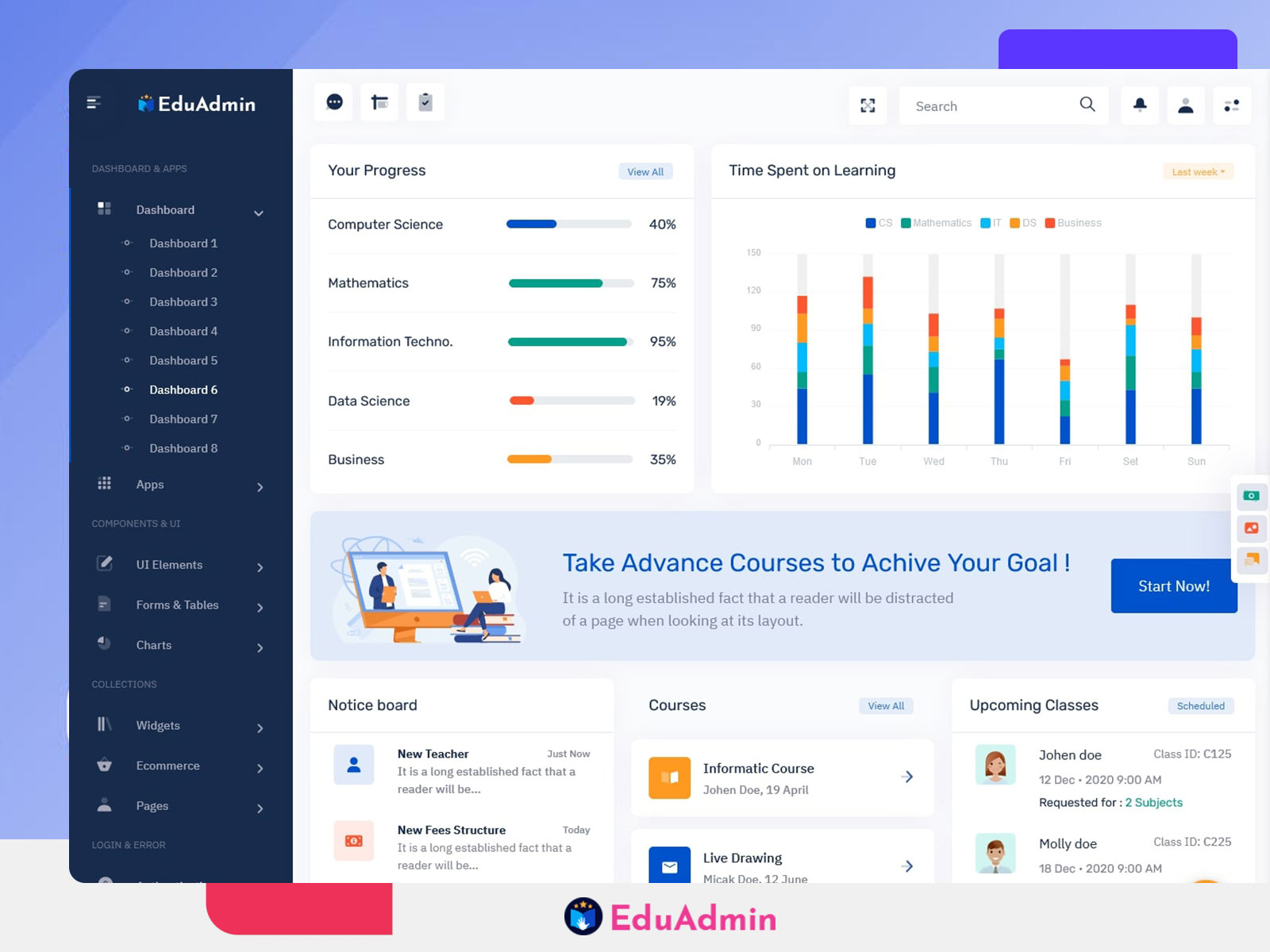
Onlinecourse Dashboard for Schools, Universities & Elearning Management
We are excited to announce the addition of a brand-new Onlinecourse Dashboard in our existing admin template. The latest update brings a fully-featured, modern LMS Dashboard designed to simplify the management of educational platforms, schools, universities, and online learning portals. Our Education Dashboard focuses on providing an intuitive, responsive, and easy-to-use interface for administrators, teachers, and staff, helping them monitor courses, students, lessons, attendance, and performance analytics from a single place.
This newly added Elearning Dashboard is tailored for modern online education needs. It is not only a backend for data management but also a tool for improving the learning experience. With ready-to-use pages, UI components, and analytics charts, EduAdmin makes it easier to run any learning platform efficiently. Whether you manage a small online course or a large university system, our Onlinecourse Dashboard provides seamless control over all aspects of educational administration.
The new dashboard upgrade reflects the evolving requirements of digital education, focusing on clarity, performance, and actionable insights. Admins can now track student progress, manage teacher assignments, view attendance summaries, and generate reports with minimal effort. With EduAdmin, managing your LMS becomes faster, more accurate, and more user-friendly, ensuring that every stakeholder in the education ecosystem can stay organized and productive.
Explore New Education Dashboard
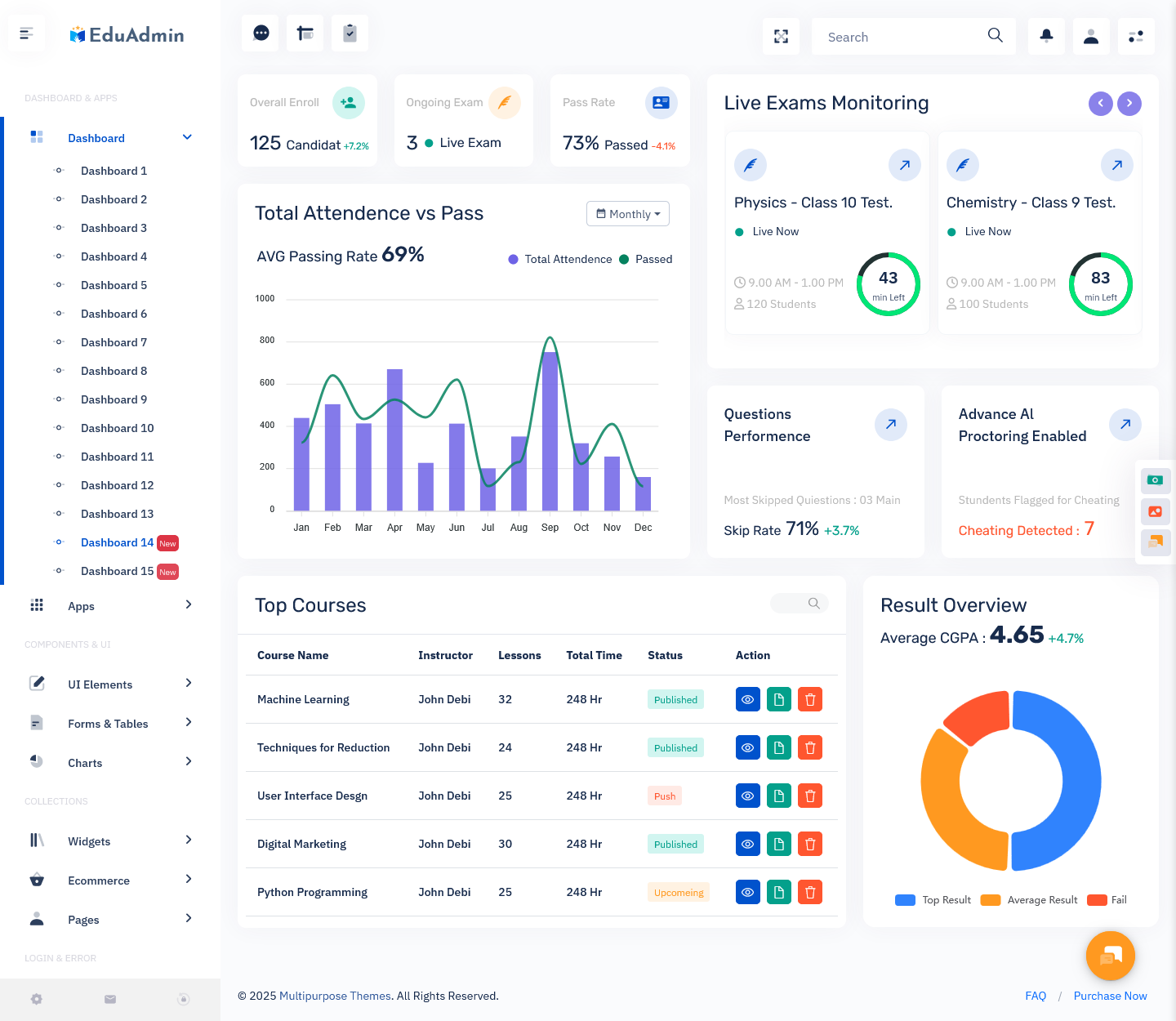
BUY NOW DEMO
Features of the New Dashboard
1. Student & Course Management
Our new Onlinecourse Dashboard allows administrators to manage students, courses, and classes efficiently. You can add or remove students, assign them to specific courses, track their enrollment status, and monitor their progress. Teachers can also view assigned students and provide personalized feedback. The dashboard provides clear visualizations of active courses, completed lessons, and pending assignments. With this feature, managing multiple courses and student groups becomes effortless. EduAdmin ensures that both administrators and teachers have access to real-time data, improving decision-making and reducing administrative workload.
2. Attendance & Performance Analytics
The LMS Dashboard includes an advanced attendance tracking and performance analytics module. Administrators can monitor daily attendance, track student participation, and identify trends over time. Teachers can access performance graphs and reports that highlight grades, test scores, assignment submissions, and progress metrics. With visual charts and tables, it becomes easier to identify students who need extra support and take proactive actions. This feature enables schools, universities, and online learning platforms to enhance academic monitoring, improve student engagement, and ensure that learning outcomes are achieved efficiently.
3. Teacher & Staff Management
Managing staff has never been easier with the new Education Dashboard. You can add new teachers, assign courses and classes, and monitor teacher performance through attendance and feedback reports. Staff profiles include detailed information, ensuring transparency and accountability. Administrators can track workloads, assign tasks, and manage schedules, streamlining communication between departments. With all staff-related data accessible in a single dashboard, EduAdmin helps institutions save time, reduce manual errors, and maintain a smooth workflow across academic and administrative teams.
4. Analytics & Reporting Tools
The Elearning Dashboard comes with powerful analytics and reporting tools. Administrators can generate custom reports on student performance, attendance, course completion, and teacher activity. Real-time charts, graphs, and dashboards provide actionable insights, allowing for data-driven decision-making. This feature also helps in accreditation processes, audits, and compliance tracking. With detailed performance metrics, educators and managers can improve teaching methods, optimize course content, and enhance overall learning outcomes. The reporting module is designed to be flexible, customizable, and easy to interpret, making it suitable for all types of educational institutions.
5. Responsive & User-Friendly Design
EduAdmin’s new dashboard is fully responsive and works seamlessly across desktops, tablets, and smartphones. The Onlinecourse Dashboard features a modern, intuitive interface that makes navigation simple for administrators, teachers, and students. With clean layouts, color-coded data, and organized menus, users can quickly access the information they need. The dashboard supports quick searches, filters, and sorting options to enhance usability. By combining a responsive design with a user-friendly experience, EduAdmin ensures that all users can perform tasks efficiently, whether they are managing classes, checking attendance, or generating reports, regardless of their device or screen size.
Discover Other Dashboard
Dashboard: Semi Dark Version
BUY NOW DEMO
Dashboard: Dark Version
BUY NOW DEMO
Dashboard: Mini Sidebar
BUY NOW DEMO
Dashboard: Horizontal
BUY NOW DEMO
Who Can Use This New Dashboard?
1. Schools
Primary and secondary schools can greatly benefit from the Education Dashboard. Teachers and administrators can manage student enrollment, track daily attendance, and monitor performance metrics for each class. School leaders can generate academic reports, manage schedules, and maintain communication with parents. By integrating LMS features, schools can also provide digital assignments, quizzes, and online learning materials. EduAdmin makes administrative tasks easier, reduces manual paperwork, and ensures that educational standards are met efficiently. With a centralized Onlinecourse Dashboard, schools can improve student engagement, teacher productivity, and overall academic outcomes while managing day-to-day operations from a single platform.
2. Universities & Colleges
Universities and colleges often handle multiple faculties, departments, and large student populations. The new LMS Dashboard simplifies the management of courses, classes, and student performance. Faculty members can track attendance, submit grades, and provide feedback, while administrators monitor departmental performance and resources. The Onlinecourse Dashboard supports scheduling for lectures, exams, and assignments, and allows reporting for accreditation or regulatory compliance. By providing a clear overview of academic and administrative activities, EduAdmin enables universities to improve efficiency, enhance collaboration between staff, and ensure that students receive a quality education.
3. Online Course Providers
Online course platforms can utilize the Onlinecourse Dashboard to manage students, courses, instructors, and lesson progress. Administrators can add new courses, update content, and track student engagement in real-time. Teachers and trainers can monitor learning activity, issue certificates, and evaluate assessments. The dashboard supports multimedia content, quizzes, and interactive assignments, making it perfect for e-learning businesses. With analytics and reporting, platforms can measure course effectiveness, student satisfaction, and completion rates. EduAdmin helps online educators save time, enhance student experience, and maintain a scalable and professional learning environment.
4. Tutoring & Coaching Centers
Tutoring and coaching centers benefit from the Elearning Dashboard by streamlining student and teacher management. Administrators can track student attendance, progress, and performance in individual or group sessions. Teachers can assign homework, monitor results, and provide personalized support. The dashboard also helps manage fees, schedules, and notifications efficiently. With centralized data and real-time updates, coaching centers can enhance transparency, reduce administrative workload, and focus on improving learning outcomes. EduAdmin’s flexible dashboard supports small to large centers, making management simpler, faster, and more effective.
5. Corporate Training Platforms
Corporate training providers can use the LMS Dashboard to manage employee learning programs, track course completion, and monitor performance. Trainers can assign modules, track progress, and generate reports for management. HR teams can identify skill gaps and plan training schedules effectively. With real-time dashboards, executives can view the ROI of training programs, improve engagement, and ensure compliance with industry standards. EduAdmin’s adaptable system makes corporate learning management streamlined and measurable, helping organizations deliver professional development efficiently while maintaining complete oversight of employee performance and progress.
6. Educational Nonprofits & NGOs
Nonprofits and NGOs that run educational programs can leverage the Education Dashboard to track student participation, course completion, and impact metrics. The dashboard simplifies record-keeping, allows reporting for donors and stakeholders, and helps evaluate program effectiveness. Teachers and volunteers can monitor progress, provide feedback, and adjust teaching methods based on data-driven insights. By centralizing student and program information, EduAdmin improves operational efficiency, reduces manual errors, and ensures that educational initiatives reach their full potential. This dashboard helps NGOs enhance transparency, accountability, and measurable outcomes for their learning projects.
7. Examination & Assessment Boards
Examination and assessment boards can benefit from the Education Course Dashboard by managing students, scheduling exams, and tracking results efficiently. Admins can oversee multiple schools or institutions, generate performance reports, and ensure standardized evaluation. Teachers and invigilators can monitor submissions, grading, and compliance with examination rules. The dashboard allows real-time analytics, simplifying decision-making for academic boards. EduAdmin provides a centralized system for large-scale examinations, reducing administrative burdens, improving accuracy, and delivering timely reports, which are essential for maintaining educational quality and credibility.
Why Choose Us
EduAdmin stands out as a modern, responsive, and feature-rich dashboard tailored for education platforms. Unlike other generic admin templates, our LMS Dashboard is specifically designed to meet the needs of schools, universities, online course providers, and corporate training systems. With pre-built UI components, ready-made pages, and flexible customization options, EduAdmin allows administrators and teachers to manage data effortlessly.
We prioritize user experience and simplicity while delivering advanced functionalities such as attendance tracking, performance analytics, and real-time reporting. Our Bootstrap 5 Admin Dashboard is compatible across all devices, ensuring that users can access critical information anytime, anywhere. By choosing EduAdmin, you gain a reliable, scalable, and modern platform that improves workflow, reduces administrative workload, and enhances student engagement. It’s the perfect solution for institutions looking to combine technology, efficiency, and education management seamlessly.
Conclusion
The new Onlinecourse Dashboard in our EduAdmin template is a complete solution for modern educational needs. From student and teacher management to course tracking, attendance, performance analytics, and reporting, every aspect has been thoughtfully designed for simplicity and efficiency. The LMS Dashboard provides actionable insights, helping administrators, educators, and institutions make informed decisions.
By integrating advanced features such as Metallurgical Analytics, real-time reporting, responsive design, and flexible course management, EduAdmin ensures that schools, universities, coaching centers, corporate training platforms, and NGOs can operate smoothly. It enhances collaboration between students, teachers, and administrators while maintaining transparency, reliability, and performance. EduAdmin is more than a dashboard—it is a comprehensive tool for driving educational success. With this upgrade, managing online learning, academic data, and administrative workflows has never been easier or more efficient.
FAQs
Q1. What is the new feature in EduAdmin’s dashboard?
The new dashboard includes enhanced LMS management, student progress tracking, attendance, course management, performance analytics, and responsive UI components for a complete online education solution.
Q2. Can schools use this dashboard for offline classes?
Yes, EduAdmin can manage both online and offline classes, tracking attendance, student performance, and course progress efficiently in a centralized system.
Q3. Is EduAdmin responsive on mobile devices?
Absolutely. The dashboard is fully responsive and works seamlessly across desktops, tablets, and smartphones for teachers, students, and administrators.
Q4. Can universities track student progress using this dashboard?
Yes, the LMS Dashboard allows administrators and teachers to monitor grades, assignments, attendance, and performance analytics for each student in real time.
Q5. Does EduAdmin support corporate training programs?
Yes, corporate learning and training platforms can use the dashboard to assign modules, track completion, generate reports, and monitor employee performance efficiently.
Q6. Can NGOs use this dashboard for educational projects?
Yes, EduAdmin helps NGOs manage courses, track student participation, measure outcomes, and generate reports for donors or stakeholders.
Q7. What are the main components of the dashboard?
The dashboard includes student and teacher management, course management, attendance tracking, performance analytics, reporting, charts, tables, user management, and responsive UI components.
Q8. Is it suitable for online course platforms?
Yes, the dashboard is ideal for online course providers, offering course creation, student tracking, progress monitoring, quizzes, certifications, and interactive learning features.
Q9. Can administrators generate reports in EduAdmin?
Yes, the analytics and reporting module allows generating detailed reports on student performance, attendance, course progress, and teacher activities in real time.
Q10. Why choose EduAdmin over other dashboards?
EduAdmin is specifically designed for educational platforms, providing modern, responsive, feature-rich, and easy-to-use tools for managing students, teachers, courses, and analytics efficiently.



This Post Has 0 Comments