Running a pharmacy involves small tasks that must align at the right moment. Stock must…
Advanced Pharmaceutical Dashboard – Modern Pharma Admin Dashboard UI
Reading Time: 7 minutes
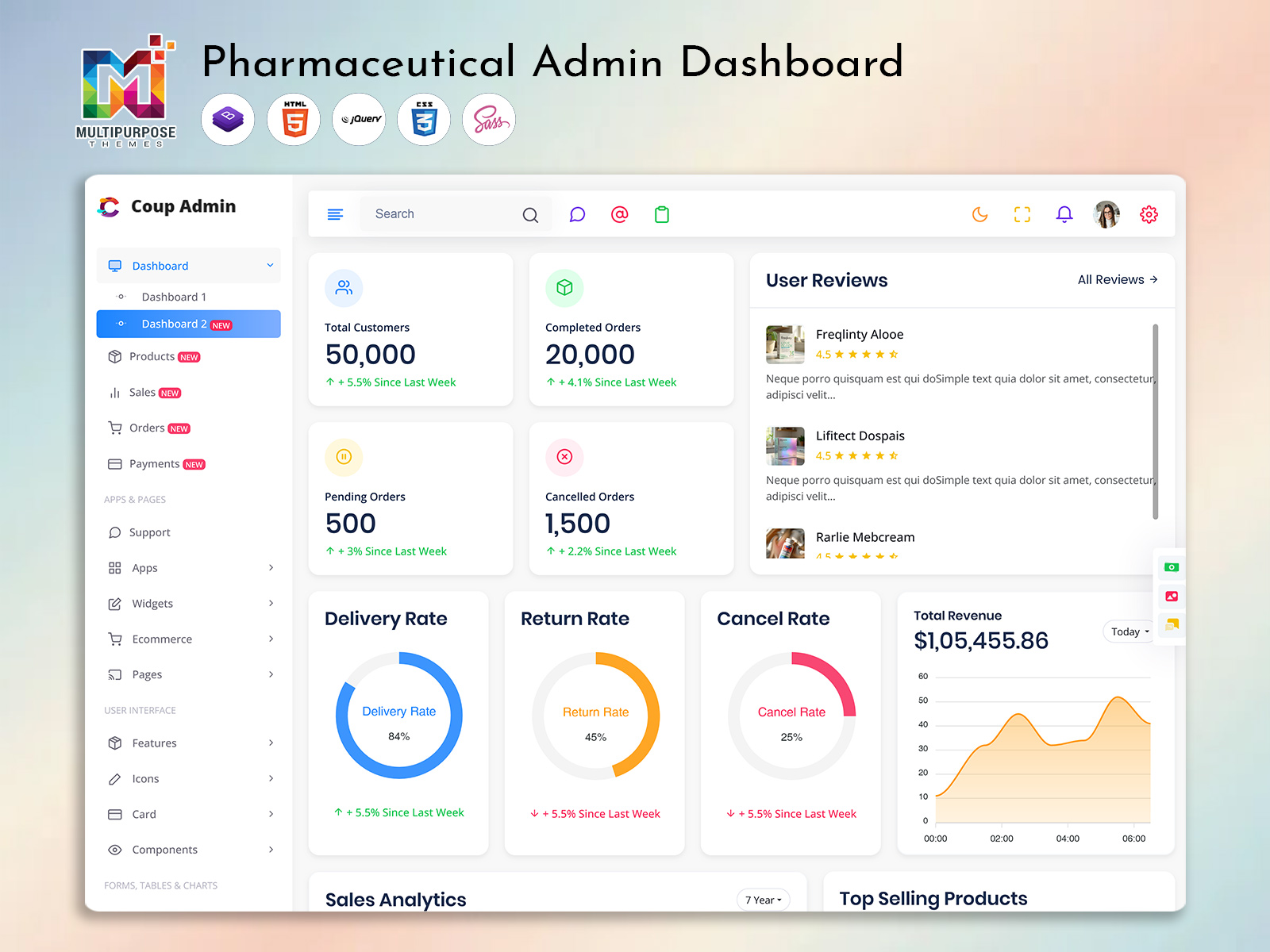
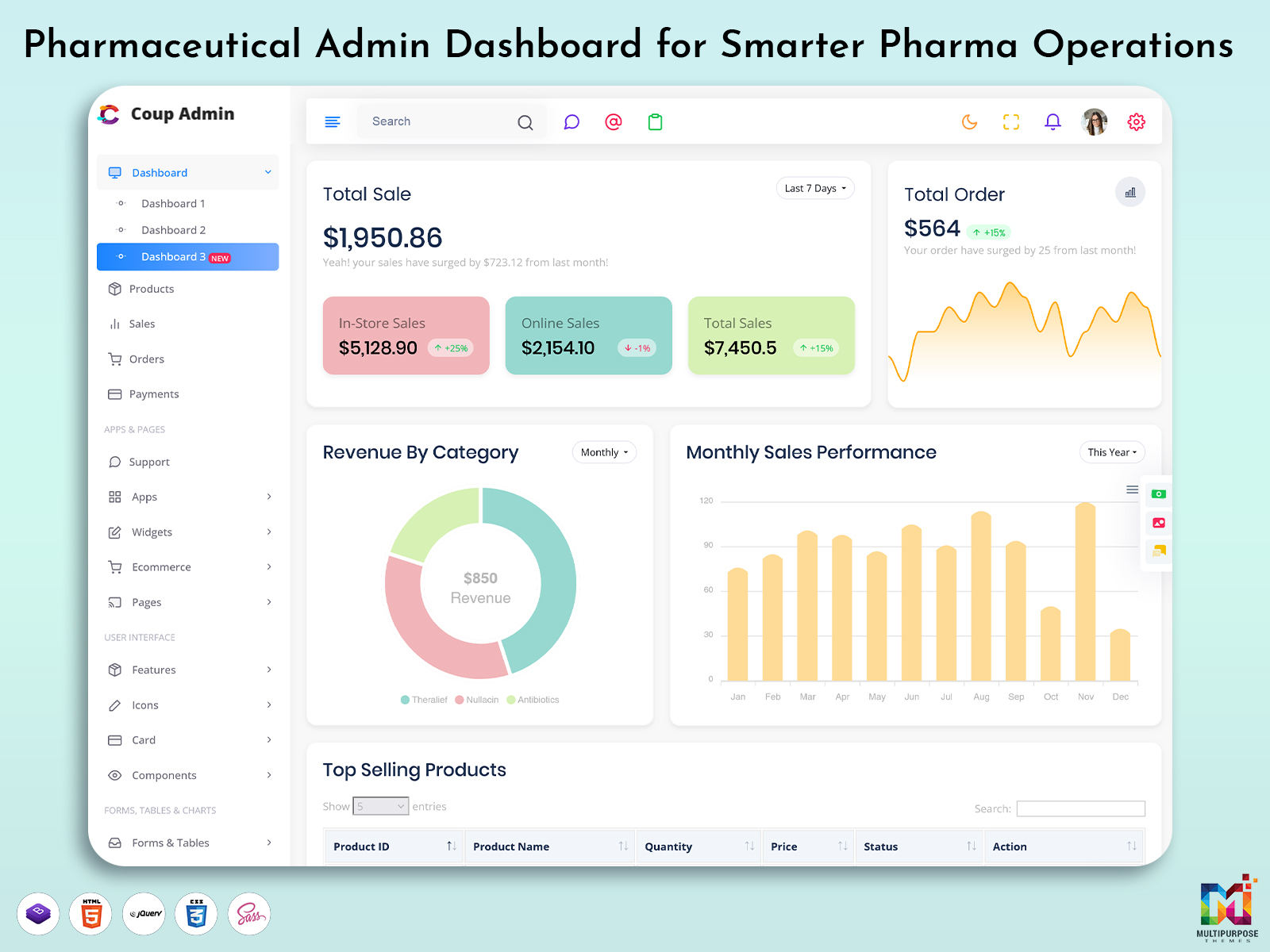
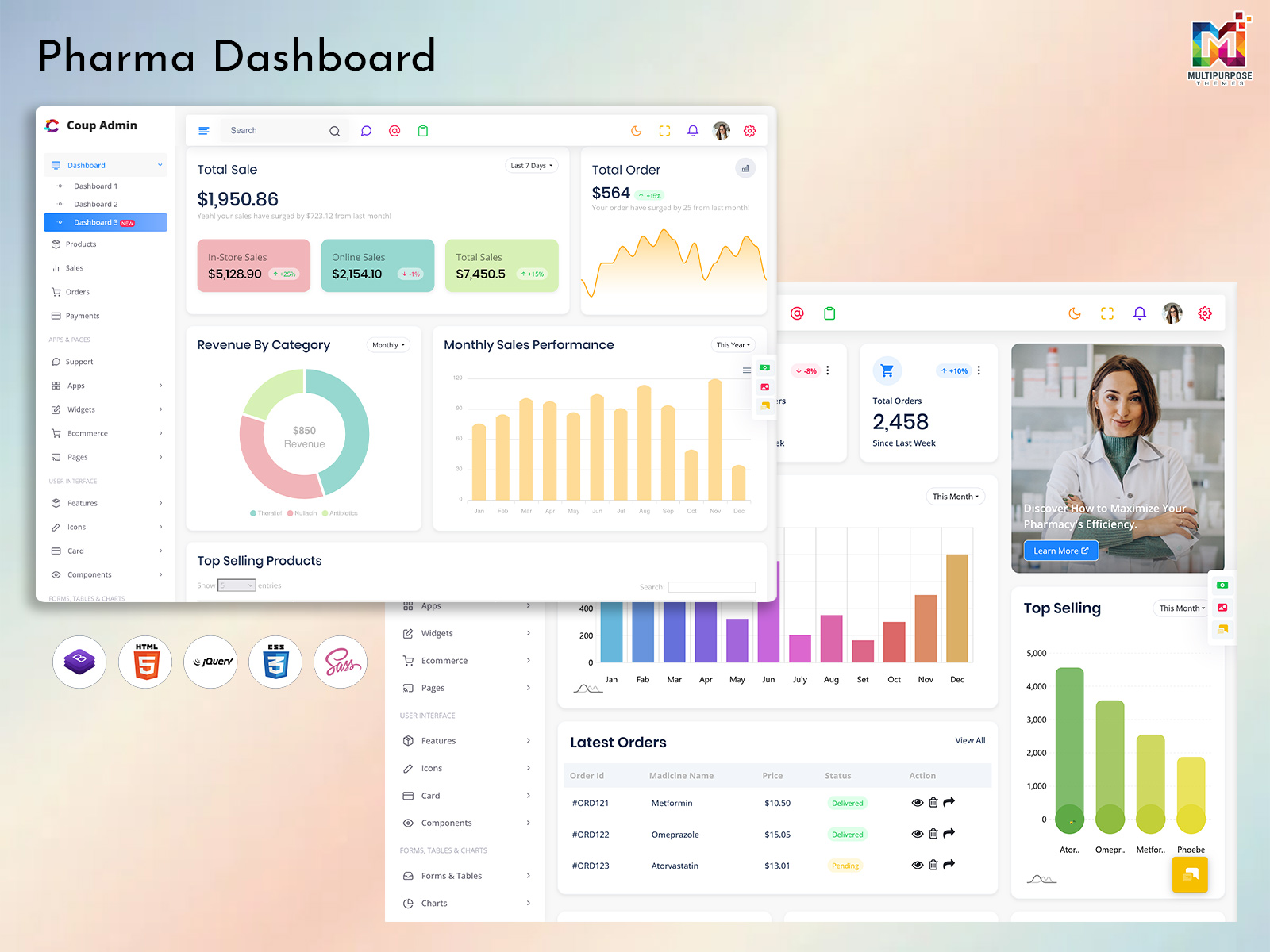
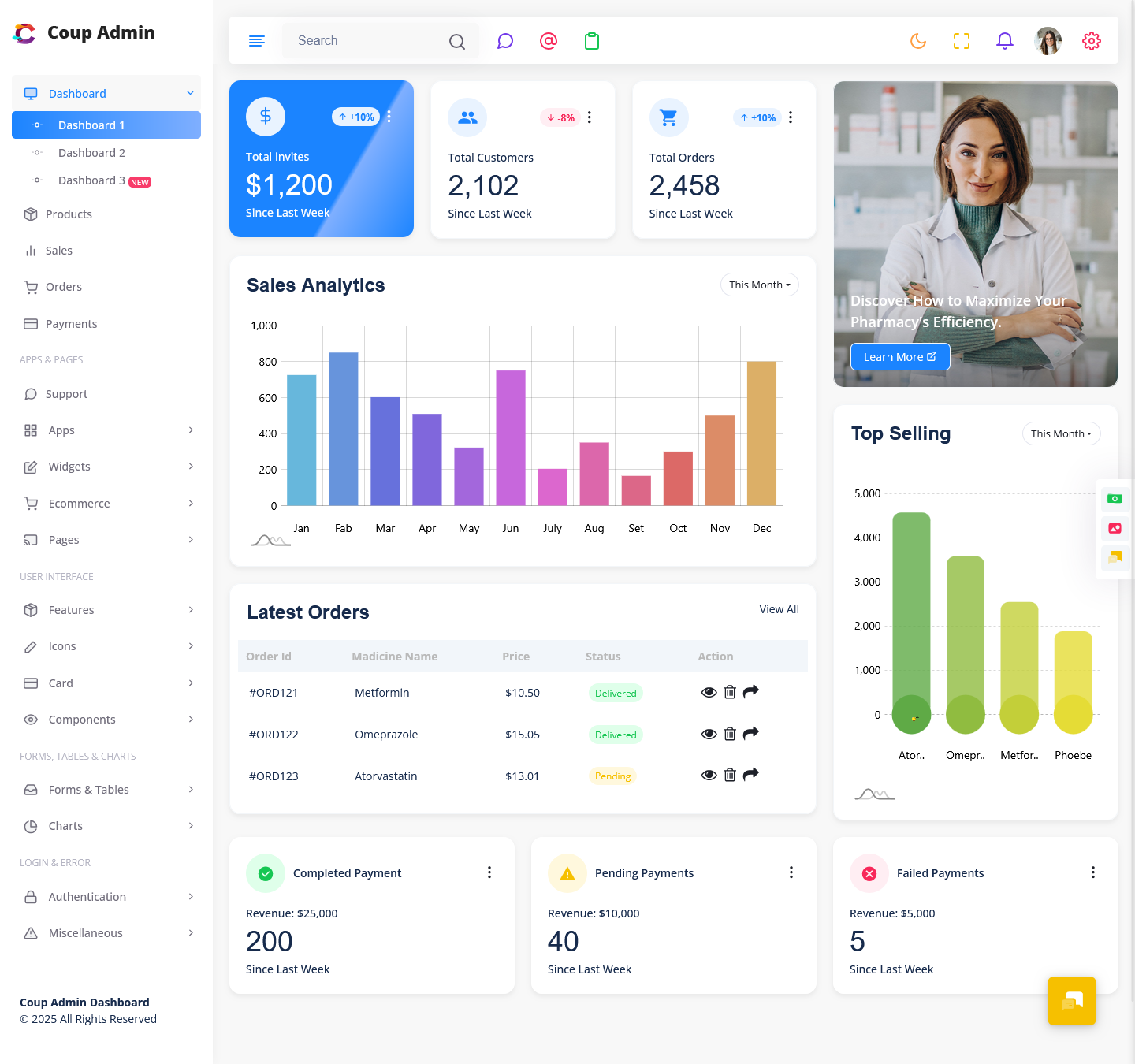
We are extremely excited to announce the launch of our brand-new Pharmaceutical Dashboard, now officially added to our existing Pharma Admin Template. This newly upgraded dashboard has been designed to enhance visibility, improve decision-making, and simplify day-to-day operational tasks for pharmacy, medical, and pharmaceutical organizations. Created with modern UI/UX practices, real-time analytics capability, and powerful performance structure, the new update transforms the way data is analyzed, monitored, and managed in pharmaceutical environments.
Today, efficiency, transparency, and real-time reporting are crucial for running a successful pharma business. Understanding sales performance, stock status, prescription flow, supplier management, inventory control, and healthcare operations is more important than ever. Our upgraded interface allows organizations to manage everything from a single screen through a beautifully structured and feature-rich Pharma Admin Dashboard.
This update provides developers, pharmaceutical agencies, hospitals, pharmacies, and distributors with a ready-to-deploy system that helps them accelerate development without starting from zero. Whether you are building pharmacy management software, prescription tracking systems, medical ERP, billing software, or a pharmaceutical analytics platform – this new Pharma Dashboard Template brings unmatched clarity, speed, and capability.
Explore New Pharma Dashboard – Coup Admin
BUY NOW DEMO
About the New Pharmaceutical Dashboard
The new Pharmacy Management Dashboard is built to deliver an intelligent and smooth workflow for backend operations. It offers a clean and organized interface where users can access important insights like stock reports, sales charts, supplier records, billing status, staff performance, and operational metrics in real time. For developers, it acts as a strong foundation for creating large-scale healthcare applications, CRMs, and pharmacy systems without heavy coding effort.
Our goal was to build a dashboard that looks modern, works effortlessly, and helps users make faster decisions supported by real data. The interface makes complex information easy to understand through visual graphs, structured widgets, and interactive UI elements. From managing drug categories and prescriptions to auditing purchase reports and tracking profit, the dashboard simplifies every crucial task.
Top Features of the New Upgraded Pharma Dashboard Template
1. Advanced Stock & Inventory Analytics
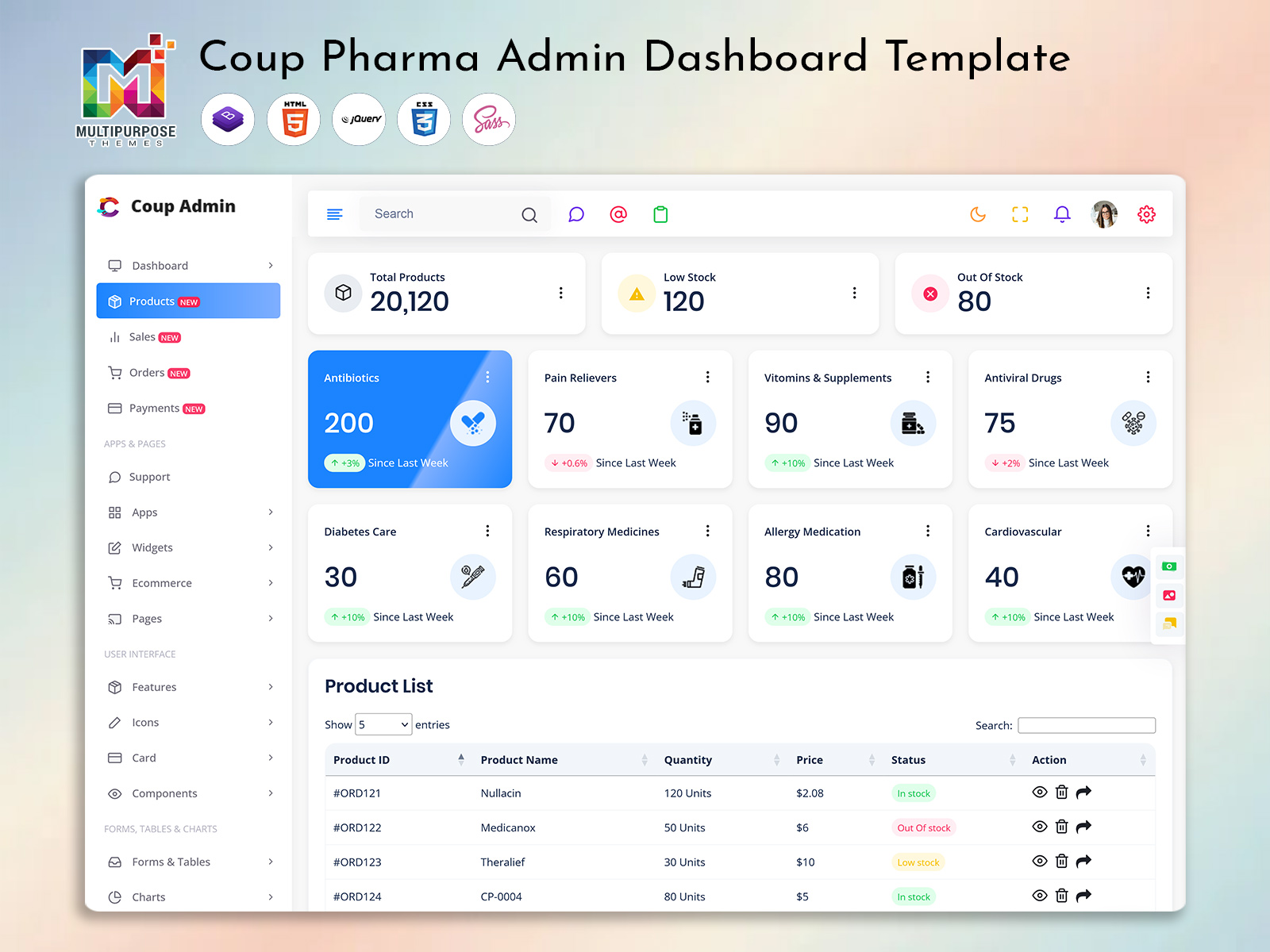
Inventory is the heart of pharmaceutical operations, and losing control of stock can cause massive financial and operational challenges. The new Pharmacy Management Dashboard provides powerful and easy-to-read inventory analytics that help organizations monitor available stock, low-stock alerts, expiry dates, batch details, supplier status, and purchase records. It visualizes usage trends, fast-moving products, seasonal demand patterns, and medicine performance charts in real time. This helps decision makers plan smartly and avoid stock outages or over-purchasing. With clear visibility into quantity insights and product movement tracking, pharmacies and wholesale supply chains can operate more efficiently, ensuring zero waste and better profitability.
2. Sales & Revenue Performance Visualization
Understanding sales activity is essential for identifying business progress and improving profitability. The upgraded Pharmaceutical Dashboard includes detailed sales analytics through interactive charts, region-based comparisons, revenue breakdowns, and graphical representation of performance trends. Users can monitor customer flow, most-sold medicines, weekly or monthly revenue, and yearly growth patterns. For managers and owners, this feature acts as a powerful decision-support tool that simplifies forecasting and planning. With visual reports and live performance tracking tools, organizations can optimize business strategy, find opportunities for improvement, and increase sales efficiency. The clear and organized presentation ensures data-driven decision making at every level.
3. Prescription, Patient & Billing Management Tools
The new Pharma Admin Dashboard includes powerful workflow tools that help healthcare units manage patient information, prescription cycles, and billing processes smoothly. Hospitals and pharmacy outlets can use it to maintain digital patient records, medication histories, doctor recommendations, and invoice management systems. This feature improves accuracy and prevents manual data entry errors by offering structured forms, quick-search capability, prescription tracking, and automated calculation systems. With secure access control, users can manage detailed medical histories conveniently and transparently. This feature enhances customer service experience, reduces waiting time, and contributes to more organized healthcare administration in both retail and institutional pharmacy settings.
4. Data Visualization & Reporting with Modern UI Components
A powerful admin system must present complex data in an easy-to-understand format. The new Pharma Dashboard Template is equipped with high-quality charts, graphical widgets, tables, progress indicators, and data filters that simplify visualization. Users can interact with multiple report views, custom filters, sorting tools, and export options. It supports everything from stock analytics and hospital operational reporting to medicine usage insights and performance analytics. Modern design components improve clarity and usability, enabling users to discover insights instantly. Built with more than 400 UI components and 150+ widgets, it ensures flexibility and excellent control for fast system development and smooth user experience.
5. Light / Dark Mode, RTL Layout & Fully Responsive Design
This upgraded system is built to support global usage. The dashboard features light/dark theme switching, which is ideal for comfort and accessibility across environments like pharmacies, hospitals, or corporate offices. The RTL layout makes the interface friendly for Arabic-language and Middle-Eastern regions. The responsive layout ensures perfect display on desktop, mobile, and tablet devices, which is essential for managers and field staff working across locations. Whether checking patient data from a phone or analyzing stock performance from a computer, the system adjusts automatically for a smooth viewing experience. This level of flexibility is essential for modern pharma businesses.
Explore Other Dashboards
Dashboard: 2
BUY NOW DEMO
Dashboard: 3
BUY NOW DEMO
Developer Friendly, Modular & Scalable Code Structure
The upgraded architecture of the Pharma Admin Dashboard offers highly modular, scalable, and customization-friendly development possibilities. It supports seamless integration with third-party tools, APIs, ERP systems, CRM systems, billing software, and database structures. The codebase follows clean standards, making modifications fast and simple without complexity. Developers benefit from 1200+ pages, 90+ plugins, and strong reusable components that reduce development time dramatically. Instead of building each part manually, they can customize ready sections and focus on core functionality. The template ensures stability, performance optimization, and long-term scalability — making it a perfect option for production-grade applications.
Who Can Use This New Pharmaceutical Dashboard?
This upgraded dashboard is perfectly suited for a wide range of industries, organizations, service providers, and development agencies working in or serving the pharmaceutical and healthcare domain.
Industries & Agencies That Benefit Most
- Pharmaceutical companies & manufacturing units
- Hospital administration & healthcare ERP developers
- Medical equipment suppliers & distributors
- Pharmacy chain management companies
- Clinical laboratories & diagnostic centers
- Pharmacy billing system providers
- Healthcare software development agencies
- Medical wholesaler and logistics companies
- Research & life sciences data analytics firms
- Medical CRM & patient management platform providers
The Pharma Dashboard Template is ideal for any business that needs complete control, clear visualization, real-time reporting, and automated operational performance for medicine and healthcare management.
Conclusion
The new upgraded Pharmaceutical Dashboard is a powerful step forward in modernizing medical and pharmacy operations. It delivers faster processing, cleaner visualization, responsive layouts, and advanced analytics to improve efficiency, accuracy, and strategy. With improved UI components, a scalable coding structure, and real-time data presentation features, it enables developers to build reliable systems without wasting time on designing from scratch.
Whether used as a Pharma Admin Dashboard, Pharma Dashboard Template, Pharmaceutical Dashboard, or Pharmacy Management Dashboard, it provides a smooth, professional, and intelligent solution for modern pharmaceutical environments.
This update is officially included in our existing Pharma Admin Template — ready to enhance your development workflow and transform your healthcare applications.
FAQs
1. What is the new Pharmaceutical Dashboard?
The new Pharmaceutical Dashboard is a redesigned analytics and management interface added to our existing Pharma Admin system. It provides complete visibility over pharmacy operations, stock status, sales performance, billing flow, and overall business analytics from one centralized control panel. The dashboard helps users simplify complex data, improve decision-making, and manage daily activities more efficiently.
2. Why was the Pharma Admin Dashboard upgraded?
The upgrade was created to enhance performance, speed, and usability. The new version provides modern UI elements, real-time reporting tools, responsive layout, and advanced visualization components. The purpose is to support healthcare and pharmacy systems with a more powerful and structured management environment that improves workflow and operational clarity.
3. Who can use this Pharma Admin Dashboard?
The Pharma Admin Dashboard is suitable for pharmacies, hospitals, medical stores, pharmaceutical companies, wholesale distributors, clinical labs, and healthcare software development agencies. Any organization managing drug inventory, patient data, financial reports, or supply chain operations can benefit from this upgraded solution.
4. Does the dashboard support inventory and stock tracking?
Yes, the system includes advanced stock management tools for tracking drug availability, reorder levels, expiry status, batch details, supplier records, and purchasing analytics. The dashboard improves inventory accuracy and helps avoid overstocking or product shortages.
5. Is the Pharma Dashboard Template responsive and mobile-friendly?
Absolutely. The Pharma Dashboard Template is fully responsive and optimized for use on desktops, tablets, and mobile devices. Whether users access it from a pharmacy counter, hospital office, or remote workspace, the interface remains smooth and easy to navigate.
6. Does the dashboard include Light / Dark mode and RTL language support?
Yes, the upgraded system includes Light and Dark theme switching and complete RTL support. This makes the dashboard more comfortable to operate in different environments and accessible to global users.
7. Can developers customize the Pharmacy Management Dashboard easily?
Yes. The Pharmacy Management Dashboard is built with a modular and scalable code structure that allows fast customization. Developers can modify layouts, UI elements, widgets, charts, and functional components without rebuilding the system from scratch.
8. What types of reports can be generated using the dashboard?
The dashboard supports data visualization for sales performance, stock movement, batch expiry, purchase and supplier activity, patient prescription history, and operational workflow insights. Users can view analytics in real time through charts, tables, and graphical widgets.
9. Is the Pharmaceutical Dashboard secure for patient and medical records?
Yes, security and structured access control are key features. Data is managed through protected modules that keep sensitive information safe and organized. Only authorized users can access specific sections, ensuring privacy and accuracy.
10. Does the upgrade require separate installation?
No. The new upgrade is already integrated within the existing Pharma Admin Template. Current users can directly access the updated version without additional setup or extra cost.
11. Can this dashboard support multi-branch pharmacy management?
Yes, the system is designed to support chain-based operations and multi-location workflows. Users can monitor performance across different outlets, compare analytics, and maintain centralized control.
12. Can this dashboard be used to build pharmacy billing or ERP software?
Definitely. The upgraded Pharma Dashboard Template is an excellent foundation for medical ERP systems, hospital management solutions, billing software, CRM platforms, and complete pharmacy automation systems.

Related Posts