

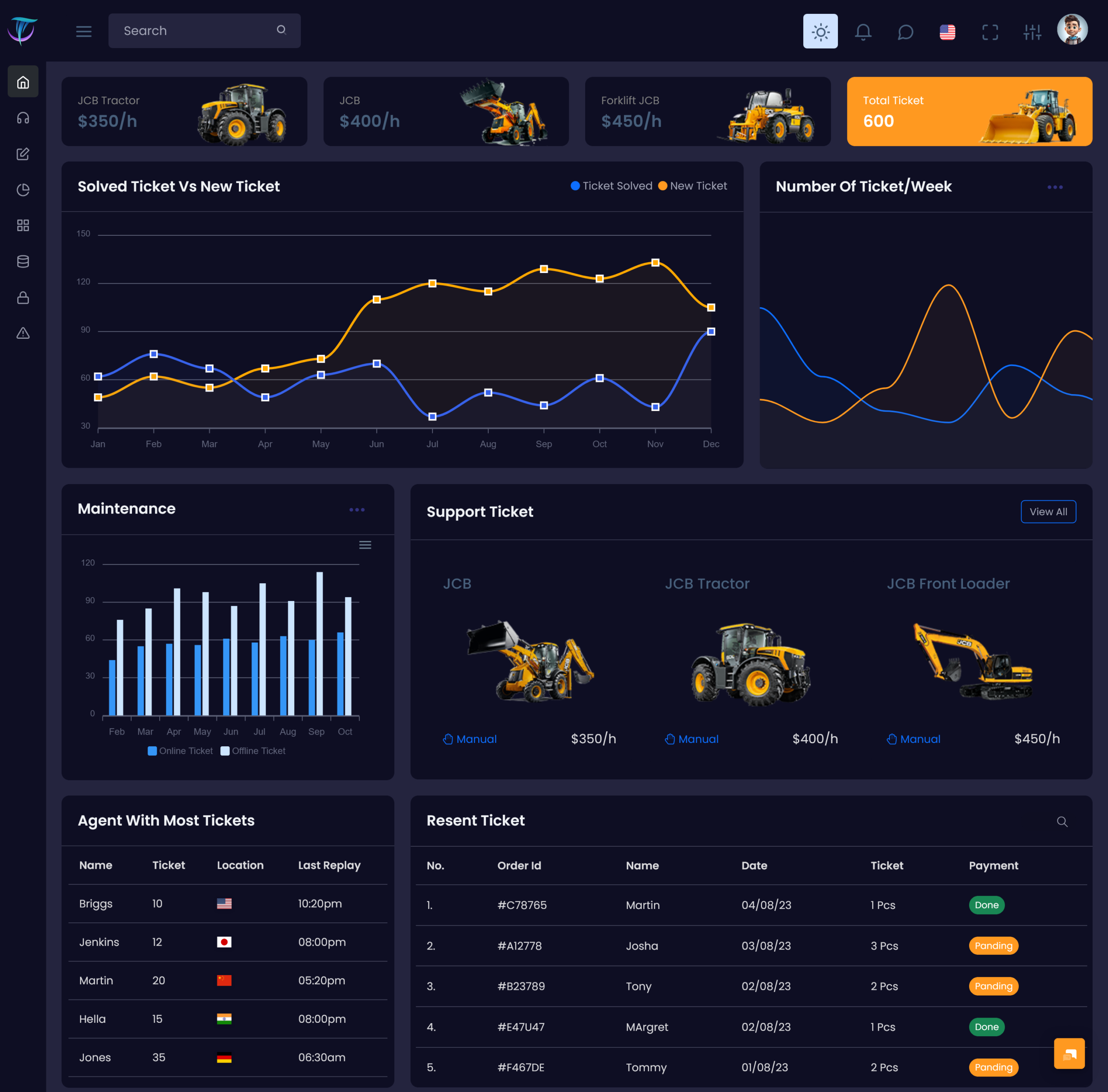
A support Ticket dashboard can provide a centralized workspace for organizing these customer requests. Instead…
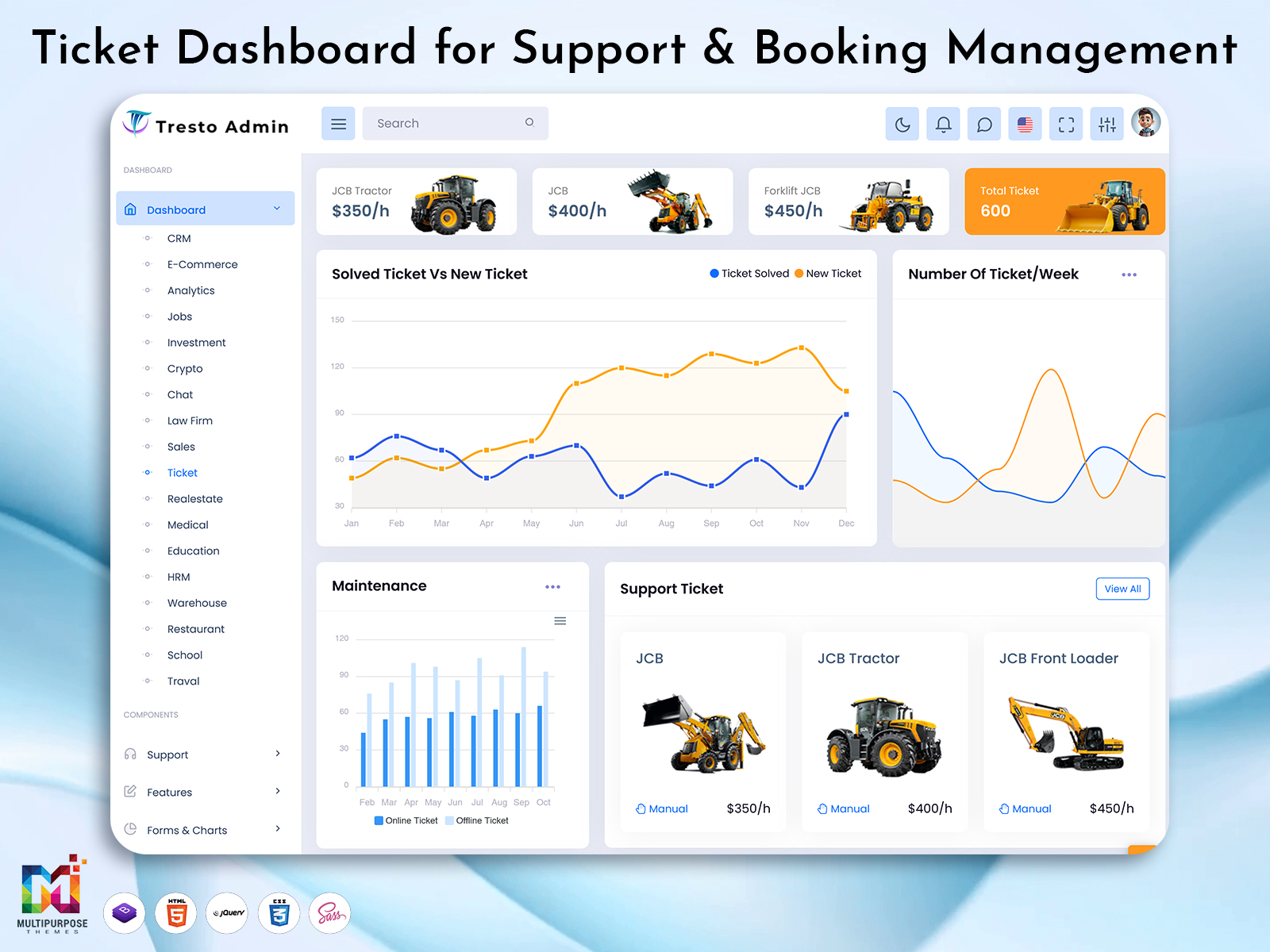
Ticket Dashboard: Simplify Support and Booking Management
Reading Time: 11 minutes
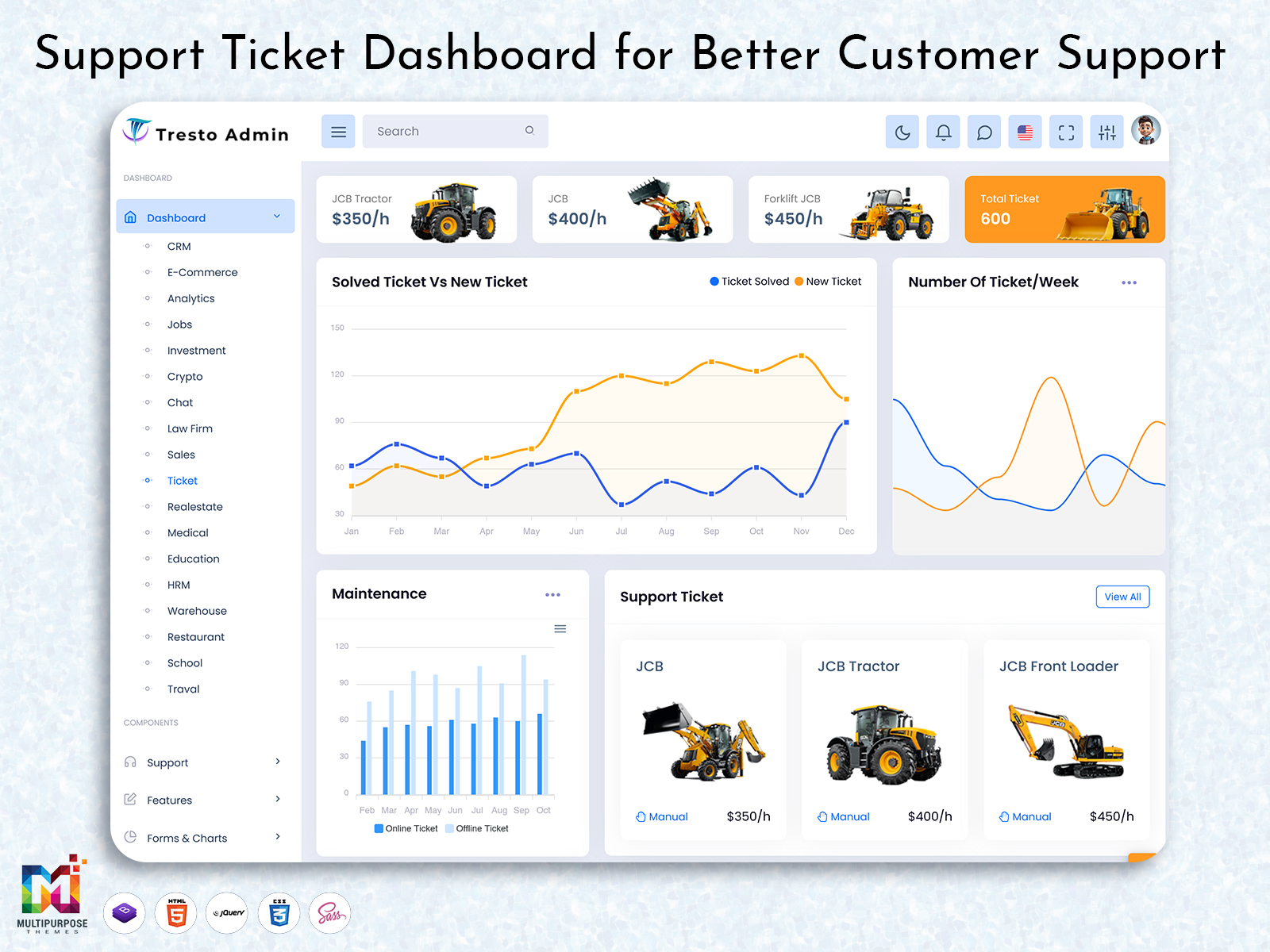
A ticket dashboard is an administrative interface that is used to simplify a business’s day-to-day operations in relation to tickets. Depending on the context, ticket booking management or support ticket management systems allow an organization to observe relevant entries in an organized manner. Inside a dashboard, these entries can take on a variety of different forms depending on whether the primary purpose of the application is to manage booking tickets or service tickets. A support ticket dashboard typically contains tickets, statuses, priority levels, assigned agents, and communication contents. In contrast, a ticket booking dashboard likely includes passengers, dates, category, and other relevant booking information. While these two ticket dashboard types take on different forms, both are organized into a single interface so that pertinent information can be found easily.
Watch Full Video
In short, a ticket dashboard is a tool used to organize ticket data according to the specific needs of a business. In this regard, not only is a ticket dashboard appropriate for industries outside of the hospitality field. Instead, developers should choose an appropriate set of cards, tables, buttons, and other interface elements that reflect the general operations of the application. For instance, a support ticket dashboard would have a different interface than one meant to track down reservations.
Ticket Dashboard for Organized Service and Booking Operations
It is common for ticket-related businesses to have to manage fluctuating amounts of information. A support ticket, for instance, may contain a list of customer requests, including open, new, and closed tickets. In contrast, a booking ticket may have to manage a list of reservations and cancellations, depending on the needs of the client. In either case, using a ticket dashboard is an excellent way to observe the general state of an organization in relation to the tickets. A well-designed dashboard will allow agents to accomplish this task seamlessly by providing them with a single interface that will allow them to accomplish their objectives for viewing and managing tickets.
Ticket management systems, particularly those that are focused on booking, require more than a simple dashboard. Beyond the visual elements, developers have to consider the general logic of the application. For instance, a ticket booking system will most likely have to contain records of reservations, including any relevant cancellation policies and payment information. While an application built around a ticket dashboard may not be concerned with any of these restrictions, the visual elements should still be changed to reflect the different needs of the ticket management system.
One of the primary functions of a dashboard, regardless of whether it is used for tickets or not, is to allow agents and managers to store, retrieve, and update relevant data more easily. One way to achieve this objective is to make the search and filtering mechanisms intuitive. Elements such as search bars, status filters, and other similar dashboard widgets allow agents to find the data that they need to review and update without having to undergo the time-consuming process of scanning through every dashboard entry.
Another best practice in dashboard design is to ensure that the interface is suited to the end-users of the ticket management system. In this regard, a support ticket management system is much simpler than one that has to do double-duty as a ticket booking system. This is not to say that a ticket booking dashboard cannot be designed in such a way as to suit both support ticket managers and those who have to update and view reservation records. Rather, developers should ensure that the dashboard has been optimized for the needs and abilities of the target audience. For instance, a support ticket manager will have to update and view different sets of information than an agent who manages support tickets.
Finally, a dashboard in relation to ticket management should be able to provide intuitive methods of communication between ticket managers and agents. In this regard, ticket dashboard designers should ensure that relevant ticket data can be found easily within the confines of a single interface. However, notifications, messages, and other dashboard elements concerning the ticket will have to be implemented on a per-application basis.
VIEW DEMO BUY NOW
Ticket Dashboard Development: An Overview
For developers who want to create an application that is concerned with ticket management, a dashboard can be an invaluable tool. Not only does it provide an intuitive interface for managers and agents, but it also serves as a good starting point for developers who want to construct an application with minimal UI code. In this regard, a dashboard can be used to inform the general organization and structure of an application without having to spend the time and resources required to design an interface from scratch. As such, a dashboard should be taken as a general guideline for the visual elements of an application that concerns ticket management.
Features of a Ticket Dashboard
| Feature | Description |
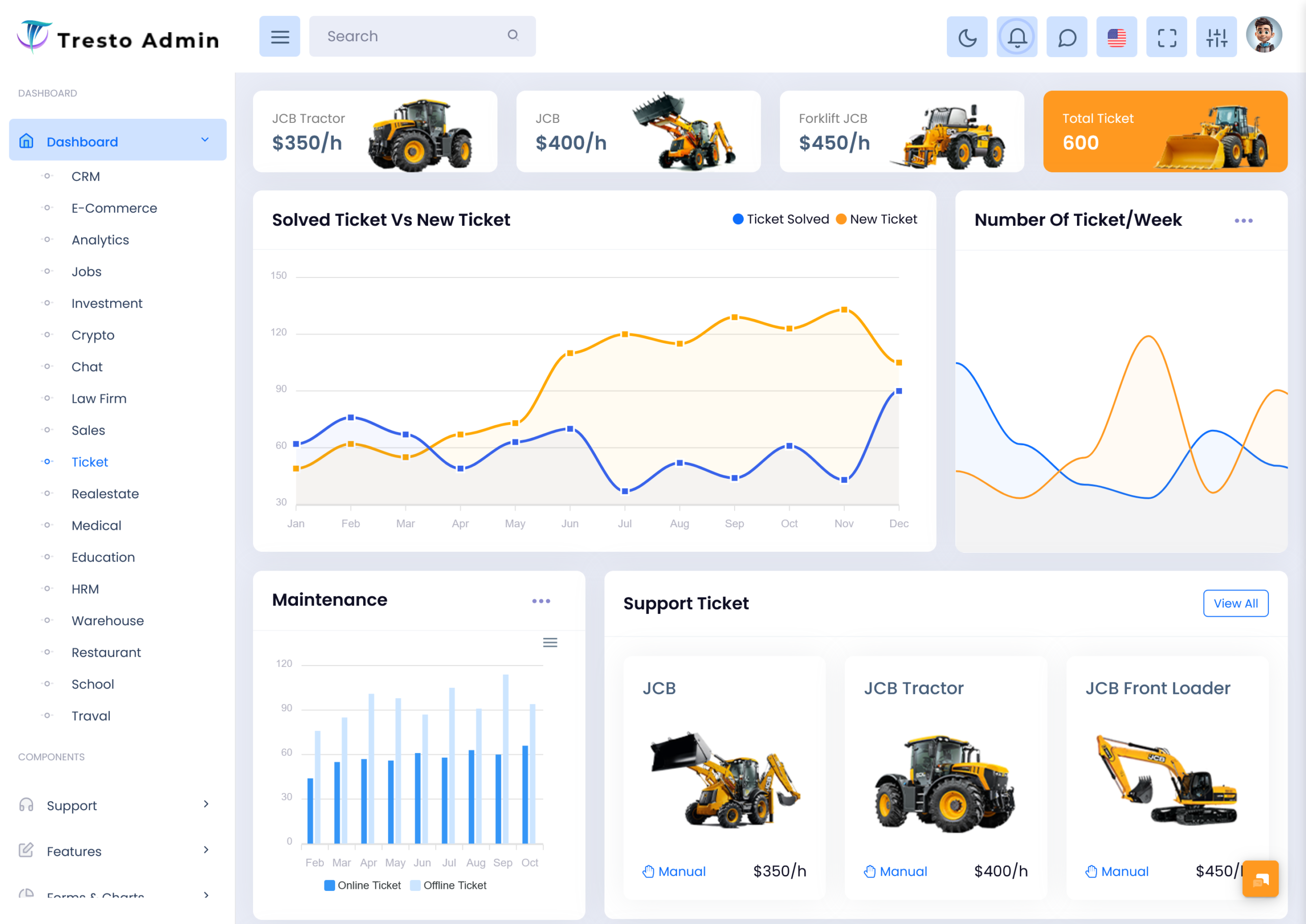
| Ticket Overview and Status Summary | An overview of the dashboard can be used to track the general state of the application. Cards will allow agents and managers to view the open, new, closed, and pending tickets. Developers should customize the contents of the dashboard, depending on the needs of the ticket application. |
| Support Ticket Management | A dedicated section can be used to update and view support ticket entries. Elements such as the subject, prioritization, assigned agent, and status will allow agents to update and view the support tickets. Developers will have to construct this section according to the needs of the application and the level of ticket support that will be provided. |
| Ticket Booking Management | Similar to the section described above, a dashboard can be constructed to update and view ticket bookings. Information such as reservations, ticket dates, category, and passenger names will allow agents and managers to make the necessary observations and updates. Developers should ensure that the interface is constructed according to the needs of the ticket booking application in question. |
| Search and Filtering | The inclusion of search fields and filters will allow agents to make the necessary observations without having to scan the dashboard. Filters can be applied to tickets and bookings, depending on the needs of the ticket management application. In summary, search fields and filter bars should be intuitive and should reduce the time spent finding the relevant ticket entries. |
| Booking and Ticket History | A feature that allows agents to view the ticket history can be useful in a variety of scenarios. In a support ticket dashboard, it is useful to see the history of the ticket and the actions that have been taken to resolve it. In a booking ticket application, it allows agents to view the history of the reservation. In either case, developers will have to implement the feature according to the needs of the ticket management system. |
| Data Visualization and Reports | Cards, tables, and other visual elements can be used to create reports that concern the ticket data. Charts and bar graphs can be used to provide a more intuitive overview of the ticket data. Developers should ensure that the data is relevant and that it can be organized in a manner that is easy to understand. |
| Responsive and Customizable Layout | A responsive layout will ensure that the ticket dashboard is intuitive across platforms and viewport sizes. Developers should ensure that the layout can be customized to fit the needs of the target audience and that it does not impose any restrictions on the intended end-users. |
VIEW DEMO BUY NOW
Designing a Ticket Dashboard Around Different Business Workflows
The requirements of a ticketing application can vary significantly, depending on the needs of an organization. At the most basic level, it is necessary to distinguish between applications that are focused around support tickets and those that are concerned with ticket bookings. Developers should consider what the intended purpose of the application is before proceeding with the creation of the UI. For applications that are focused on support tickets, the designer should plan around the life cycle of the ticket. For an application that is meant to update and view support tickets, the life cycle of a support ticket should inform much of the dashboard.
A similar approach should be taken when designing an application that concerns itself with booking tickets. In this regard, developers should consider themselves as the end-users of the application to ensure that the interface is not overly complicated. It is not uncommon for booking ticket applications to have intuitive navigation that informs much of the general structure and organization of the application. In a similar vein, developers should also ensure that navigation is intuitive, regardless of the nature of the ticket management application. A sidebar can be used to organize records, reservations, reports, and other relevant sections. In a ticket support application, the sidebar can be used to organize tickets, agents, categories, and other relevant sections.
Another consideration that should be taken into account is the amount of relevant data that should be displayed on the dashboard. A dashboard should provide an overview without resorting to displaying unnecessary data. Information that is not relevant to the needs of the ticket application should be pushed to another section to avoid the unnecessary consumption of resources. Developers should ensure that the information that is presented on the dashboard is relevant and digestible.
For applications that are concerned with support tickets, it is useful to provide appropriate statuses for each support ticket so that agents and managers can have an overview of the general life cycle of the support ticket. Similarly, applications that are meant for ticket booking reservations should have a feature that allows agents and managers to view reservations easily. In summary, it is useful to provide an interface that is intuitive and that does not require extensive reorganization of the ticket application to meet the needs of the visual elements.
Ready-made admin templates can be useful assets for developers that need an interface that suits the needs of an application without having to spend the time and resources to develop a dashboard from the ground up. In this regard, a ready-made ticket dashboard can be useful in informing the interface of an application without much of the development overhead. As such, developers should ensure that the general components and technologies utilized by the selected dashboard can be integrated into the intended application. In particular, developers should ensure that the dashboard can be viewed on a variety of different platforms and that it does not require extensive modifications to fit the needs of the end-users of the application.
Why Choose Multipurpose Themes for a Ticket Dashboard?
Multipurpose Themes is a website that provides ready-made admin dashboard templates that can be utilized for a variety of different purposes. In this regard, the templates that are provided by this website can be used to inform the design elements of an application that is concerned with ticket management. The Etikto Admin template, for instance, can be used for ticket management applications and is displayed on the website. The website can provide helpful information for potential buyers in regards to what applications can be informed by a given dashboard. On the website, the ticket dashboard is used for a variety of purposes, ranging from travel booking to ticket support.
For developers that need to create an application that is focused on ticket management, Multipurpose Themes can provide a variety of useful solutions. In this regard, developers may want to focus on the components that the selected admin dashboard template provides before selecting the layout that will be used in the application. While Multipurpose Themes provides a variety of templates that can be useful for ticket management applications, developers should ensure that the features of the template are compatible with the requirements of an application.
Benefits of a Ticket Dashboard
1. Centralized Ticket Information
A dashboard is useful when it provides an intuitive interface for viewing and updating tickets. Rather than navigating between unrelated interfaces, ticket management applications can be organized in a dashboard that allows designers and developers to provide an overview of the necessary ticket data without sacrificing the requirements of the ticket application. In summary, a dashboard provides an intuitive layout for an application that concerns ticket data.
2. Easier Request Tracking
For applications that concern themselves with support tickets, a dashboard is useful in the life cycle of the ticket. For instance, agents and managers can view the general progress of the tickets that they have to update and view. In this regard, the ticket dashboard would provide an intuitive overview of the support tickets. However, the exact method of tracking is dependent on the application and the requirements of the developers.
3. Convenient Booking Review
Applications that require ticket booking data to be viewed and updated can be organized in a dashboard in such a way as to allow designers and developers to provide an intuitive interface. Cards and tables can be used to view reservations and other ticket booking data with relative ease. In summary, a ticket dashboard provides an intuitive interface for applications that are intended for ticket booking management.
4. Better Record Organization
A dashboard can be designed to organize ticket data according to the needs of the application. Elements such as categories and filters can be used to separate ticket data so that end-users can update and view the data without much difficulty. In summary, a dashboard provides an intuitive layout that can be used to organize data in accordance with the needs of the ticket application.
5. Adaptable Interface Design
A dashboard can be constructed in such a way as to inform much of the visual requirements of the ticket application. In this regard, developers can view a dashboard as a prototype of an application that will have to be adapted to the needs of the application. In summary, a dashboard is an intuitive interface that can be modified to suit the needs of the ticket management application.
6. Support for Team Coordination
A dashboard is useful in that it allows tickets to be reviewed and updated without much difficulty. In this regard, a dashboard can be used to allow teams to coordinate the application in real-time. In short, a dashboard can be useful for cooperation between teams. However, cooperation between teams requires that developers provide the features that will allow them to share data between themselves. In short, a dashboard can be useful when the application has been given appropriate authorization between relevant teams.
7. Structured Reporting
A dashboard provides charts and other elements that allow ticket data to be used to create reports. In this regard, developers can use a dashboard to create cards, tables, and charts that allow stakeholders to review specific aspects of the ticket management application. In summary, a dashboard provides the features necessary to structure the ticket data into reports that can be easily reviewed.
Conclusion
A ticket dashboard provides the necessary visual elements that can be useful for ticket management applications. In this regard, developers should ensure that the interface is suited to the needs of the application that they are developing. Multipurpose Themes provides an array of templates that can be useful when creating an application that is concerned with support tickets and booking tickets. In summary, developers should ensure that a dashboard is used to inform the general layout and structure of an application. Using an appropriate ticket management system, developers can ensure that an intuitive interface is used to view and update ticket data that is appropriate to the requirements of the application.
VIEW DEMO BUY NOW
Frequently Asked Questions
1. What is a Ticket Dashboard used for?
A Multipurpose Themes ticket dashboard is used to organize relevant ticket data with intuitive cards and tables, allowing organizations, managers, and agents to update data that is appropriate to the needs of an application. Developers should select a dashboard that can be adapted to the needs of an application. In short, a ticket dashboard is an interface that will allow ticket data to be managed according to the needs of an application.
2. What is the difference between a Support Ticket and a booking ticket?
A support ticket is typically a request that is made by a customer and requires assistance from an agent, while a booking ticket typically concerns itself with reservations. While a dashboard can be used to view and update both support and booking tickets, developers should ensure that the dashboard will allow the necessary ticket data to be viewed and updated.
3. Can I use a Ticket Booking Dashboard for a travel agency?
A Multipurpose Themes ticket booking dashboard can be used to view and update ticket bookings for a travel agency. If the requirements of the application will suit the needs of a travel agency, a dashboard can be useful in providing an interface that is tailored to the needs of an application. In short, a ticket booking dashboard can be used for a travel agency, provided that developers ensure that the application has the necessary booking features.
4. Is a ticket dashboard suitable for customer support teams?
A ticket dashboard is suitable for customer support teams that need to update and view relevant support tickets. The interface elements that are selected will depend on the needs of the application, as customer support teams have different needs depending on the context of the ticket support application. In short, a ticket dashboard can be useful for customer support teams to update and view tickets, provided that the application provides the necessary features to do so.
5. Can I customize a Ticket Dashboard template according to my business?
Administrative dashboard templates that are customizable can be used as a prototype for an application that will have to be adapted to the needs of the developer and the requirements of the ticket application. In summary, developers should ensure that the ticket dashboard that they select can be customized to the needs of their application, depending on the extent to which an application will be used.
6. Does a Ticket Booking Management System include payment and cancellation features?
A Multipurpose Themes ticket booking management system can include payment and cancellation features, provided that the application provides the features that are necessary for ticket booking. In short, developers should ensure that a ticket booking system includes the features that are necessary. If a ticket dashboard will be used for a ticket booking management system, it is advised that developers verify that the application will be able to handle such features. Rather than a ready-made application, developers will have to ensure that the necessary ticket booking features will be included in the application.
7. Why should I choose Multipurpose Themes for a ticket admin dashboard?
Multipurpose Themes provides admin dashboard templates, including those that are appropriate for ticket management applications. Developers can select an appropriate template, depending on the needs of an application. In summary, developers should ensure that Multipurpose Themes can meet the requirements of an application that is concerned with ticket data.

Related Posts


This Post Has 0 Comments