

Every sales team has that one meeting. The manager asks, "Where are we this month?"…

Explore Our Newly Upgraded CRM Dashboard for Multiple Industries & Business Needs
Reading Time: 8 minutes
We are excited to announce that we have upgraded a brand-new CRM Dashboard in our Admin Template, designed to deliver a more powerful, seamless, and intuitive experience for modern businesses. This latest edition of our CRM Dashboard, CRM Software Dashboard, CRM Admin Dashboard & CRM WebApps focuses on improved performance, clean UI, real-time analytics, and smart data visibility that helps teams make faster decisions.
With enhanced usability and a refined layout, the new version brings advanced customer management, lead tracking, sales monitoring, and workflow automation into one centralized space. Whether you manage clients, grow sales, or monitor activities, this CRM Dashboard makes every step simple, smooth, and efficient.
Discover Upgraded CRM Dashboard
BUY NOW DEMO
What is CRM?
CRM (Customer Relationship Management) is a software system that helps businesses manage customer interactions, track leads, organize communication, and maintain strong relationships throughout the sales journey. A CRM allows teams to store customer data, analyze behavior, automate follow-ups, track deals, and measure business performance.
From sales and marketing teams to customer support and management leadership—CRM acts as a single platform that connects all departments and ensures better collaboration. Businesses that use CRM can boost productivity, increase customer satisfaction, improve sales conversions, and grow faster with real-time insights.
Why CRM & Bootstrap 5 Combination is the Best
The combination of CRM System with Bootstrap 5 delivers the perfect balance of performance, speed, security, and modern front-end styling. Bootstrap 5 provides a responsive grid structure, lightweight design system, and advanced UI components that ensure the CRM Dashboard looks professional across all screen sizes—desktop, tablet, and mobile.
Using Bootstrap 5 allows our CRM Dashboard to deliver smooth navigation, faster page load, and high customization flexibility for developers. It also brings strong accessibility, cross-browser compatibility, and clean layouts without heavy scripts.
This combination not only improves the user experience but also reduces development time, making customization easier and more scalable for future business needs.
Features of Our New CRM Dashboard
1. Sales Pipeline Visualization
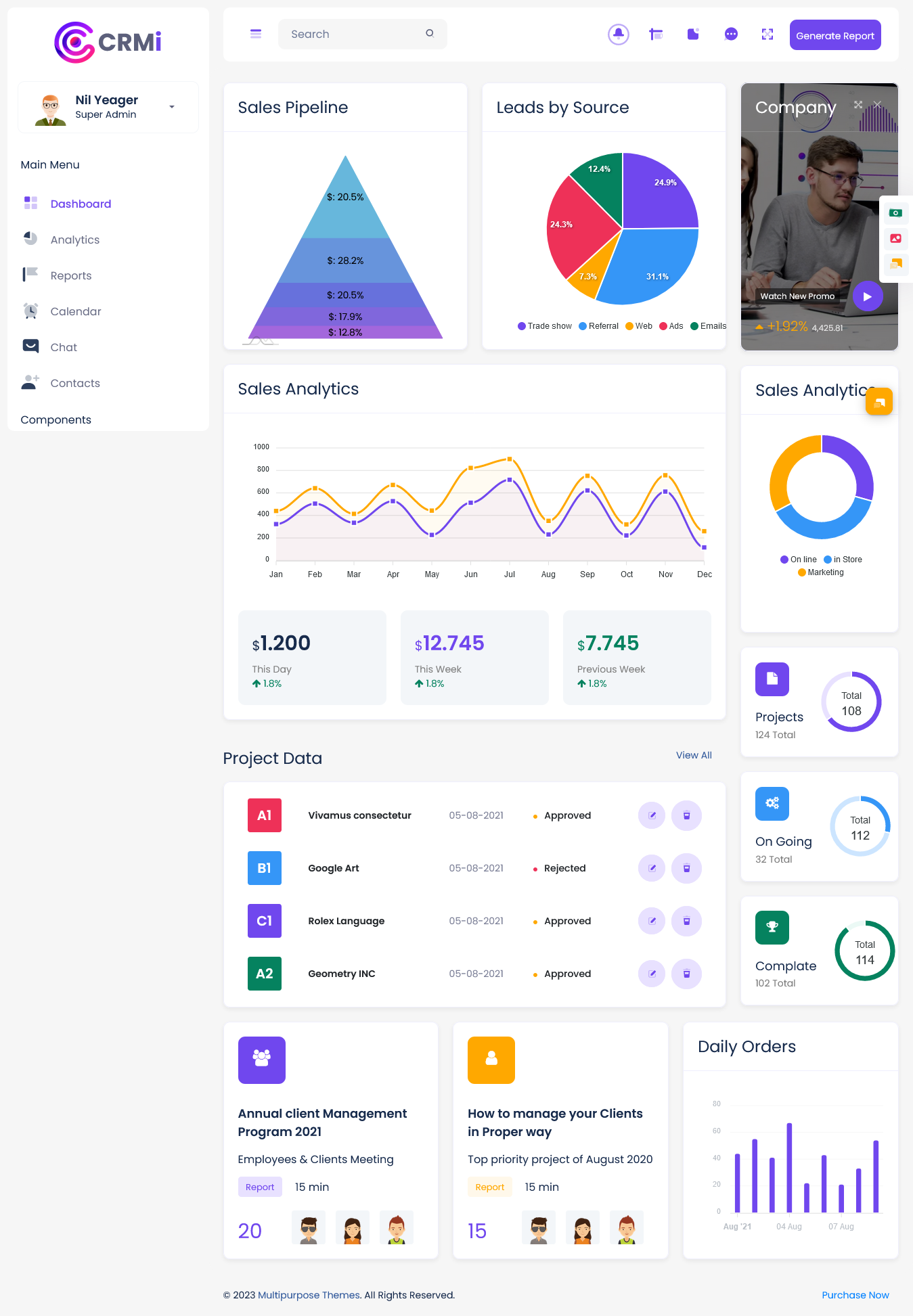
Our new CRM Admin Dashboard includes a powerful Sales Pipeline feature designed to help teams clearly visualize the entire sales funnel—from initial inquiry to final deal closure. This feature allows sales managers and team members to track the percentage of leads at different stages such as New, In Progress, Follow-Up, Negotiation, and Won/Lost. With real-time movement between stages, businesses gain complete clarity on sales progress and forecast future revenue more accurately. It helps identify bottlenecks, evaluate team performance, and prioritize high-value opportunities without missing follow-ups. With this advanced visualization tool inside our CRM Dashboard & CRM WebApps, organizations work smarter and improve conversion rates efficiently.
2. Leads by Source Tracking
The Leads by Source feature in our CRM Software Dashboard helps businesses understand which channels deliver the most effective conversions. Represented through a clear and colorful pie chart, users can analyze lead distribution from multiple acquisition sources such as trade shows, referrals, web forms, marketing campaigns, email outreach, ads, and direct calls. This insight makes it easy to plan marketing budgets, measure ROI, and strengthen high-performing channels. By identifying strong and weak sources, companies can make data-backed decisions to improve marketing strategies and focus on profitable opportunities. This feature ensures consistent growth and strategic lead prioritization within the CRM Admin Dashboard.
3. Real-Time Sales Analytics
The Sales Analytics module provides real-time tracking of sales performance, trends, and revenue patterns using smart visual charts. Users can view comparisons between daily, weekly, previous week, and monthly sales results directly from the dashboard. This feature helps leaders evaluate performance progress, monitor team activities, and identify the most successful selling periods. With historical and live data in one view, decision-making becomes faster and more reliable. The CRM Software Dashboard transforms complex numbers into easy-to-read graphs, eliminating guesswork and manual reporting. Whether tracking market changes or planning future targets, this smart analytics system helps drive better business results.
4. Project Data & Progress Tracking
The upgraded CRM Admin Dashboard includes a dedicated Project Data management section to track all active projects with details like project name, client, due date, and current approval status (Approved / Rejected / In Progress). This helps managers monitor progress clearly and ensure deadlines are never missed. Users get complete visibility of project workflows, teamwork activity, and task updates—improving accountability and operational clarity. Businesses handling multiple projects at the same time can manage everything in one structured view without confusion. This feature is especially useful for agencies, corporate teams, development companies, and service-based organizations needing reliable project tracking.
5. Company Insights & Media Module
Our new Company Insights feature brings an interactive media and performance section to the CRM Dashboard where businesses can showcase promotional videos, branding content, and corporate highlights. Along with visual media space, this module includes key performance metrics such as growth statistics, achievements, or milestone indicators. It helps build internal motivation and enhances communication transparency within teams. Companies can highlight updates, new launches, or recognition banners that keep employees engaged and aligned with goals. This content-driven approach strengthens connection, awareness, and brand culture across the entire organization, making CRM software more than just a data tool—turning it into a business growth hub.
6. Project Status Overview
The Project Status section offers a quick snapshot of ongoing, pending, and completed projects in real time. Instead of reviewing multiple reports, users can instantly understand workload distribution and overall progress through a smart numerical summary. Managers can identify delays, reassign work when needed, and monitor efficiency across departments. This feature supports performance planning and helps improve project completion rates. It is especially beneficial for engineering teams, agency workflows, and consulting firms that handle large project volumes. The simplified view enhances productivity and makes the CRM Dashboard a central place for project lifecycle visibility.
7. Daily Orders & Performance Monitoring
The Daily Orders / Daily Sales bar chart provides a clear representation of order counts or sales activity on each day of the week or month. This feature helps businesses measure daily performance, compare result trends, identify peak days, and take action when performance drops. Sales teams can evaluate productivity and plan strategic promotions based on order movements. It is a perfect tool for eCommerce, distribution, retail, and service companies needing transparent order tracking in the CRM WebApps environment. With instant visibility, businesses can reduce reporting time and maintain consistent revenue growth.
8. Reports & Quick Links
Our upgraded CRM Dashboard includes a Reports and Links section that provides one-click access to essential reports such as client details, sales progress, performance reports, project updates, customer history, and analytics summaries. Users can quickly download or view reports without searching through multiple pages. This improves time efficiency and ensures high productivity for managers, decision-makers, and internal teams. Quick links help streamline workflows and create a smoother navigation experience. This feature makes the CRM Software Dashboard more convenient, organized, and reliable for daily operations.
Who Can Use This CRM Dashboard
- Sales Teams & Marketing Agencies
- Customer Support & Client Service Departments
- SaaS Businesses & Web Application Developers
- Corporate & Enterprise Organizations
- Freelancers & Consultants
- E-commerce & Service-based Businesses
Anyone needing smart customer management, fast reporting, and real-time tracking can benefit greatly from this CRM Dashboard.
Explore More CRM Dashboard Options for Every Industry
CRM Dashboard for HRM
BUY NOW DEMO
CRM Dashboard for Sales
BUY NOW DEMO
CRM Dashboard for Hospital
BUY NOW DEMO
CRM Dashboard for Project Management
BUY NOW DEMO
CRM Dashboard for School
BUY NOW DEMO
CRM Dashboard for eCommerce
BUY NOW DEMO
CRM Dashboard for Restaurants
BUY NOW DEMO
Why We Are Best
1. For Software Development Companies
Software companies require powerful, scalable CRM tools to handle large customer bases and manage cross-department collaboration. Our CRM Dashboard offers real-time project tracking, communication logs, and automated workflows that help development teams stay aligned with timelines and client expectations. With lead management, ticket support, and analytics, software teams can monitor performance, identify bottlenecks, and maintain high customer satisfaction. The dashboard helps track new client onboarding, revenue forecasting, recurring services, and renewal cycles—all in one place. This makes it a perfect CRM solution for IT firms to operate systemized, structured, and professionally.
2. For Digital Marketing & Advertising Agencies
Agencies work with multiple clients simultaneously and need complete visibility across campaigns, leads, performance, and billing. Our CRM Admin Dashboard provides transparent lead tracking, client communication history, scheduled tasks, and pipeline-based deal monitoring. With reporting dashboards and activity timelines, teams can monitor campaigns, update clients instantly, and improve project coordination. It also supports automation tools that save time and reduce manual reporting. Agencies can prioritize leads, track conversions, and manage contracts efficiently. This helps in building stronger client relationships and improving delivery consistency while maintaining creative workflow.
3. For Corporate & Enterprise Businesses
Large organizations require a secure and scalable CRM system to handle high-volume interactions across departments. With role-based permissions, real-time analytics, and automated workflows—corporates can manage departmental productivity, customer progress, and profitability without complexity. The dashboard provides executive-level reporting and centralized resource management. This helps leadership track KPIs, business trends, and operational performance while maintaining data security. The CRM enables transparent collaboration between sales, support, and finance, delivering faster decision-making and improved operational control.
4. For SaaS Product & WebApp Companies
SaaS companies depend on customer lifecycle tracking—trials, onboarding, renewals, and upgrades. Our CRM Dashboard is built to monitor every stage with detailed analytics and automation. Subscription management, support ticketing, lead nurture workflows, and engagement insights help SaaS brands improve retention and reduce churn. It centralizes customer communications and allows teams to respond faster. With performance graphs and churn indicators, companies can improve user experience, scale growth, and maintain control over long-term customer success.
5. For Freelancers, Consultants & Startups
Independent professionals require an affordable, simple, and powerful CRM without complexity. Our CRM WebApps provide contact storage, lead tracking, notes, invoices, reminders, and pipeline functionality—helping individuals stay organized and gain more conversions. Instead of juggling spreadsheets and emails, users can manage clients from a single organized system. The intuitive interface makes it easy for beginners and small businesses to adopt a professional workflow and grow faster without technical dependency.
Conclusion
Our newly upgraded CRM Dashboard, CRM Software Dashboard, CRM Admin Dashboard & CRM WebApps is built to deliver stronger performance, better control, and a seamless user experience for teams of any size. With modern UI, advanced analytics, automation, and secure role management, this CRM is ready to help businesses work smarter, grow faster, and maintain meaningful customer relationships. It’s flexible, scalable, and designed to adapt to all industry needs. Your success begins with the right dashboard—and ours is built exactly for that purpose.
FAQs
1. What is a CRM Dashboard?
A CRM Dashboard displays real-time customer and sales insights to help businesses manage relationships, track leads, and make faster decisions.
2. Is this CRM Dashboard built with Bootstrap 5?
Yes, it uses Bootstrap 5 for lightweight performance, responsive UI, and smooth experience across desktop, mobile, and tablet devices.
3. Can I customize modules according to my business needs?
Yes, everything is customizable including widgets, UI sections, automations, and roles, making it ideal for flexible business workflows.
4. Is role-based access available?
Yes, role permissions help protect sensitive data and allow controlled access for teams and departments.
5. Does the CRM include automation features?
Yes, automated tasks, reminders, notifications, and workflows save time and improve productivity.
6. Do you provide analytics and reporting dashboards?
Yes, real-time visual analytics and charts help track performance and revenue insights.
7. Is the CRM mobile-friendly?
Yes, fully responsive layout ensures an excellent mobile experience.
8. Who can use this CRM Dashboard?
Businesses, agencies, enterprises, developers, and freelancers managing customers or sales.
9. Does it support lead and customer tracking?
Yes, complete customer lifecycle, communication, and conversion tracking.
10. Can developers integrate this easily?
Yes, clean code and modular structure enable smooth integration and faster customization.








Related Posts


This Post Has 0 Comments