

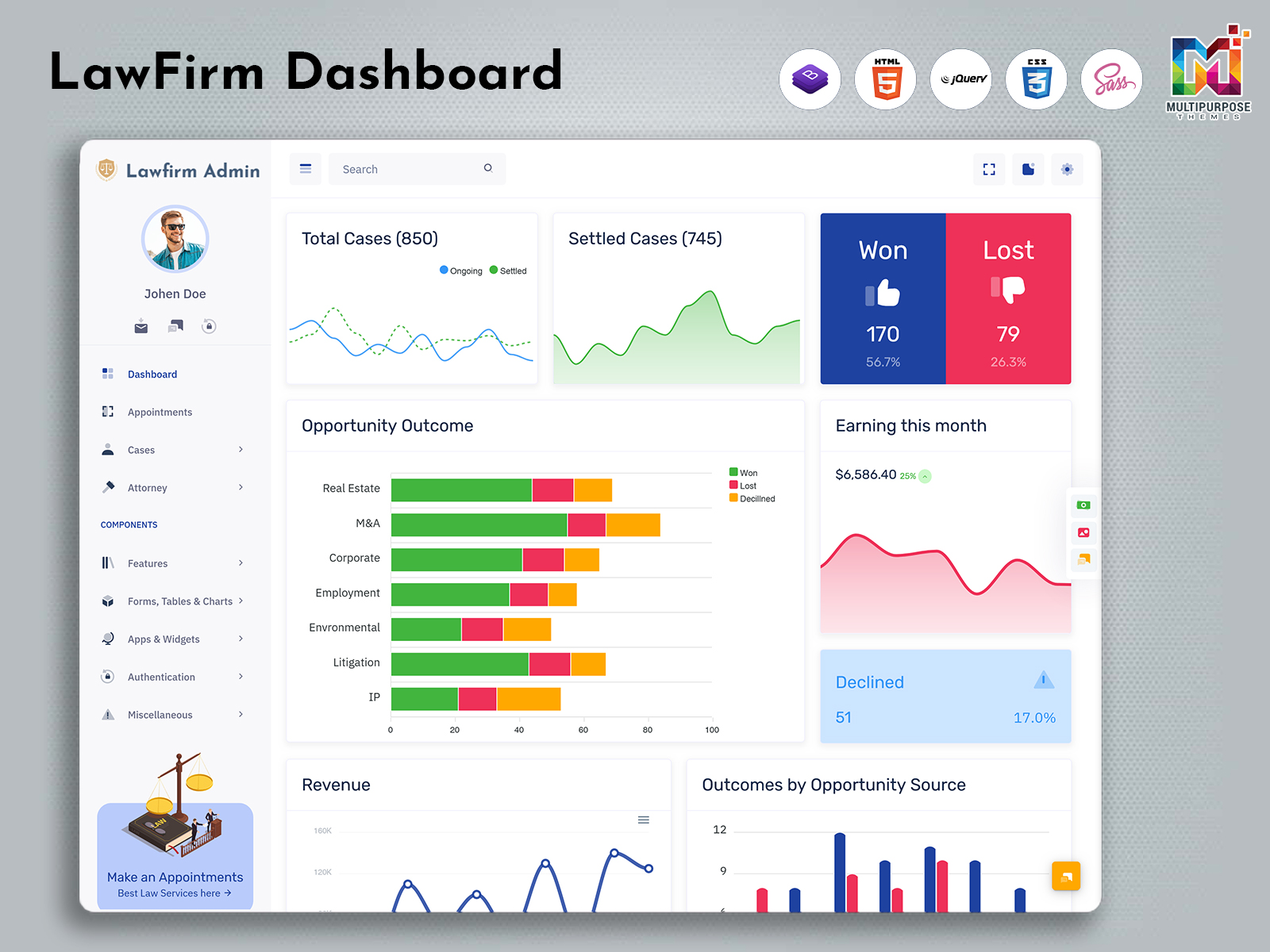
What is a Law Firm Dashboard? A Law Firm Dashboard is a centralized administrative interface…
Law Firm Dashboard for Legal Operations
Reading Time: 11 minutes
What Is a Law Firm Dashboard?
A Law Firm Dashboard is created to make the business side of the practice easier by using a dashboard. It is meant to show information about clients, legal cases, appointments, actions, documents, staff actions and financial actions in a way. People do not need to use different tools to watch what is happening.
Watch Full Video
The Law Firm Dashboard should not be seen as a replacement for the decision-making of a lawyer. The Law Firm Dashboard will help with the part of the legal business. There are people in the firm who will find the Law Firm Dashboard in different ways.
For example a receptionist might use the system to check messages and make meetings. A lawyer might want to see the cases they are working on the meetings coming up and any responses from clients that are still needed. A firm administrator might focus on what the staff’s doing the requests for help the payments that need to be followed up on and how the office is running. A system that is made carefully gives everyone the information they need to do their job.
A Client Management Dashboard can be part of the system. It can contain information about the profile of the clients, their contact details, source of contact for the firm, history of interaction, and the level of engagement at which the client is with the firm. The Legal Services Dashboard could help further in organizing the service requests and consultations.
The design of the dashboard also plays an important part. The Law Firm Admin Panel must be neat, professional and user-friendly. The legal department deals with many documents and urgent tasks, so the interface shouldn’t distract the users. Proper labeling, convenient navigation, legible tables, well-designed status indicators and organized panels can help with everyday work.
How a Law Firm Dashboard Organizes the Legal Office
The process of carrying out legal business starts even before the case is opened. A prospective client can make contact with the law firm through a web inquiry, phone call, email, introduction, or even physically at the office itself. The problem is to make the contact and respond to it. If this information is not kept in order follow-ups might be missed. Important details might be forgotten.
A Law Firm Dashboard can offer a place for inquiries and consultation requests. Staff can write down the client’s information, type of need preferred contact method and the next step. This gives the firm a view of which inquiriesre new which have been contacted and which still need attention.
Once a client becomes part of the firms work the information can be linked with the legal matter. This makes a view of the relationship between the client and the services being offered. Staff can look at the client profile while checking appointments, messages, assigned lawyers or pending documents.
The dashboard can also help with taking ownership. Each case or task may be given to a lawyer, associate, paralegal or administrative employee. This makes it clear who is responsible for the step. Of depending only on spoken instructions the team can look at assignments through a shared screen.
A Legal Services Dashboard can be very helpful for firms that deal with types of legal work. Civil issues, corporate services, family law inquiries, property-related requests compliance work and consultation services might have processes. A flexible dashboard can show categories and statuses without making every case follow the path.
The aim is not to add administration. It is to give the firm a structure for the work that is already happening.
VIEW DEMO BUY NOW
Features of Law Firm Dashboard
1. Client Enquiry Management
There can be a portion of the dashboard that will contain details of the queries raised by the clients. These include the date on which the query is raised, the name of the client, service required, mode of communication, person accountable for it, and the action to be taken subsequently. It allows the company to distinguish leads, scheduled appointments, pending responses and queries processed.
2. Client Profile Workspace
A client profile workspace keeps information connected to one record. It may include contact details how the client wants to be contacted, history of inquiries, cases, meeting notes and document references. The way the profile is set up helps staff understand the client relationship without opening pages.
3. Legal Matter Overview
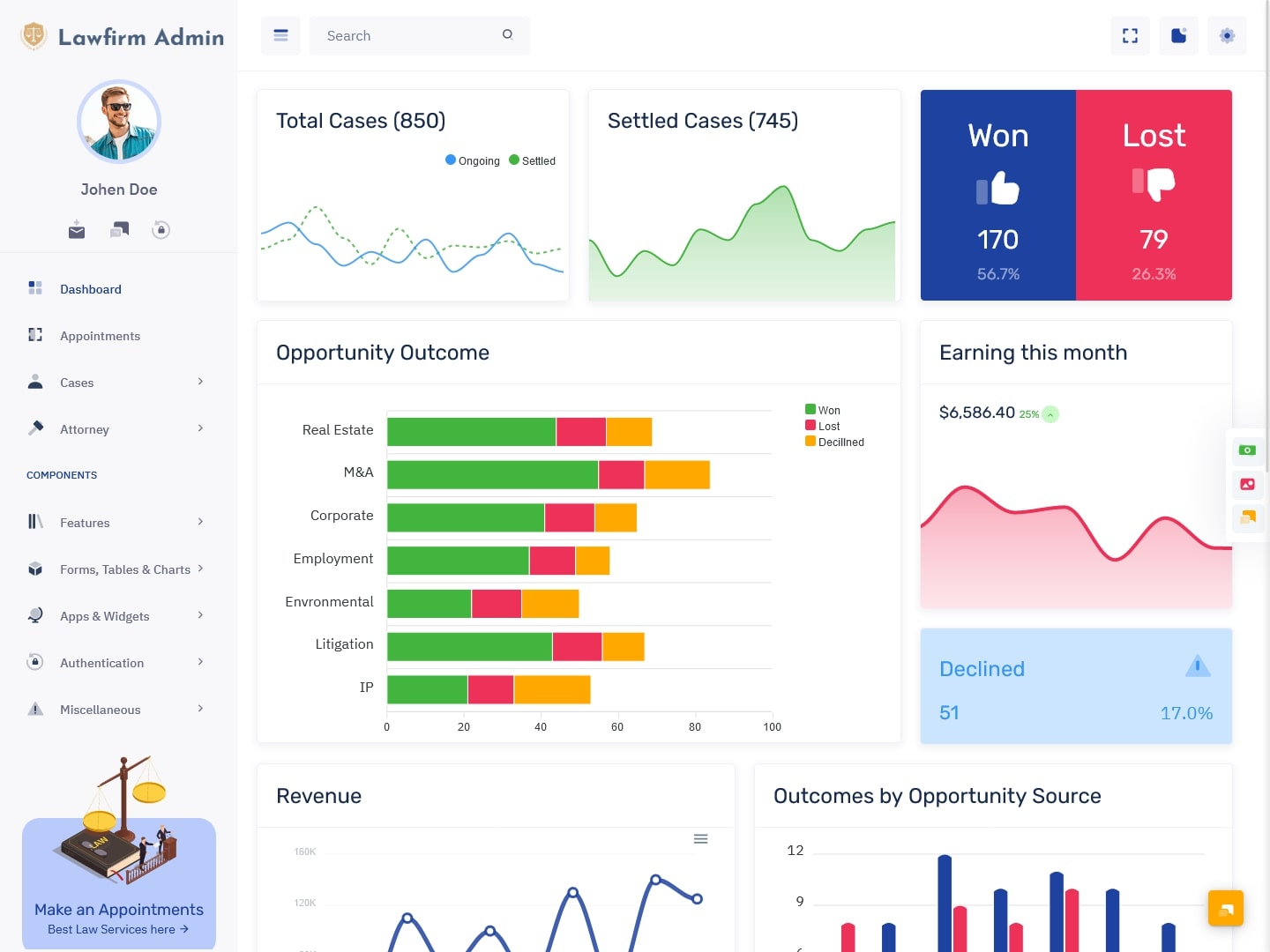
The issue summary enables the users to get a place where they can see all the features associated with an assignment. These could be the title of the case, the case number, the attorney’s name, the kind of service, the current state, and the related tasks. The information could be presented in cards, tables, or detail panels based on the design of the application.
The Legal Case Management Dashboard could provide such a legal matter overview due to the organization of the relevant case information in one place.
4. Task Assignment Panel
The task board helps managers or key team members give work to staff. The work may involve writing a file talking to a client looking over data setting up meetings or checking a site.
5. Appointment and Consultation Calendar
The calendar section can hold appointments. The calendar section can hold meetings. The calendar section can hold consultations. The calendar section can hold follow‑up visits and other planned events. Users can view appointments in the view. An organized calendar will help prevent conflicts and stay organized about what is upcoming.
6. Document Reference Section
Legal teams often work with agreements, notices, forms, identification records, statements and other files. A document reference section can link documents to a client or case. It may show file names, document categories upload dates and the person responsible depending on how the system’s set up.
7. Communication History
A communication history section can keep track of some interactions between the firm and a client. It may include notes from calls, references to emails, summaries of meetings or follow-up records. Keeping these details together helps staff understand what has already been discussed and stop sending repeated or conflicting messages.
8. Matter Status Indicators
Status indicators help users see where a case is now. A firm may use labels such as inquiry, consultation scheduled information needed under review active waiting for client response or closed. These labels should match the firms process. Be easy to understand.
9. Billing Follow-Up View
A Law Firm Admin Panel may have a billing follow-up part for invoices, payment stages, money still. Reminders for billing. This does not need to be an accounting system. Even a clear list of things to do can help staff check which items need attention.
10. Staff and Role Management
Different people need access levels. A staff management feature can show team members, departments what they are responsible for and their account roles. When connected with access settings it can help limit access to parts that are not needed for a persons job.
11. Search, Filters and Sorting
Search and filtering tools help users find information in an office. Staff can search by client name, case number, lawyer, service type, date or status. Sorting options can help in checking the pending tasks or cases assigned to a certain team member.
12. Dashboard Summary Cards
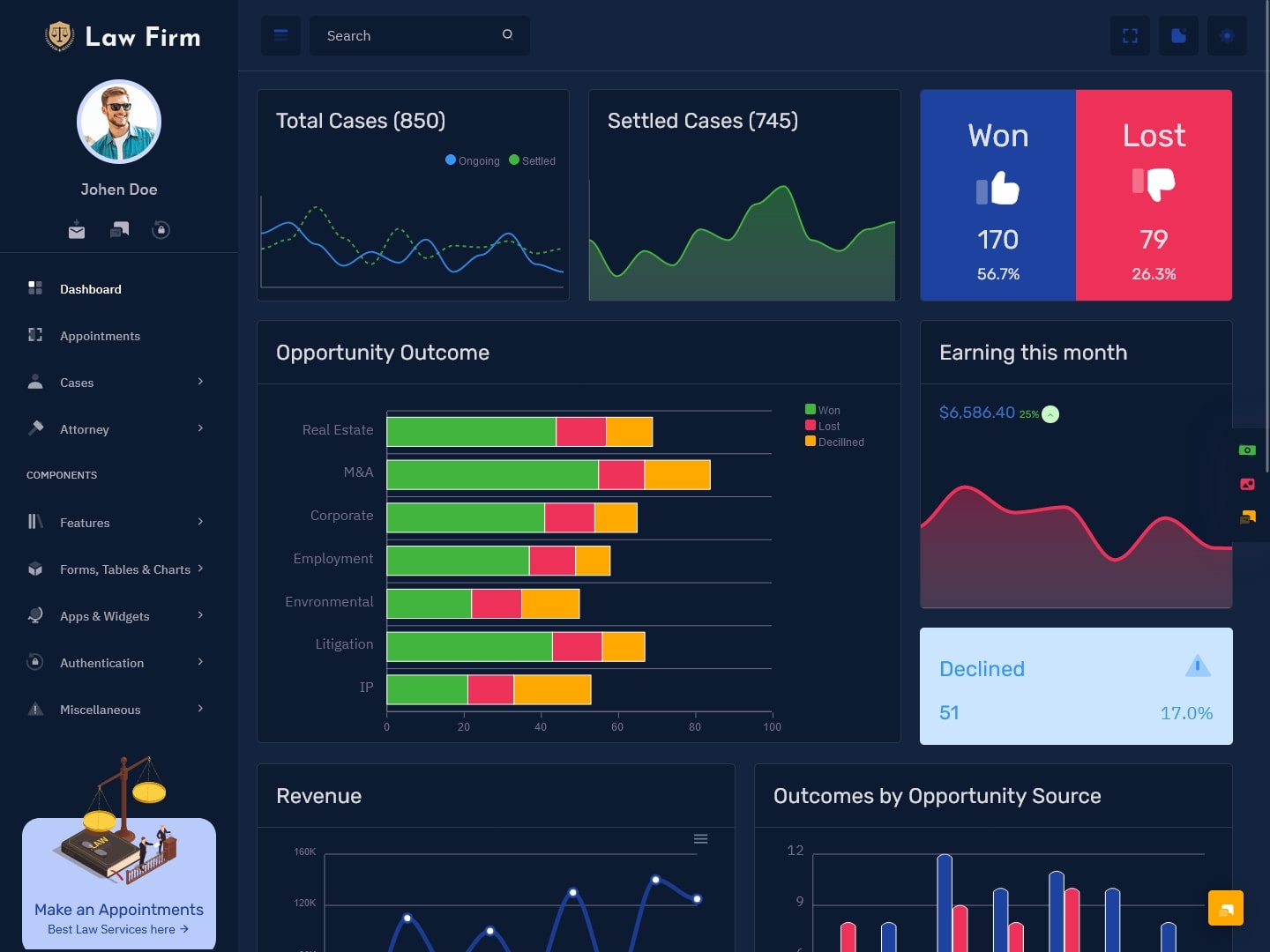
Summary cards can show some office information, such as new inquiries, scheduled meetings, pending tasks, active cases or unresolved follow-ups. These cards should show numbers without filling the screen with many details.
VIEW DEMO BUY NOW
A Different Way to Manage Legal Clients
Client management in a law firm is more than saving contact details. A client may talk to people in the office at different points. One person may get the inquiry another may arrange the meeting. A lawyer may later handle the legal discussion. Without a system the client might have to repeat information times.
A Client Management Dashboard can help make sure there is a transition between these steps. The initial inquiry can be recorded with the client’s contact method and the type of help needed. When a meeting is set up the details can be connected to the profile. If the client later starts a case the firm can continue using the record instead of starting from scratch.
This way of working is helpful for both offices and larger legal companies. In an office one person may handle many administrative jobs. In a different departments may manage intake, documents, billing and client contact. A shared dashboard gives each department the information that’s important to their work.
The dashboard can also help with following up. A client who has not sent a needed document may need a reminder. Another client may be waiting for a meeting date. A third may have asked a question that needs to be passed to the lawyer. These situations are different. The interface should let staff tell them apart.
A good Legal Services Dashboard should focus on the actions, not the records. A profile is useful. It becomes more useful when it shows pending tasks, recent communication, who is handling it and the current stage of the service.
Handling Internal Work Through a Law Firm Admin Panel
A legal office needs people to work together. Even when each person knows their job the overall workflow can be hard to follow when many cases are going on at the time.
A Law Firm Admin Panel can give a shared view. Managers can look at tasks that are not assigned, overdue waiting for information or needing another department. Team members can see what tasks belong to them and what has been done.
The panel can also offer views for different users. A lawyer may need a screen while an office manager may need a broader look at appointments, staff assignments, inquiries and billing follow-ups. A receptionist may only need access, to contacts and scheduling tools.
This way of working makes the dashboard more useful. It stops everyone from seeing the busy screen and lets the screen show what each person needs to do. For people who write code a made Law Firm Dashboard template can give the starting shape for these screens. The design might have menus, tables, cards, forms, calendars, profile pages and parts that change size. These parts can then be adjusted to fit how a particular legal company works and how it looks.
Choosing a Law Firm Dashboard for a Legal Application
The best dashboard design depends on the type of application that is being made. A private law office might need features like taking in clients setting up meetings keeping track of cases and assigning work to staff. A place where people offer help might need tracking questions, types of help profiles of people who offer help and talking with customers. A program that helps with work might need a control area with many different types of people who use it.
Before choosing a design people who write code should explore how the dashboard deals with a lot of information. Legal records can have names, numbers, descriptions and detailed notes. Tables should be easy to read. Important things should not be hidden in ways.
The way people move around the dashboard is also important. Users should be able to go from one client to another from one case to another from tasks to appointments and from documents to things. If each part feels separate the dashboard might be difficult to use even if it has a lot of features.
Changing things is also important. A Law Firm Dashboard should allow people to change colors, logos, labels, menu items, forms and sections with content. A company might want to use its words for stages of a case types of help departments or roles for people who work there.
Being able to work on screen sizes is helpful too. Even though legal teams usually work on computers sometimes they need to check appointments, messages or updates on tablets or smaller screens. A Law Firm Admin Panel that works on any screen can make the way people use it more flexible.
Security needs to be considered during the process of making the application. A front-end design alone does not ensure that private legal information is secure. Things like who can view things ensuring people are who they say they are, back-end systems handling files securely and the right rules for data should be added separately according to the project’s needs.
Benefits of Law Firm Dashboard
1. Better Follow-ups with Clients
Law Firm Dashboard helps people see which clients need a call a reminder about a paper, confirmation of a meeting or an update. Law Firm Dashboard displays all the steps needed in one location so the office can handle communication in a way without relying on personal notes.
2. Better Ways to Give Work to People
Tools for giving tasks show who is in charge of each thing that needs doing. It makes it easier to distribute work based on what people can do and what they’re responsible for. Workers can focus on their jobs while managers can see what is coming up.
3. Organized Legal Requests
New requests can be grouped by the kind of help needed the date the person in charge or the stage they’re in. This provides the company with a way to check requests and decide which need quick attention more details or a meeting.
4. Easier Access to Information About Cases
A place where all the details about a case are connected brings together the information about a client, the things that need to be done dates and documents. Workers can view the background of a case without searching through systems or asking people for the same information.
5. Better View of the Office
A Legal Services Dashboard gives people in charge a way to view appointments, tasks that are not done requests and who is doing what. This view helps them see where things are not going well and manage work with awareness.
6. More Consistent Experience for Clients
When the arrangement of people talk and the steps in a case are organized clients are less likely to get the question over and over. Workers can see what is happening now.
7. Strong Base for Legal Programs
A made Law Firm Dashboard provides parts that can be reused for programs. Developers can change the design for a law office, an advice company, a place for clients to go or a service for help while maintaining the same look.
Conclusion
A Law Firm Dashboard helps organize the things that support work. It can connect requests, profiles, cases, meetings, tasks, messages and things that need to be done through one way to look at everything.
The goal of a dashboard is not to display information. Its primary purpose is to make it easier to see what needs to be done. People should be able to see which client needs attention which task is theirs which meeting is coming up and which case needs an update.
A Client Management Dashboard can help connect the contact with a client to the help that comes after. A Legal Services Dashboard can organize kinds of requests and the work that goes with them. A Law Firm Admin Panel can give managers and workers a shared place to handle work.
For developers a flexible Law Firm Dashboard template can make it easier to build these screens from the start. With the changes controlling who can view what screens that change size and secure back-end parts it can become a base for new legal programs.
Frequently Asked Questions
1. What is the main job of a Law Firm Dashboard?
The main job of a Law Firm Dashboard is to help organize the work that a legal company does. It can aid people in managing clients the details of cases, meetings, jobs for staff, messages and some things about billing. The dashboard helps the team by ensuring that important things are easily found and showing the state of work in a clear way.
2. Can a Law Firm Dashboard handle both clients and legal cases?
Yes a Law Firm Dashboard can be made to handle both clients and cases. A clients page may have contact details and messages while a case might have the person in charge the type of case dates, tasks and documents. Linking these two aids the company in seeing how a client and the help they get are connected.
3. What does a Client Management Dashboard do in a law firm?
A Client Management Dashboard helps a legal office manage the relationship with a client from the question to the steps in service. It may track questions meeting requests, how people want to be contacted what needs to be done and the cases connected to that. This aids workers in checking all the information about a client and makes it less likely that important details are missed when one person leaves and another starts.
4. Is a Legal Services Dashboard good for types of work?
A Legal Services Dashboard can be changed to kinds of legal work including small law offices, legal advice places, bigger legal groups and places that offer legal help. The way it looks depends on the work that is being done. For example a group that gives advice may need ways to track questions and meetings while a bigger group may need ways to assign work and organize teams.
5. Can a Law Firm Admin Panel have access for people?
A Law Firm Admin Panel can have access that is based on what each person needs to do. Different people may gain access based on their job like a lawyer, assistant, worker who helps with cases someone at the desk or a person who deals with money. The design gives the look. The way people see things has to be made safe through the end and security parts of the program.
6. Can developers change a Law Firm Dashboard template?
Yes developers can change a Law Firm Dashboard template to fit how a legal program works. Common changes include making it look like the company, colors, menu items, types of cases fields on forms, columns, in tables.

Related Posts


This Post Has 0 Comments