



The decision-makers within healthcare systems are finding themselves challenged by a new issue nowadays. This…
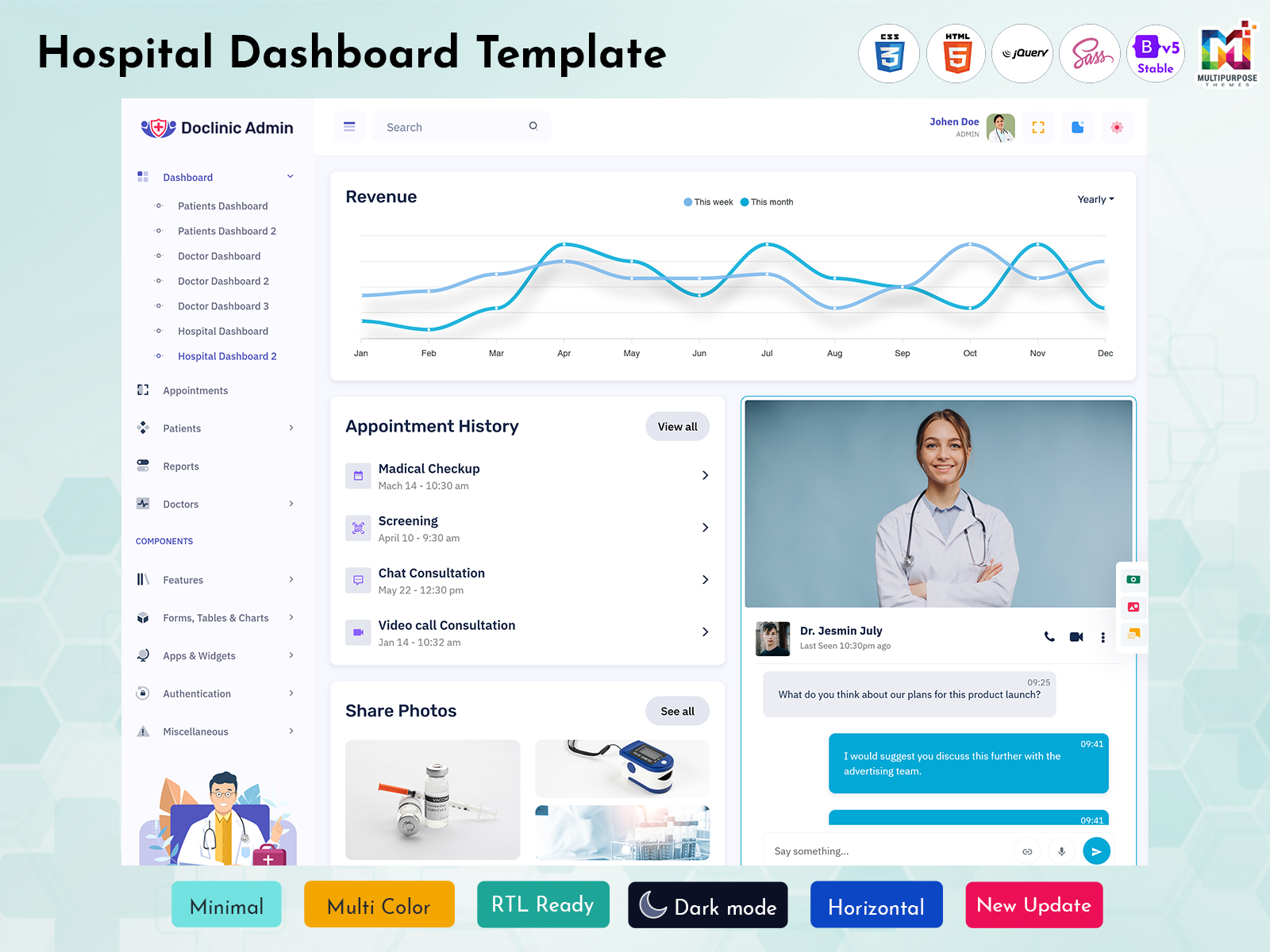
Hospital Dashboard Template: The Smart Way to Manage Modern Healthcare
Reading Time: 9 minutes
Running a hospital is no longer limited to treating patients. Every day, healthcare teams handle appointments, admissions, staff schedules, billing, pharmacy records, laboratory reports, and many other operations and responsibilities . Managing all these activities manually can consume a large amount of valuable time and increase the chance of errors. That’s why many healthcare organizations are choosing this Hospital Dashboard to organize information in one place and make daily management much easier and reliable.
Watch Full Video
An Hospital Dashboard Template helps administrators, doctors, reception teams, and management staff monitor important data through a clean and interactive interface. Instead of checking multiple files or different software systems. users can view everything from a single dashboard. This improves communication, speeds up decision-making, and supports better patient services.
Whether you are developing a healthcare management system or looking for a professional Hospital Admin Dashboard, choosing the right Hospital Admin Template can simplify complex workflows. A well-designed Medical Dashboard also gives healthcare providers a clear overview of hospital performance while saving time and reducing manual effort.
What is a Hospital Dashboard?
A Hospital dashboard is a virtual interface that brings together important information of the hospital at one organized location. It shows real-time data like admission list of patients, availability of doctors, total revenue, total inventory of pharmacy, regular laboratory updates, and access to everything they require from one screen.
An advanced medical dashboard replaces complex hospital data into easy-to-read charts, tables, cards, and graphs. This visual presentation allows doctors, administrators, and managers to understand hospital performance quickly without spending time analyzing lengthy reports. As a result, daily operations become smoother and more efficient.
Businesses developing healthcare software often choose a customizable hospital dashboard template because it provides a professional layout that can be adapted to different hospital sizes. No matter if it is a clinic, diagnostic center, specialty hospital, or multi-location healthcare organization.This dashboard helps users to manage information accurately while increasing overall productivity of the hospital.
How Hospital Dashboard Works
A Hospital dashboard works by collecting healthcare-related information from different departments and presenting it through a centralized management system.data form patient records, appointment systems, billing software, management of pharmacy and laboratory departments can be shown at one place. This allows hospital staff to analyse main activities without switching between multiple software or platforms.
The dashboard processes collected information and converts it into understandable visuals such as graphs, reports, progress indicators, and statistics. For example, administrators can quickly check the number of admitted patients, available doctors, pending appointments, or daily revenue through the Hospital Admin Dashboard. This makes it easier to identify problems and take quick action.
A well-built Medical Admin system also helps different users access information according to their roles. Doctors may focus on patient-related details, while administrators can review operational reports and financial performance. With proper permissions and organized navigation, a Hospital Admin Template creates a secure environment where every team member can work more effectively.
A professional Product Dashboard Template approach is often used while designing healthcare dashboards because it focuses on user experience, simple navigation, and clear data presentation. This helps healthcare professionals understand important information quickly, even if they are not highly technical users.
How Hospital Dashboards Improve Patient Care and Operational Efficiency
Healthcare quality depends on immediate decisions, real information and easy coordination between departments. This hospital dashboard increases patient care by giving medical teams instant access to important information. Doctors and staff can track patient visits, treatment progress, appointment schedules and medical updates without any unnecessary delays.
When patient information is organized properly, it helps hospitals reduce waiting times and increase quality of the services. Like , reception teams can manage appointments more efficiently, while doctors can prepare better for consultations by reviewing available patient information. This creates a more convenient experience for both healthcare providers and patients.
From an operational perspective, a Hospital dashboard helps hospital managers understand how different departments are performing. They can monitor staff workload, resource usage, financial activities, and inventory levels. A reliable Hospital Admin Dashboard allows decision-makers to find areas that require improvement and create better strategies for daily operations.
A healthcare organization using a structured Medical Dashboard can also reduce paperwork and manual reporting tasks. Employees spend less time preparing reports and more time focusing on important responsibilities. This combination of better visibility and improved workflow helps hospitals deliver faster and more reliable healthcare services.
Features of Hospital Dashboard
1. Patient Management System
A Hospital Dashboard includes patient management features that help staff maintain and review patient information easily. Users can track registrations, medical histories, appointments, and treatment details from one place. This feature reduces manual record handling and allows healthcare teams to provide more organized and personalized patient services.
2. Appointment Scheduling Management
This feature Appointment management helps hospitals to organize doctor schedules and patient visits effectively. With this hospital dashboard template. admin can view upcoming appointments, manage available time slots, and avoid scheduling complexity. This increases coordination between patients, doctors and reception teams while creating a smoother healthcare experience.
3. Real-Time Analytics and Reports
Analytics features allow hospital administrators to understand performance through visual reports and data summaries.a medical dashboard shows essential information using charts and graphs, It makes complex data easier to understand . These monitor reports help management teams make informed decisions related to patient care, resources, and overall hospital growth.
4. Doctor and Staff Management
Managing healthcare professionals becomes easier with organized staff management tools. The dashboard allows administrators to monitor doctor availability, department assignments, and employee information. A professional Hospital Admin Template helps create a structured workflow where staff members can access the right information and complete their responsibilities efficiently.
5. Billing and Payment Tracking
Financial management is an important part of healthcare operations. A dashboard can display billing details, payment records, invoices, and revenue information in a simple format. This feature helps administrators maintain accurate financial records and reduces mistakes that may occur during manual billing processes.
6. Pharmacy and Inventory Monitoring
Hospitals need proper inventory control to avoid shortages of essential supplies and medicines. A Hospital Admin Dashboard helps monitor stock levels, available medicines, and purchase requirements. This allows teams to maintain necessary resources and improve the efficiency of pharmacy and supply management.
7. Secure User Access Control
Security is essential when managing healthcare information. A reliable dashboard provides user-based access options so different employees can view information according to their roles. A well-designed Medical Admin system ensures sensitive patient data remains protected while allowing authorized users to complete their tasks smoothly.
Hospital Dashboard vs Traditional Reporting: Which Is Better for Modern Healthcare?
Traditional reporting methods commonly depend on spreadsheets, paperwork, and manually prepared documents. While these methods can offers information, they often require more time and effort. Healthcare managers may need to collect data from different departments before understanding the actual situation of the organization.A Hospital Dashboard provides a faster and more efficient approach by displaying updated information in real time. Instead of reviewing multiple reports, administrators can check important metrics through a single interface. This helps hospitals respond quickly to challenges such as increased patient demand, resource shortages, or scheduling issues.
Traditional reports are useful for detailed analysis, but they may not offer instant visibility. this hospital dashboard focuses on accessibility and quick understanding. Through interactive charts and organized sections, healthcare teams can identify patterns and make better and instant decisions without depending completely on technical experts.For advanced healthcare organizations, combining reporting systems with a professional Product Dashboard Template approach creates a stronger management solution. Dashboards offers speed, clarity, and convenience, while detailed reports continue supporting deeper analysis when needed.
Overall, hospitals that want better efficiency and improved decision-making can benefit significantly from using this hospital dashboard system instead of relying only on traditional reporting methods.
Benefits of Hospital Dashboard
1. Faster Decision Making
A Hospital Dashboard provides important information in a clear visual format, helping managers make decisions quickly. Instead of waiting for manual reports, administrators can instantly review hospital performance, patient numbers, and operational updates. This saves time and allows healthcare teams to respond faster to changing situations.
2. Improved Patient Experience
A dashboard helps hospitals create a smoother patient journey by improving appointment handling, communication, and service coordination. Staff members can access necessary details quickly, reducing unnecessary waiting periods. Better organization allows healthcare providers to focus more on patient needs and deliver a more comfortable experience.
3. Better Resource Management
Hospitals manage many resources, including doctors, equipment, medicines, and staff members. A Medical Dashboard provides better visibility into resource usage and availability. Administrators can identify shortages, improve planning, and ensure that hospital resources are used properly without unnecessary waste.
4. Reduced Administrative Work
Manual paperwork and repeated data entry can slow down healthcare operations. A dashboard automates many reporting and monitoring tasks, reducing the workload for administrative teams. With a structured Hospital Admin Dashboard, employees can complete daily activities more efficiently and spend more time on important healthcare responsibilities.
5. Accurate Data Monitoring
Accurate information is necessary for effective hospital management. Dashboards collect and display updated data from different departments, reducing confusion caused by outdated records. Healthcare managers can rely on organized information to evaluate performance, track progress, and create better operational strategies.
6. Enhanced Team Collaboration
Different hospital departments need to work together for better patient outcomes. A centralized dashboard improves communication by allowing teams to access shared information. Doctors, administrators, and support staff can coordinate activities more effectively, creating a connected workflow across the entire healthcare organization.
7. Scalable Healthcare Management
As hospitals grow, managing increasing amounts of information becomes challenging. A flexible Hospital Admin Template allows organizations to expand their systems according to future needs. Whether adding new departments or managing more users, dashboards provide a scalable solution for long-term healthcare management.
Conclusion
The healthcare industry is becoming more technology-driven and managing hospital operations efficiently has become more important than ever. A hospital dashboard offers a practical solution for organizing information of patients, analytics of daily activities, and improving communication between various departments. By bringing necessary data together at one place. It also helps healthcare professionals save time and make better decisions.
A well-designed hospital dashboard template is not only for large hospitals. This dashboard is also made for the clinics, medical centers and healthcare startups. It has simple way to manage appointments, staff details, patient records,financial activities, and operational reports through a single platform. This improves accuracy and creates a more organized working environment.
For businesses developing healthcare software solutions, choosing a professional Hospital Admin Template can help create a powerful and user-friendly system. A modern Medical Dashboard design focuses on easy navigation, clear information display, and better user experience. These features allow healthcare teams to manage their responsibilities without dealing with complicated processes.
As healthcare demands continue to increase, digital management tools will play a main role in the process of improving service quality. A reliable Medical Admin system helps organizations to build efficient workflows, and reduce manual tasks. it also provide better patient support. Investing in a smart dashboard solution is a step toward creating a faster, more connected, and more effective healthcare environment.
Frequently Asked Questions (FAQ)
1. What is a Hospital Dashboard?
A MultiPurpose Themes Hospital Dashboard is a virtual management tool that shows essential healthcare information in an organized format. It helps hospitals analytic patient records, appointments, staff activities, billing information, inventory details, and operational performance from a single place. Instead of checking multiple files or softwares, users can view necessary updates with the help of charts, reports, and data summaries. This dashboard increases visibility which can help healthcare professionals manage daily activities more efficiently while supporting better decision-making.
2. How does a Hospital Dashboard work?
A Hospital Dashboard works by collecting information from different healthcare departments and presenting it through a centralized platform. Data from patient management systems, appointment software, billing platforms, pharmacy records, and laboratory systems can be shown together. The dashboard organizes all this information into easy-to-understand visuals like graphs, tables, and statistics. This allows administrators and healthcare staff to monitor important updates, identify problems, and take instant actions without spending extra time preparing manual reports.
3. Can clinic owners use a Hospital Dashboard?
Yes, clinic owners can use a Hospital Dashboard to manage their daily tasks more effectively. Small clinics often handle multiple tasks like patient appointments, doctor schedules, billing, and records of medical . This dashboard helps organize all these activities at one place and provides better control over daily workflows. Even smaller healthcare businesses can benefit from this customized Medical Dashboard because it helps reduce manual paperwork, improve efficiency, and provide a better experience for both staff and patients.
4. Is a Hospital Dashboard easy to use?
A professionally created MultiPurpose Themes Hospital Admin Dashboard is made with user-friendly layouts and simple navigation. Healthcare employees do not have technical backgrounds, so dashboards are designed to make information easy to understand. Features like organized menus, visual reports, and clear sections which help users complete tasks quickly. With basic training, most hospital staff members can easily learn how to use a dashboard for managing appointments, patient information, reports, and other important activities.
5. Can a Hospital Dashboard improve hospital management?
Yes, a MultiPurpose Themes Hospital Dashboard Template can improve hospital management by providing better control over different operations. Administrators can track performance, monitor resources, manage staff activities, and review important reports without depending on manual processes. This creates better coordination between departments and helps management teams identify areas where improvements are needed. A dashboard supports smarter planning by providing accurate information that helps hospitals operate more effectively.
6. Is a Hospital Dashboard suitable for future healthcare growth?
A MultiPurpose Themes hospital admin template with flexible features can support future healthcare growth by allowing organizations to expand their management systems easily. As hospitals add more departments, employees and services, a scalable dashboard can handle improving amounts of information. It also provides a foundation for better digital management and helps healthcare organizations adapt to changing requirements. By using a modern dashboard solution, hospitals can prepare themselves for future operational challenges and improved patient service expectations.

Related Posts



This Post Has 0 Comments