

What is a Hospital Dashboard? A Hospital Dashboard is a digital interface designed to give…
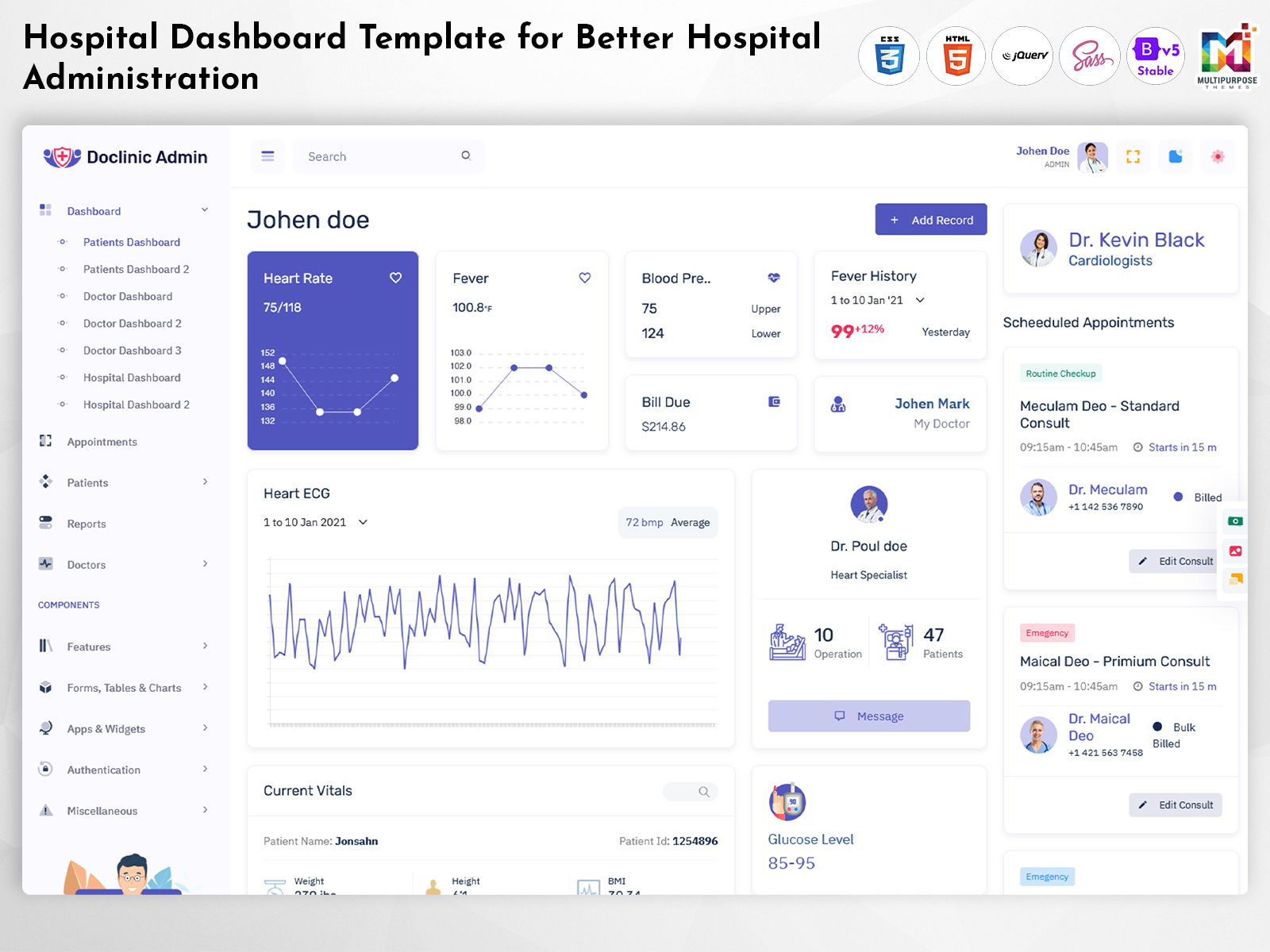
Hospital Dashboard: A Perspective on Modern Hospital Administration
Reading Time: 11 minutes
Running a hospital is a job. It includes all the tasks that need to be done. It also includes talking with different groups of people. It involves handling all the requests that come in. It means keeping an eye on important information. All of this is needed so everything works properly. The management and execution of such processes via systems might become overwhelming with a lack of a well-structured dashboard.
Watch Full Video
A Hospital Dashboard is a concept of streamlining processes and displaying relevant data pertaining to the operations of a hospital in a structured manner. Of juggling many screens and data administrators and users can rely on a single interface that gives them the needed information and allows them to move easily through their departments.
A dashboard is more, than a pile of charts and numbers.
A dashboard that is well designed helps a department run its tasks smoothly. A dashboard should be intuitively accessible to a receptionist, manager, an administrator, and a medical professional. The design, scope, and functionalities of the dashboard should be decided with a perspective of user-friendly interactions, the volume of information to be displayed, and the range of features and permissions.
A Hospital Dashboard Template could be the perfect solution to the requirement of a structured yet customizable interface for hospital administration. Such a solution arms an organization with a ready-made design, easily modifiable components, and a series of screens to simplify the creation of a multi-purpose dashboard for a hospital or medical organization.
This article aims to illustrate the perspective of a Hospital Dashboard on the organization of processes, departments, and the overall ease of use and interaction that it brings to the hospital or the medical institution. It is important to note that this concept of a dashboard does not replace an array of integrated systems, considerations for professionals, and security and safety measures.
What Is a Hospital Dashboard?
A Hospital Dashboard is an interface that displays relevant data and information about the processes related to the functioning of a hospital. It could consolidate the management and execution of processes in a single screen accessible to authorized users.
A dashboard does not have a universal feature set, as the requirements for a small-scale organization would differ from those of an extensive network of affiliated organizations. A dashboard for the former might involve a few specialized sections, while the latter might require a series of subsections, departments, personnel, facilities, financial and executive services, and reports. A dashboard should be designed with the user’s perspective and should encompass all the necessary tools and not overload users with irrelevant information and excessive functions.
An admin dashboard is typically a central tool that consolidates the management functions and tasks of executives and other authorized users. The sections and tools included in such an interface are determined by the organization’s requirements and might involve a menu bar, summaries, task lists, departmental sections, notifications, user insights, tools, and management functions and reports. The primary objective of the tools and sections is to assist users and ensure that they receive the relevant data and have access to the functions without extraneous clutter.
A Hospital Dashboard Template typically provides a designer with a ready framework and sections that offer a perspective of an interface. An organization and designers could customize the layout, components, and logic to fulfill the specific requirements and determine the appropriate functions and screens. Ideally, a dashboard should not be a single-purpose tool but should encompass an array of tools and functions relevant to the users’ departments.
The value of a Hospital Dashboard is hard to overestimate. It gives people who use it a way to move through important tools and information. At the time the success of a Hospital Dashboard is not guaranteed. It depends on things. These things include how accurate the data is. They also include whether people can get access to the dashboard. They also include how fast it works and how well it performs. They also include how it looks and how it is built technically.

VIEW DEMO BUY NOW
Hospital Dashboard Designed Around the Workflows of Hospitals
A hospital is a -faceted system that involves many roles many departments and many processes, within a hospital. The management and execution of these operations could be overwhelming for an authorized user when utilizing disparate screens for different functions.
In this regard, a dashboard could be designed with a perspective of user roles and locations, departments, functions, and other considerations. A dashboard should not force users to browse through irrelevant data and functions. A dashboard could include a primary screen that would grant immediate access to the relevant functions and processes while relegating other tools and data to lower-level submenus and secondary screens.
For example, if a role is identified and distinguished as a manager, the location of the departments and the list of functions will differ for a worker. In turn, the sections and tools will be organized to streamline the processes for the selected role. The organization of a dashboard is not necessarily a requirement for separate applications but could be applied to separate screens, submenus, and functions. The separation will ensure that a user has instant access to the tools relevant to their role while navigating through the processes performed by other departments.
The organization of a dashboard should also be adjusted to account for the requirements of each role. Tools and data relevant to the processes performed would need to be prioritized. For example, an executive would be more interested in the progress of a task, and the status of the task should be more prominent than news or task descriptions. The implementation of appropriate labels, time frames, sorting mechanisms, and other tools would be vital.
Another important consideration is the possibility of collaboration between the users and the processes occurring inside the dashboard. Hospitals are places that require a lot of skills. In hospitals teamwork between departments and units happens all the time. Therefore a dashboard must show at a glance the status of a collaboration request, the current work and the history of talks. This information must be easy to find and use for people who have the permissions. The collaboration tools and data would involve history, notes, and actions completed or requested by any party involved. The data should be available in a structured manner, but designing such a feature would require adherence to security and safety considerations of a hospital and permission settings.
A Hospital Dashboard Template could be utilized to implement the necessary tools and functions around the processes performed in a hospital. A designer or developer should consider the required layout, tools, and screens to build a dashboard around the data and functions required for the processes performed in a hospital.

VIEW DEMO BUY NOW
Features of a Hospital Dashboard
1. Organized Management View
A Hospital Dashboard could utilize the initial screen to provide a user with convenient access to essential data. The data and functions will be organized around the user’s role, department, and other considerations. Instead of viewing a series of statistics and data, a user would be able to navigate through the functions and data relevant to their department and processes performed.
2. Department-Based Navigation
A hospital has departments and units each doing different kinds of work. Because of this a dashboard must be organized to match the needs of each department. The data and tools that matter most to each unit should be easy to find. This means using a menu or a navigation bar so that staff can quickly access the sections, tables and other tools they need. The layout should support the way each team works. The organization of the dashboard should be flexible to the specifications of a hospital and the user’s preferences.
3. Role-Based Access
The tools and data available within a dashboard should be adjusted to the user’s role within the system. A user should only be able to access the functions and data relevant to their processes and the data available to them. In turn, an application utilizing a role-based access would ensure data safety and security while providing a more intuitive experience for the users.
4. Task and Status Tracking
Management functions and tools should be implemented with an emphasis on the processes and statuses of the functions performed. Tools such as lists, tables and labels must be put in place so that users can see the tasks available, the tasks statuses and the tasks relevant details. The functions performed should also be arranged in a way that’s convenient, for navigation and interaction.
5. Search and Filtering
As the number of functions and data increases, a search feature and filtering options will become a crucial aspect of a dashboard. A person should be able to move through the data and the tools by using tags, categories and other choices. A dashboard should give people choices but also be simple to use so that there is not too much effort needed to find the information or the tool that someone wants to see.
6. Flexible Screen Layout
The implementation of a dashboard will require a series of tools, functions, and data to be displayed. As such, a screen should be designed in a manner that is convenient for the majority of users. In terms of a hospital dashboard, a responsive layout would be necessary to accommodate the users and their considerations. The tools and layout should also be intuitive to avoid cognitive load and ensure seamless navigation.
7. Reusable and Customizable Components
Components such as cards, tables, forms, menus, and status indicators could be implemented to provide a consistent look and feel for a dashboard. An application would provide a designer with a series of readily available components that could be modified or edited to suit the requirements of the application. The use of components would also ensure consistency and reliability of an application.
Designing the Dashboard with Appropriate Departmental and User Considerations
The value of a dashboard is difficult to underestimate as it provides a user with a consistent interface to access the data and functions of an application. However, an application should be optimized and adjusted to the specificities of a dashboard and the users’ requirements and considerations.
A primary consideration for a dashboard in a hospital setting would involve the distribution and identification of functions performed by different departments. The functions of a department should be prioritized, with the location of the relevant tools and data being consistent with the users’ demands. A dashboard should avoid unnecessary navigation to access essential tools and functions performed by the user.
A similar consideration should be implemented with regards to the roles a user has been provided. The functions and data available to a user should be distributed in a manner that prioritizes the processes performed while eliminating the risk of exposing the user to data and functions that they are not authorized to view. Such a consideration will ensure data safety and security while providing a more intuitive interface for the users.
A dashboard should provide a user with a consistent interface when viewed on different devices. A responsive layout should be utilized to ensure that the tools and data are not cramped or difficult to access on a smartphone and remain appropriately displayed on a desktop computer. The implementation of a responsive layout is only one of the considerations for the developers as the tools and layout should also be intuitive to ensure consistent performance across different platforms.
A dashboard should provide sufficient functions and tools for the users to perform their processes and manage the data. As such, tools such as tables, lists, and status indicators should be utilized to ensure that the data is available in an organized manner. The data and functions should also be labeled consistently to avoid the cognitive load required to determine the purpose of a button or tool.
A dashboard should utilize components and design principles that allow developers to customize the interface according to the requirements of the application. The use of ready-made components would allow developers to create a dashboard that would be appropriate for the users and the functions performed. A hospital dashboard would benefit from the use of different components as a single component would be beneficial for the processes performed by one department while being inadequate for another.
A hospital would be a good candidate for a dashboard application due to the number of different functions and data relevant to different departments. An organization should be able to distribute the tools and functions performed in a manner that is consistent with the requirements of the departments while providing a seamless interface for the users to access the functions and data. A dashboard should also be designed around the processes and functions a role is responsible for, and the data available to it. Such considerations will ensure that the experience a user receives is consistent and not overwhelming.
A dashboard should also identify relevant functions and tools for the user to access and manage. The consistent utilization of data labels, statuses, and other tools would ensure that the data is easy to interpret and accessible. A dashboard application should also provide a consistent experience across different users and departments. The consistency of the application would reduce the cognitive load and would provide users with intuitive tools and data to access.
A dashboard should also consider future expansions and additions to the application. The expansion of departments and the addition of new tools would require additional functions and data. The use of a module-based approach would be appropriate when designing a dashboard application. New sections, tools, and functions should be added with due consideration for the integrity of the data, as well as other factors.
Hospital Dashboard Templates and Services by Multipurpose Themes
Multipurpose Themes offers dashboard and admin template services for businesses, including medical facilities. The collection of medical templates accommodates a variety of hospital, doctor, and patient-related dashboard needs and provides design options that are customizable to the requirements of the application. The available options of Hospital Admin Templates allow designers to use a ready-made layout, responsiveness, and visual elements to build a dashboard for a hospital or a medical organization. The selection of a template would be dependent on the requirements, functions, data, and other considerations of the application, as well as the available development solutions.
Conclusion
A Hospital Dashboard is a valuable concept that revolves around the requirements and considerations of hospital administration. A dashboard is not only a display of data but also a convenient tool that assists users in locating relevant functions and data with greater ease. A dashboard streamlines the processes performed by different departments, ensuring that the tools and data are readily available. It also identifies different roles and facilitates the management and execution of processes for each department and role by providing a consistent interface.
A Hospital Dashboard Template is a valuable tool that a team of designers and developers could utilize to build a functional and aesthetically pleasing dashboard application. However, the implementation of a dashboard would require additional considerations, such as the functions and data that should be available for different roles and departments. The template should also be easily customizable to the requirements of the application. The creation of a dashboard application that is convenient for users and not overwhelming is of paramount importance. The implementation of a series of non-essential visual effects and tools would detract from the primary purpose of a dashboard, which is to provide a consistent and intuitive interface.
VIEW DEMO BUY NOW
Frequently Asked Questions
1. What Is the Main Purpose of a Hospital Dashboard?
The primary purpose of a Multipurpose Themes Hospital Dashboard is to consolidate data and processes related to a hospital in a single interface. It could provide authorized users with convenient access to departments, tools, and data. The functions of a dashboard would depend on the requirements of a hospital.
2. Is a Hospital Dashboard Template Suitable for Clinics?
A Hospital Dashboard Template could be utilized for a clinic, depending on the requirements of a facility. A dashboard would be scaled accordingly, providing less cluttered interface and fewer tools. An organization should thoroughly consider the available options to choose a layout and design that would be appropriate for the application.
3. Can a Hospital Admin Dashboard Be Customized for Departments?
A Multipurpose Themes Hospital Admin Dashboard could be customized for departments, depending on the availability of such features in a selected dashboard template and development solution. An organization should ensure that the navigation, labels, tools, and data are redistributed conveniently for each department. The customization of a dashboard would be dependent on the functions performed and the data available for each department. Tools and data should be prioritized and distributed according to the needs of each department to avoid cognitive overload and ensure seamless navigation.
4. Does a Hospital Admin Template Include Hospital Management Software?
A Hospital Admin Template typically includes an interface and design for a dashboard, which is typically not a single-purpose application. Functions such as authentication, database management, business logic, integrations, security, and other tools would need to be provided by a development team. An organization should carefully consider the available functions to ensure that the selected solution would fulfill the requirements.
5. What Should Businesses Consider Before Purchasing a Hospital Dashboard Template?
A business should consider the behavior, page structure, components availability, customization, browser compatibility, documentation, and other factors before purchasing a Hospital Dashboard Template. An organization should ensure that the solution would be convenient for the users, available on the target platforms, and compatible with the development environment. It is also recommended to verify the ability to customize the template, as it should be flexible enough to accommodate the functions and data required for the application.
6. Can a Hospital Dashboard Be Utilized on Tablets?
A Multipurpose Themes Hospital Dashboard could be designed with responsiveness in mind to accommodate the target platforms. However, a responsive design will not be a guarantee of convenient utilization on a tablet. An organization should ensure that tables, data, forms, menus, navigation, and other tools would be easy to utilize on a mobile device.
7. How Can a Hospital Admin Dashboard Facilitate the Workflow of a Hospital?
A Hospital Admin Dashboard could be utilized to organize the tasks and statuses of the processes for each department. It would simplify the management of functions and tasks by providing convenient navigation on a single interface. The implementation of such a dashboard would depend on an array of factors, including the availability of data, appropriate permissions, and other considerations.

Related Posts


This Post Has 0 Comments