

What is a Law Firm Dashboard? A Law Firm Dashboard is a centralized digital interface…
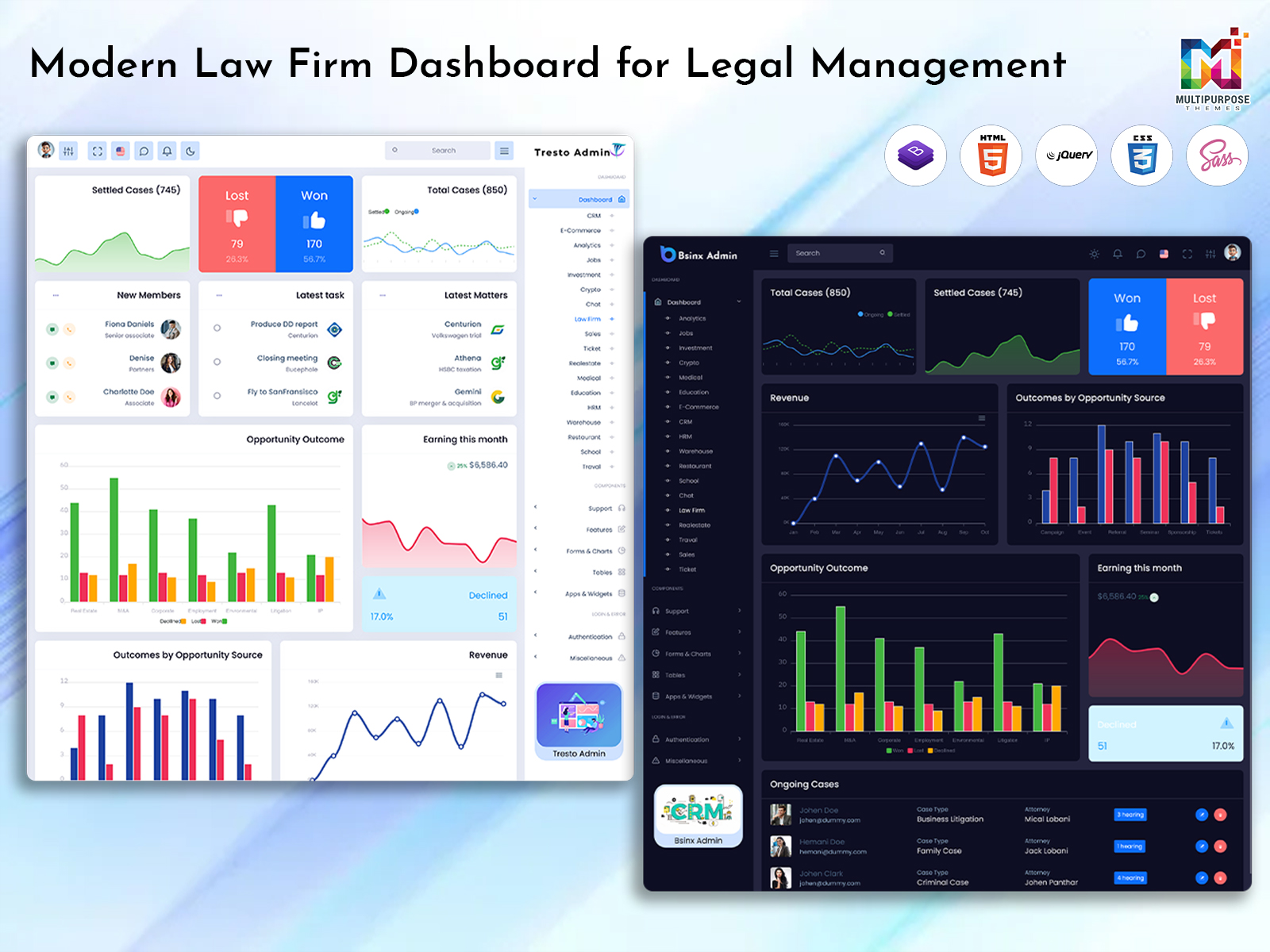
Modern Law Firm Dashboard for Legal Teams
Reading Time: 8 minutes
What is a Law Firm Dashboard?
A Law Firm Dashboard is a centralized administrative interface designed to help legal professionals keep important practice-related information organized. A law firm handles many activities every day, including client communication, case follow-ups, appointments, document-related work, billing, legal tasks, and team coordination. When these responsibilities are managed through separate records and applications, finding the right information can take valuable time.
A dashboard brings selected information into a structured workspace where lawyers, managers, and authorized staff can review relevant activities more conveniently. Instead of opening several unrelated sections to understand what requires attention, users can start from one interface and move toward the details they need. This makes a Law Firm Dashboard useful for routine administrative monitoring.
A Law Firm Admin Panel can also provide different sections for different responsibilities. A senior professional may need a broader view of cases and firm activity, while an administrative employee may primarily work with appointments, client records, or billing information. A well-organized interface can make information easier to access according to the user’s role.
Legal work also involves many deadlines and ongoing matters. A case may remain active for weeks, months, or even longer, with new information being added along the way. A Legal Management Dashboard can give teams a convenient way to maintain awareness of ongoing activities without depending entirely on manually maintained lists.
A Legal Case Management Dashboard takes this concept further by focusing on information connected with individual cases. It can provide a structured view of case-related details, current status, assigned professionals, upcoming activities, and other relevant records. This can be particularly useful for firms handling a large number of matters at the same time.
The value of a law firm dashboard is not limited to displaying information. Its main purpose is to make everyday legal administration more organized. When important details are easier to locate, teams can spend less time searching for information and more time concentrating on legal work and client requirements.
Ready-made dashboard templates can be useful for firms and organizations looking for a professional administrative interface. Instead of beginning with an empty design, a prepared dashboard can offer an established structure with sections suitable for legal management. This can make it easier to create a consistent working environment.
Whether used by a small practice, a growing legal firm, or a larger organization with several departments, a Law Firm Dashboard can provide a practical overview of day-to-day activities. Its usefulness ultimately depends on how well its interface matches the firm’s workflow and the information its team regularly needs.
Watch Full Video
Features of Law Firm Dashboard
1. Case Overview
A Law Firm Dashboard can provide a centralized view of active and completed legal matters. Users can review selected case information without opening every individual record. This gives legal teams a convenient starting point for understanding their current workload and identifying matters that may require closer attention.
2. Client Information
Client details are an important part of legal practice management. A dashboard can provide a dedicated area where authorized users can review relevant client information alongside other practice activities. Keeping these details organized can make communication and administrative follow-up more convenient for the firm’s team.
3. Case Status Tracking
Legal matters can move through several stages during their lifecycle. A dashboard can display case status in a simple and understandable manner, helping users distinguish between different types of ongoing work. This can give lawyers and administrators a clearer picture of their current case workload.
4. Appointment Management
Meetings, consultations, and other appointments form an important part of legal practice. A dashboard can provide convenient access to scheduled activities, helping users understand upcoming commitments. Having appointment-related information visible within the administrative workspace can make daily scheduling easier to follow.
5. Task Monitoring
Legal teams often handle several tasks alongside their main case responsibilities. A dashboard can provide a dedicated view of assigned work, allowing users to understand which activities are pending, ongoing, or completed. This can make it easier for managers and team members to maintain an organized working routine.
6. Billing Information
Law firms may need to monitor invoices, payments, and other financial records as part of their administration. A dashboard can summarize selected billing information in an accessible format. This allows authorized users to review financial activity without making the entire administrative process dependent on lengthy or disconnected reports.
7. Team Activity View
Legal practices often involve multiple lawyers, assistants, and administrative employees. A dashboard can provide a broader view of team-related activity, helping managers understand how work is distributed. This can support better coordination and make it easier to recognize areas where workload or responsibilities may need review.

VIEW DEMO BUY NOW
How a Law Firm Dashboard Helps Organize Legal Practice
Legal practice involves a constant flow of information. New clients arrive, existing matters progress, appointments are scheduled, documents are reviewed, and deadlines continue to move forward. When a firm handles several matters simultaneously, even experienced teams can find it difficult to maintain a complete view of every administrative responsibility. A Law Firm Dashboard can provide a more structured environment for handling this complexity.
One of the biggest advantages is the ability to begin daily work from a centralized view. A lawyer or manager may want to know which cases are currently active, what appointments are coming up, or which tasks are still pending. Instead of searching through multiple systems, the dashboard can provide a convenient overview and direct users toward the relevant information.
A Legal Management Dashboard can be particularly useful for firms that want to look beyond individual cases. While lawyers naturally focus on the details of their legal matters, managers may also need to understand broader practice activity. Information about workloads, client activity, appointments, and administrative responsibilities can help create a wider picture of how the firm is operating.
A Legal Case Management Dashboard provides a more focused perspective. When a firm has many active matters, it can become difficult to remember the current position of each one. A structured case view allows authorized users to identify relevant matters and move into their details when required. This can make routine case monitoring more manageable.
Client communication is another area where organization matters. A firm may work with clients at different stages of their legal matters, and each client may have different requirements. Having client information arranged within a consistent administrative environment can make it easier for staff to locate relevant details before handling a follow-up or appointment.
The dashboard can also support internal coordination. A legal matter may involve more than one professional or administrative employee. When responsibilities are clearly represented within the interface, team members can better understand their assigned work. Managers can also use the available information when reviewing how tasks are distributed across the firm.
Another useful area is workload awareness. A lawyer may have several active matters while another team member may have fewer immediate responsibilities. A dashboard can provide a visual overview that helps managers recognize such differences. This does not replace professional judgment, but it gives management a clearer reference when coordinating work.
For firms handling regular appointments, a dashboard can also make scheduling information easier to review. Client consultations, internal meetings, and other commitments can be placed within a broader administrative context. This can reduce the need to depend on separate lists when checking the day’s activities.
Ready-made Law Firm Dashboard interfaces can be useful for organizations looking for a professional workspace without starting from a blank administrative layout. They provide a prepared visual structure that can be adapted to the firm’s intended use and can offer a more consistent experience for people working with legal information.
The real benefit is therefore organization rather than simply presentation. A dashboard cannot replace legal expertise or professional decision-making. What it can do is provide a clearer administrative environment where relevant information is easier to find, review, and manage.
As a firm grows, this becomes increasingly important. More clients and cases naturally create more information. A well-structured dashboard can help teams maintain a consistent working environment while their legal practice becomes more demanding.

VIEW DEMO BUY NOW
Benefits of Law Firm Dashboard
1. Saves Administrative Time
A Law Firm Dashboard brings frequently required information into one structured workspace. Lawyers and staff can begin with a centralized overview instead of searching through multiple records. This can reduce routine administrative effort and allow professionals to devote more attention to legal work and client-related responsibilities.
2. Improves Case Visibility
When a firm manages numerous matters, remembering the status of every case can become challenging. A dashboard provides a broader view of ongoing work and allows users to identify relevant matters more quickly. This can make routine case monitoring more organized and convenient.
3. Supports Better Team Coordination
Legal matters may involve several professionals and administrative employees. A dashboard can help present assigned responsibilities and ongoing activities in one environment. This gives team members a clearer understanding of their work and can help managers coordinate responsibilities across different people.
4. Organizes Client Information
Client-related details can become difficult to manage when information is spread across separate records. A structured dashboard provides a consistent place for authorized users to review relevant client information. This can make follow-ups, appointments, and routine administrative communication easier to coordinate.
5. Helps Monitor Workload
A busy legal practice needs awareness of how responsibilities are distributed. A dashboard can provide an overview of cases, tasks, and team activities, helping managers recognize areas of heavy workload. This information can support more practical coordination when priorities change.
6. Makes Practice Management Clearer
A Legal Management Dashboard can bring different administrative areas into a common interface. This gives managers a broader view of the firm’s activities instead of focusing only on individual cases. Such organization can make everyday practice management easier to understand and monitor.
7. Supports Growing Law Firms
As a legal practice gains clients and handles more matters, its administrative information also increases. A flexible dashboard can provide a structured environment that remains useful as responsibilities expand. This can help growing firms maintain a consistent management approach without unnecessary complexity.
Conclusion
A Law Firm Dashboard can provide a practical way for legal professionals to organize information and monitor everyday practice activities. From cases and clients to appointments, tasks, billing, and team responsibilities, a centralized dashboard can make important information easier to access.
A Law Firm Admin Panel can support routine administrative work, while a Legal Case Management Dashboard can give teams a focused view of individual matters. For firms looking for a wider practice-management perspective, a Legal Management Dashboard can bring several areas of the business into one structured workspace.
The value of a dashboard does not come simply from having many features. Its usefulness depends on whether the interface matches the firm’s actual workflow and helps professionals find information without unnecessary effort. A clean, organized dashboard can make daily administration more comfortable while keeping important activities visible.
For a growing legal practice, having a consistent administrative environment can become increasingly valuable. As client numbers, cases, tasks, and team responsibilities increase, a suitable dashboard can help the firm maintain better organization and a more manageable working process.
VIEW DEMO BUY NOW
FAQs
1. What is a Law Firm Dashboard used for?
A Multi Purpose Themes Law Firm Dashboard is used to organize important legal practice information in one administrative interface. Depending on the dashboard, it can provide access to cases, clients, appointments, tasks, billing information, and team activity. It gives legal professionals a convenient overview of their daily administrative responsibilities.
2. Who can use a Law Firm Admin Panel?
A Multi Purpose Themes Law Firm Admin Panel can be useful for lawyers, practice managers, legal assistants, office administrators, and other authorized staff. Different users may require different types of information, so the most suitable dashboard is one that can support the responsibilities of the people working within the firm.
3. What is a Legal Case Management Dashboard?
A Multi Purpose Themes Legal Case Management Dashboard is an interface focused on organizing and monitoring information related to legal matters. It can provide a structured view of cases, their current status, assigned professionals, related activities, and other relevant details, making it easier for legal teams to manage multiple matters.
4. How is a Legal Management Dashboard different from a case dashboard?
A Legal Management Dashboard generally provides a broader view of legal practice activities, while a Legal Case Management Dashboard focuses more closely on individual matters. A management dashboard may include clients, team activities, appointments, tasks, and financial information in addition to case-related details.
5. Is a Law Firm Dashboard useful for a small law practice?
Yes. A small practice can benefit from having information organized in one place, even when it handles fewer cases. A dashboard can simplify routine administrative work and provide a consistent structure for managing clients, appointments, tasks, and cases as the firm gradually grows.
6. Can a law firm use a ready-made dashboard template?
Yes. A Multi Purpose Themes ready-made dashboard template can provide a prepared administrative interface for legal-related projects. It can be useful for firms, businesses, and developers looking for a professional starting point rather than an empty interface. The suitability depends on the template’s available features and compatibility.
7. What should I look for when choosing a Law Firm Dashboard?
Look for a dashboard that matches your firm’s workflow and presents important information clearly. Consider case organization, client information, task management, appointments, billing, team activity, responsiveness, navigation, and scalability. The dashboard should make legal administration easier and should not force your team into an unnecessarily complicated process.

Related Posts


This Post Has 0 Comments