

In today’s fast-moving digital world, education is no longer limited to classrooms and physical books.…

LMS Dashboard 2026 Edition for New Gen Developers
Reading Time: 6 minutes
In today’s digital world, education is changing very fast. Schools, colleges, and training centers are moving towards online learning systems to manage students, courses, and data easily. This is where an LMS Dashboard becomes very useful. It helps teachers, administrators, and organizations manage everything from one place without confusion.
A modern LMS Dashboard is not just a tool, it is a complete solution that improves the learning experience. Whether you are running online classes, selling courses, or managing student performance, a smart dashboard makes your work simple and organized.
With the help of an Education Dashboard, you can track student activity, manage course content, and monitor progress in real time. Many businesses and educational platforms are now using Elearning Dashboard systems to handle their daily operations smoothly.
If you are looking for a powerful and easy-to-use system, then our LMS Admin Template is designed to meet all your needs. It offers a clean design, strong performance, and useful features that help both beginners and professionals.
Watch Video
What is LMS Dashboard
An LMS Dashboard is the main control panel of a Learning Management System Dashboard. It is the place where users can see all important information in one view. This includes courses, students, progress reports, assignments, and much more.
The main goal of an LMS Dashboard is to simplify the management of online education. Instead of using different tools, everything is available in one Admin Panel. This saves time and reduces errors.
A good Learning Dashboard allows users to quickly access important data. For example, teachers can check student performance, while students can view their course progress. It creates a smooth connection between learners and instructors.
The Onlinecourse Dashboard is especially useful for platforms that sell courses. It helps in managing enrollments, payments, and user activity. On the other hand, an Online Classes Dashboard focuses more on live sessions, attendance, and communication.
Overall, an LMS Dashboard is the backbone of any digital learning platform. It brings all learning activities together in one simple and effective system.
Explore Dashboards of Education Admin
Light Dashboard

BUY NOW DEMO
Dark Dashboard
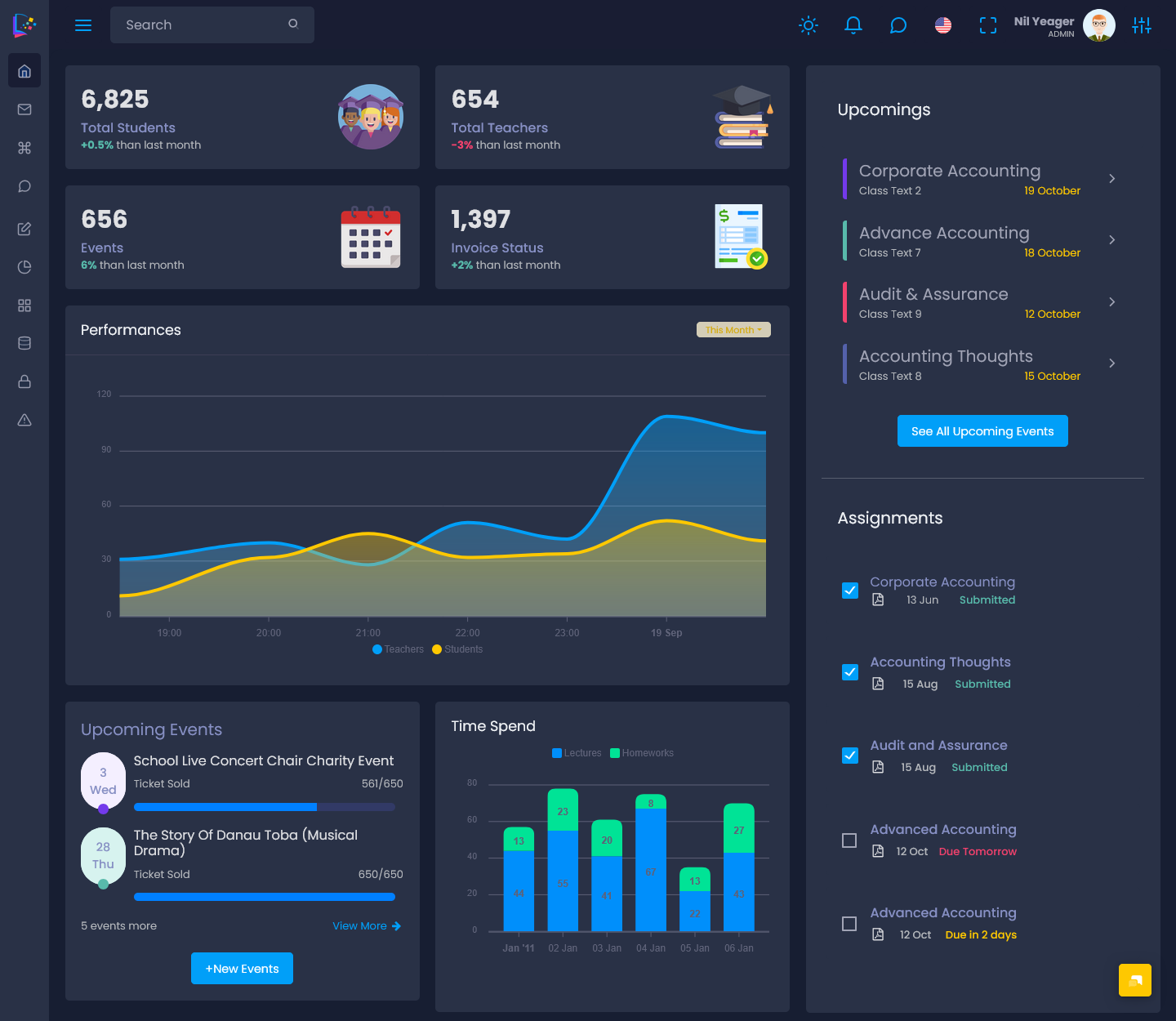
BUY NOW DEMO
Why Bootstrap 5 is Best for LMS
Choosing the right technology is very important for building a strong LMS Dashboard. Bootstrap 5 Admin Template is one of the best choices for modern dashboards because it is fast, responsive, and easy to use.
Bootstrap 5 helps developers create clean and mobile-friendly designs. This is important because users access dashboards from different devices like laptops, tablets, and smartphones. With Bootstrap 5, your Education Dashboard will look perfect on all screen sizes.
Another reason why Bootstrap 5 is popular is its flexibility. Developers can easily customize the design according to their needs. This makes it ideal for creating a unique LMS Admin Template that stands out from others.
It also saves development time. With ready-to-use components, developers can quickly build an Admin Panel without starting from scratch. This is very helpful for startups and small teams.
In short, Bootstrap 5 Admin Template provides speed, design quality, and flexibility, making it the best choice for building a powerful LMS Dashboard.
Why New Developers Choose Our Learning Dashboard
New developers often look for simple and ready solutions to build projects quickly. Our Learning Dashboard is designed especially for them. It is easy to understand, well-structured, and beginner-friendly.
The clean code and organized layout make it simple to customize. Even if someone has basic knowledge, they can easily work with our LMS Admin Template. This reduces the learning curve and helps developers complete projects faster.
Another important reason is design quality. Our Elearning Dashboard comes with modern UI elements that give a professional look. Developers do not need to spend extra time designing from scratch.
The Courses Dashboard Template is also very flexible. It can be used for different types of projects like schools, training centers, and online course platforms. This makes it a perfect choice for beginners who want a multipurpose solution.
Overall, our Learning Dashboard is a smart choice for new developers who want a simple, clean, and powerful dashboard.
Why Our Elearning Analytical Charts is the Best for Educations Data
Data plays a very important role in online learning. Understanding student performance, course engagement, and progress is only possible with proper data analysis. This is where our Elearning Dashboard stands out.
Our LMS Dashboard includes advanced analytical charts that help users understand data easily. These charts are designed in a simple way so that even non-technical users can read and understand them.
The Learning Management System Dashboard shows important insights like student progress, course completion rates, and performance trends. This helps teachers and administrators make better decisions.
The visual representation of data saves time. Instead of reading long reports, users can quickly understand information through graphs and charts. This improves efficiency and accuracy.
For any Onlinecourse Dashboard, data is very important. Our system ensures that all important information is displayed clearly and effectively. This makes our Elearning Dashboard one of the best choices for education data management.
Plus Points of Education Dashboard
An Education Dashboard offers many useful features that make learning management easy and effective. Our LMS Admin Template includes all important tools required for a complete system.
Course Management is one of the main features. It allows users to create, update, and manage courses easily. Teachers can upload content, organize lessons, and control course structure without any difficulty.
Student and Instructor Management helps in managing all users in one place. Administrators can add, edit, and monitor students and teachers. This makes the system organized and easy to control.
Progress Tracking and Reports provide detailed insights into student performance. The Learning Dashboard shows how students are performing, which helps in improving learning outcomes.
Quiz and Assignment Builder allows teachers to create tests and assignments easily. This feature is very useful for evaluating student knowledge and improving engagement in online classes.
Role-Based Access Control ensures security and proper management. Different users get different access levels in the Admin Panel. This keeps the system safe and well-managed.
Overall, the Education Dashboard provides all essential features needed for a smooth and effective learning system.
Discover Industries Powered by Our LMS Admin Template
Our LMS Admin Template is not limited to one sector. It is used across different education-related industries because of its flexibility and powerful features.
Training and Certification Institutes use the LMS Dashboard to manage courses, exams, and certifications. It helps them organize training programs and track student progress easily.
Colleges and Universities use the Education Dashboard for managing large numbers of students, courses, and academic data. It simplifies complex operations and improves efficiency.
Language Learning Centers use the Online Classes Dashboard to manage live sessions, practice tests, and student progress. It helps in delivering better learning experiences.
Skill Development Institutes use the Learning Dashboard for professional training programs. It helps in tracking skills, progress, and certifications in an organized way.
E-Learning Platforms depend heavily on the Onlinecourse Dashboard. They use it to manage users, courses, and payments. It acts as the main Admin Panel for their entire system.
These industries show how useful and flexible our LMS Admin Template is for different types of learning environments.
Conclusion
An LMS Dashboard is an essential tool for modern education systems. It simplifies learning management, improves efficiency, and enhances user experience.
With features like course management, progress tracking, and analytical charts, a Learning Management System Dashboard becomes a complete solution for education and training.
Our LMS Admin Template, built using Bootstrap 5 Admin Template, offers everything needed to create a powerful and user-friendly system. It is suitable for beginners, developers, and organizations alike.
Whether you are running online classes, managing a training institute, or building an e-learning platform, our LMS Dashboard is the perfect choice for you.
FAQs
What is an LMS Dashboard used for?
An LMS Dashboard is used to manage courses, students, and learning activities in one place. It helps in tracking progress and improving learning efficiency.
Who can use an LMS Admin Template?
Anyone including schools, colleges, training institutes, and e-learning platforms can use an LMS Admin Template for managing their learning system.
Is Bootstrap 5 good for LMS development?
Yes, Bootstrap 5 Admin Template is fast, responsive, and easy to customize, making it perfect for LMS development.
What features are included in an Education Dashboard?
An Education Dashboard includes course management, student management, progress tracking, quizzes, and role-based access control.
Can beginners use this Learning Dashboard?
Yes, our Learning Dashboard is designed to be beginner-friendly with simple structure and easy customization.

Related Posts


This Post Has 0 Comments