

In today’s digital hiring environment, companies and recruitment platforms rely heavily on organized systems to…

Upgrade Your Recruitment with Advanced Job Board Dashboard
Reading Time: 7 minutes

Recruitment is the backbone of every successful organization. Managing multiple job applications, shortlisting candidates, scheduling interviews, and monitoring trends can often be overwhelming without the right tools. This is where our Job Board Dashboard comes into play. We have recently upgraded our Job Board Admin Template, incorporating a brand-new dashboard design with the best UI components and enhanced features to make your recruitment process smoother, faster, and more efficient.
Our Job Board Software Dashboard is designed for HR teams, recruitment managers, and organizations aiming to streamline hiring operations. With this new dashboard, managing applications, jobs, and interviews becomes not just easier but also more visually intuitive. Whether you are a small startup or a multinational corporation, this dashboard provides the tools you need to make informed recruitment decisions.
Explore Dashboard of Job Board

BUY NOW DEMO
What is a Job Board Dashboard?
A Job Board Dashboard is a central platform that consolidates all recruitment activities into a single, easy-to-navigate interface. It acts as a control center for HR teams, providing real-time updates and analytics about job postings, candidate applications, and recruitment trends.
Unlike traditional spreadsheets or manual tracking systems, the Job Portal Admin Dashboard offers a digital, visually appealing solution. Recruiters can monitor the progress of each application, track shortlisted candidates, and manage interviews from a single platform. Features like interactive charts, application status tracking, and social media engagement make this dashboard not just functional but strategic.
The purpose of a Job Employment Dashboard is to enhance efficiency, reduce recruitment time, and help organizations make better hiring decisions. By giving recruiters access to meaningful insights, it allows them to prioritize applications, plan interview schedules, and ensure that no candidate is overlooked.
Why This Job App Dashboard is the Best
Choosing the right recruitment management tool can make a significant difference in hiring quality and speed. Our upgraded Job Board Dashboard Template stands out for several reasons.
First, the new design focuses on user experience. Every component, from charts to tables, is crafted to make navigation intuitive. Recruiters can access all important data with just a few clicks. The dashboard is responsive and adaptable, ensuring a seamless experience on desktops, tablets, and mobile devices.
Second, it combines data visualization with actionable insights. The Job Board Software Dashboard not only shows the number of applications but also provides trends, highlighting active jobs and upcoming interview schedules. This allows recruiters to forecast hiring needs and strategize effectively.
Third, automation and integration make the recruitment process effortless. The dashboard connects with social media platforms to show engagement metrics, helping recruiters understand candidate interactions and brand visibility. Notifications for new applications or scheduled interviews ensure no important task is missed.
Finally, the flexibility of the Job Portal Admin Dashboard makes it suitable for organizations of any size. Whether you are handling hundreds of applications or just a few, this dashboard scales with your requirements.
Other Dashboard of Job Board
LTR Style – Light Version Dashboard
BUY NOW DEMO
LTR Style – Dark Version Dashboard
BUY NOW DEMO
Who Can Use This Dashboard?
The Job Board Dashboard is designed for a wide range of users across different industries. Its versatility allows recruitment teams, HR departments, and organizations to manage applications efficiently. Below are some examples of who can benefit from this dashboard:
1. IT Companies
In fast-paced IT firms, hiring the right talent quickly is crucial. The Job Board Dashboard allows IT recruitment teams to track applications for roles like software developers, project managers, and system analysts. With visual insights into candidate status, trends, and shortlisted applications, IT HR teams can make data-driven decisions without missing deadlines. The ability to schedule interviews and manage communications with candidates in one place reduces workload and improves response times.
2. Manufacturing Firms
Manufacturing companies often deal with multiple job positions simultaneously, from engineers to machine operators. Using a Job Employment Dashboard, recruiters can manage applications for different roles efficiently. Features like active job tracking, application trends, and candidate management help manufacturing HR teams prioritize hiring tasks and ensure timely recruitment for critical positions.
3. Educational Institutions
Schools, colleges, and universities frequently hire teaching and administrative staff. A Job Portal Admin Dashboard allows academic institutions to post multiple openings, monitor applicant status, and schedule interviews for faculty and administrative positions. Insights into application trends help institutions plan future recruitment drives effectively, ensuring they attract high-quality candidates.
4. Healthcare Providers
Hospitals, clinics, and medical centers have unique staffing needs. Using a Job Board Software Dashboard, healthcare HR teams can track applications for doctors, nurses, and technical staff. Monitoring shortlisted candidates, pending applications, and interview schedules ensures the hiring process remains efficient and organized, even under high-pressure conditions.
5. E-commerce Companies
Rapidly growing e-commerce businesses require diverse talent for operations, marketing, logistics, and customer service. The Job Board Dashboard Template helps recruitment teams track applications across multiple departments and positions. Trends and data insights allow for better workforce planning and timely hiring for key roles.
6. Government Organizations
Recruitment in government departments is often structured and requires handling a large number of applicants. The Job Board Dashboard simplifies this process by providing a single platform to monitor applications, schedule interviews, and track shortlisted candidates. It ensures transparency and efficiency in managing recruitment workflows.
7. Startups and SMEs
Startups often operate with limited HR resources, making efficient recruitment crucial. The Job Portal Admin Dashboard allows small teams to manage multiple applications without being overwhelmed. Features like trend monitoring, social media engagement, and interview scheduling help startups quickly identify top talent and make hiring decisions confidently.
Features of the New Dashboard
Our upgraded Job Board Dashboard Template comes packed with powerful features to enhance recruitment management. Each feature is designed to simplify workflows and improve productivity.
1. Track Job Applications
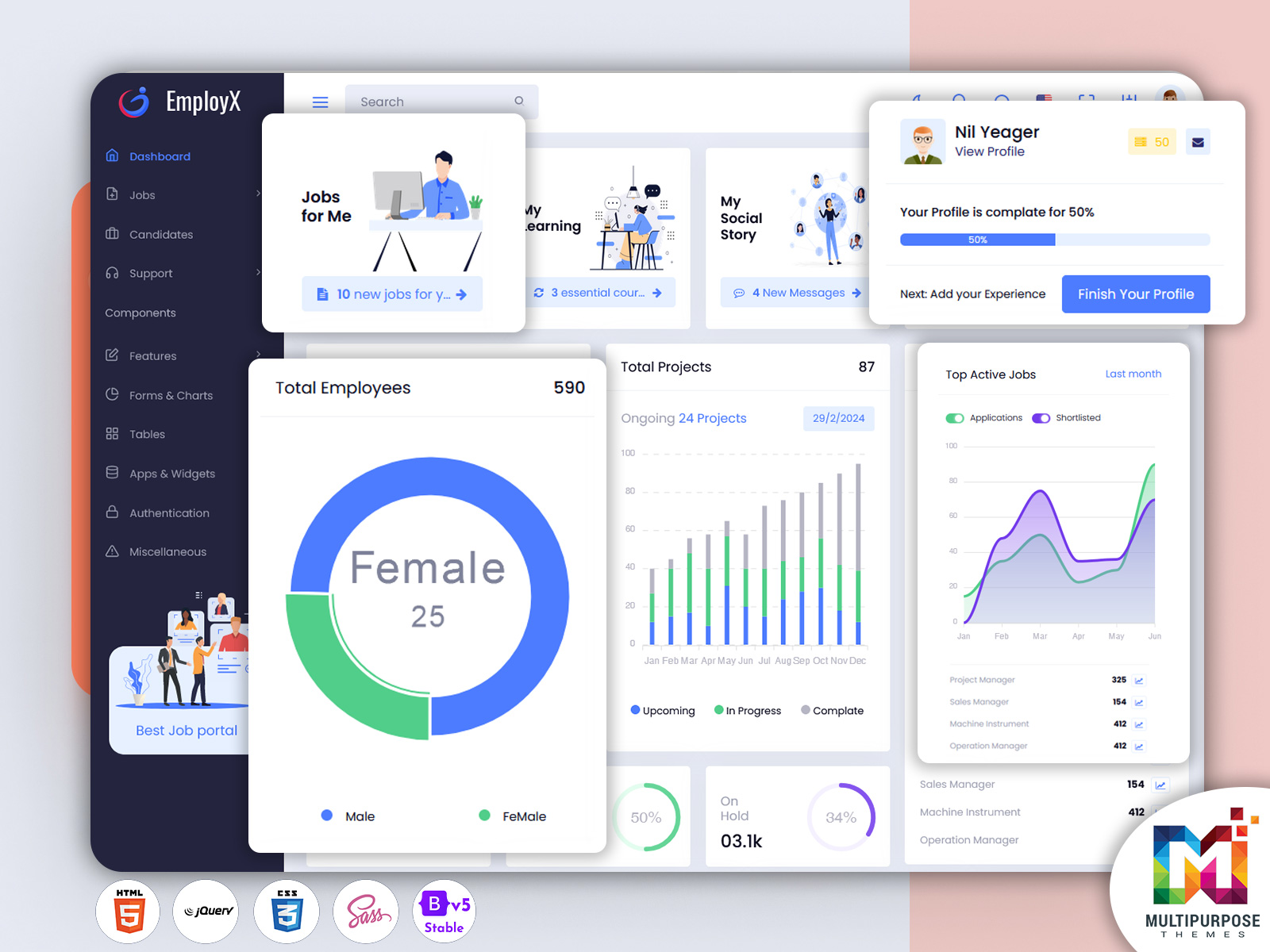
The dashboard provides a detailed overview of all applications received. Metrics like total applications, shortlisted candidates, and on-hold applications give recruiters a clear understanding of the current hiring status. By displaying percentages and trends, the Job Board Dashboard allows HR teams to make informed decisions about candidate selection and prioritization. This feature ensures that no applicant is overlooked and helps streamline the recruitment process effectively.
2. Manage Job Positions
Managing multiple job positions is effortless with our Job Portal Admin Dashboard. Recruiters can create and monitor job titles, assign positions to specific departments, and track applications for each role. Whether it’s a Project Manager, Sales Executive, or Machine Operator, this feature ensures organized management of job openings. It helps HR teams maintain clarity and avoid confusion while dealing with multiple vacancies simultaneously.
3. Monitor Application Trends
Understanding recruitment trends is essential for efficient hiring. The Job Employment Dashboard includes an Active Jobs section with bar charts showing monthly application and shortlisting trends. This feature enables recruiters to identify peaks and troughs in candidate applications, forecast hiring needs, and adjust strategies accordingly. Visual insights make it easier to present data to management and improve overall workforce planning.
4. New Applications
Keeping track of new applications is simple with the Job Board Software Dashboard. Recruiters can view a list of recent applications, including the applicant’s name, the position applied for, and their application status. This real-time update allows HR teams to respond quickly, shortlist top candidates, and maintain timely communication. It helps reduce delays in the recruitment process and ensures candidates receive prompt feedback.
5. Scheduled Interviews
The Scheduled Meetings section of the Job Board Dashboard Template provides a clear overview of upcoming interviews. Displayed in a calendar format, recruiters can easily manage their schedules, avoid conflicts, and ensure interviews are conducted on time. This feature streamlines communication with candidates and improves the overall candidate experience, reflecting positively on the organization’s brand.
6. Social Media Engagement
In today’s digital era, social media plays a vital role in recruitment. The Job Board Dashboard includes a Social Media Updates section showing recent posts from platforms like Twitter and Facebook. Recruiters can track engagement, monitor candidate interactions, and assess the impact of job postings on social channels. This feature helps organizations improve their online presence and attract top talent more effectively.
Conclusion
Our upgraded Job Board Dashboard is more than just a management tool; it is a strategic solution for modern recruitment challenges. By combining functionality, intuitive design, and insightful analytics, the dashboard empowers HR teams to manage applications efficiently, shortlist candidates effectively, and schedule interviews seamlessly.
With features like job tracking, trend monitoring, and social media integration, this Job Board Software Dashboard enhances productivity while providing a visually appealing and user-friendly interface. Organizations across industries, including IT, healthcare, education, manufacturing, and startups, can benefit from its versatile design and robust capabilities.
The Job Portal Admin Dashboard ensures that every step of the recruitment process is organized, data-driven, and efficient. Whether you are hiring a few key employees or managing mass recruitment, this dashboard provides the insights, tools, and control needed to make the best hiring decisions.
Investing in this advanced Job Board Dashboard Template means reducing recruitment time, improving candidate experiences, and achieving better organizational outcomes. It’s the ultimate solution for HR professionals who want to streamline their workflows and stay ahead in the competitive talent acquisition landscape.
FAQs
Q1: What is a Job Board Dashboard?
A Job Board Dashboard is a central platform that allows recruiters to manage job applications, track candidates, and schedule interviews efficiently in one organized interface.
Q2: Who can use a Job Employment Dashboard?
HR teams, recruitment managers, startups, IT companies, healthcare providers, educational institutions, and government organizations can all benefit from using a Job Employment Dashboard.
Q3: What features are included in the Job Board Software Dashboard?
The dashboard includes tracking job applications, managing positions, monitoring trends, viewing new applications, scheduling interviews, and social media engagement features.
Q4: How does the Job Portal Admin Dashboard improve recruitment?
It provides visual insights, real-time updates, and organizational tools that streamline workflows, reduce hiring time, and improve candidate management efficiency.
Q5: Can the Job Board Dashboard handle multiple job positions?
Yes, the dashboard allows recruiters to manage multiple job openings simultaneously, track applications for each position, and organize recruitment workflows effectively.
Q6: Is the new dashboard mobile-friendly?
Absolutely, the dashboard is responsive and designed to work seamlessly across desktops, tablets, and mobile devices.
Q7: How does social media integration help with recruitment?
By tracking posts and engagement on platforms like Twitter and Facebook, recruiters can monitor brand presence, assess candidate interactions, and improve outreach strategies.
Q8: What makes this Job Board Dashboard Template different from others?
Its combination of intuitive design, comprehensive features, real-time updates, and data-driven insights makes it a superior tool for effective recruitment management.







Related Posts




This Post Has 0 Comments