

Planning a wedding involves managing many tasks at the same time. From coordinating vendors and…

Updated Wedding Dashboard for Managing Bookings, Guests & Task Tracking
Reading Time: 6 minutes
Managing wedding events is a beautiful but complex responsibility. Every bride and groom dream of a perfect day, and behind that special day stands a hardworking team handling endless tasks — guest lists, budgeting, vendors, schedules, bookings, invitations, follow-ups, and much more. But despite the importance of smooth planning, many event management teams still struggle with disorganized spreadsheets, scattered emails, manual tracking systems, and duplicate work.
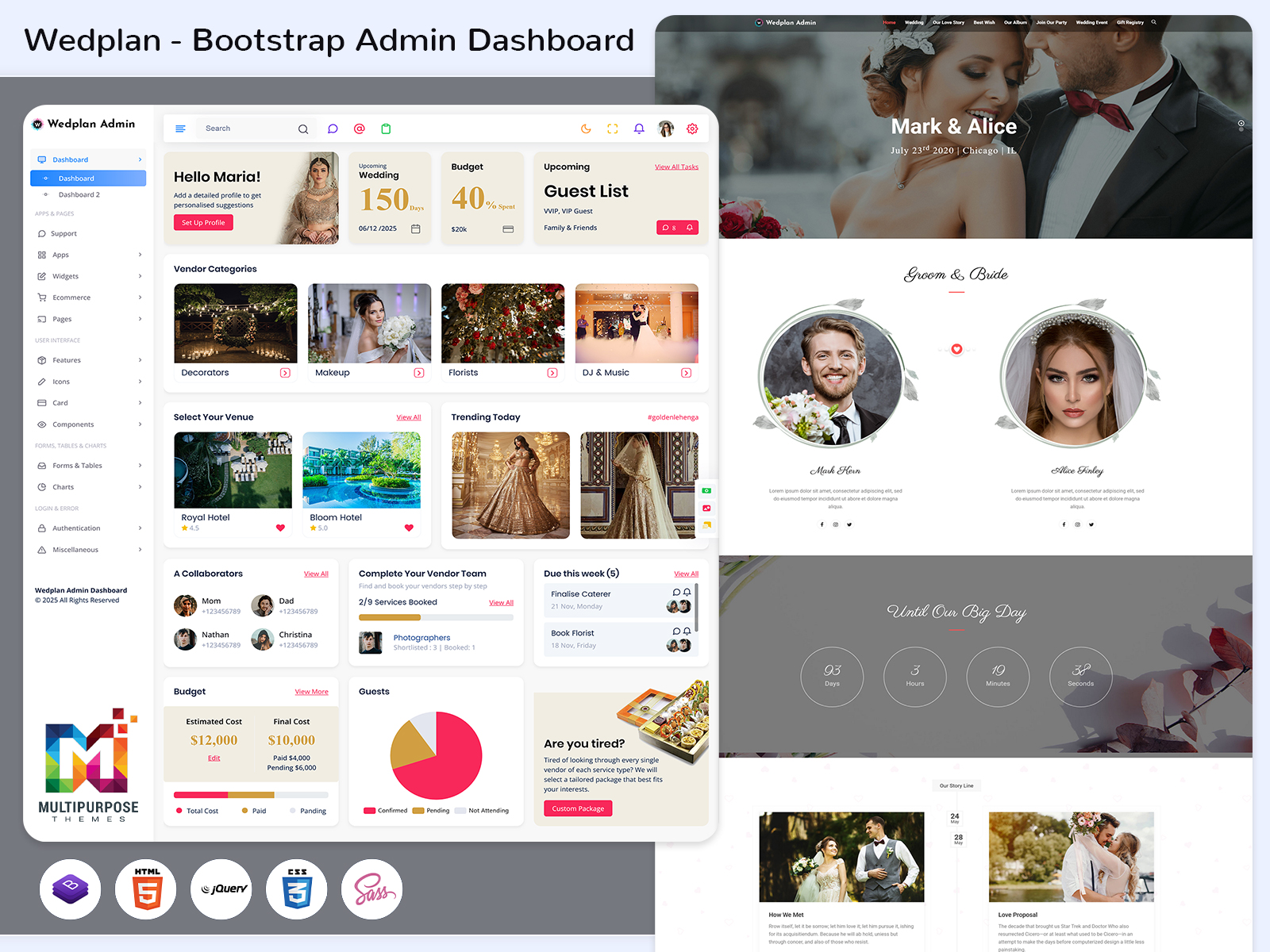
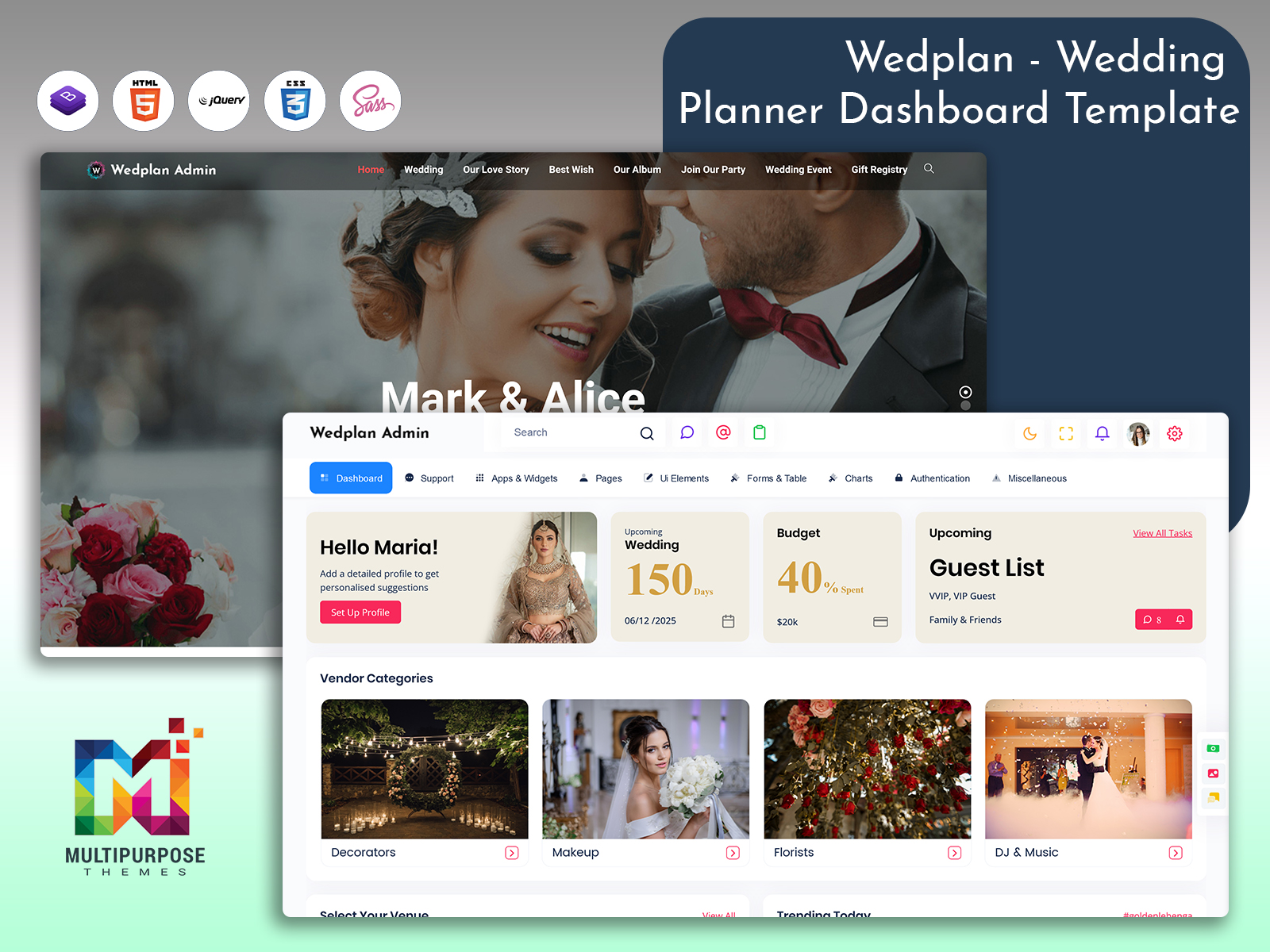
That’s exactly why we created Wedplan — a newly launched Wedding Dashboard, built using Bootstrap 5, thoughtfully designed to simplify and automate the entire event planning process. Wedplan is a pre-built, ready-to-use admin dashboard developed to support wedding planners, event managers, freelancers, developers, and small agencies who need a modern, clean, and professional backend system to manage their workflow efficiently.
Whether you’re organizing one wedding at a time or managing multiple high-scale events across different dates and locations, Wedplan gives you full control and real-time visibility from a single dashboard. It replaces manual data handling with a powerful digital interface, helping planners improve accuracy, save time, and deliver unforgettable client experiences.
With Wedplan, you can manage guest tracking, vendor bookings, event scheduling, budgeting, client information, invoices, todo lists, reports, and progress charts — all from one easy-to-use dashboard. Future-ready, flexible, and fully customizable, Wedplan is more than just a template — it’s a complete admin system designed to scale with your business.
Explore Dashboard Design of Wedding Management
Dashboard – 1
BUY NOW DEMO
Dashboard – 2
BUY NOW DEMO
Frontend HTML Template
Demo – 1
BUY NOW DEMO
Demo – 2
BUY NOW DEMO
Why Wedplan Stands Out
In the event industry, time is everything. Clients expect fast updates, transparent information, and perfectly coordinated execution. Wedplan eliminates confusion and ensures event managers always stay ahead of their tasks. Its user-friendly design, modern UI components, and built-in planning tools transform the way teams work, communicate, and deliver results.
The Wedding Dashboard is built with Bootstrap 5, making it responsive, mobile-friendly, and visually appealing on all devices — whether your team works from a desktop, tablet, or smartphone. It comes with structured menu layouts, advanced forms, tables, charts, modals, calendars, analytics, and documentation, so you can launch your backend system without writing code from scratch.
Wedplan is ideal for those who seek speed, clarity, and performance. It helps reduce manual work, improves productivity, ensures organized planning, and strengthens vendor & client collaboration.
Key Features of Wedplan
Guest & Wedding Tracking
Admin Template includes a powerful guest & wedding tracking module that allows planners to manage everything related to guest invitations, RSVPs, total attendees, meal selections, and seating plans. It also enables planners to track multiple weddings simultaneously from one system — making it perfect for companies working on multiple events. Instead of maintaining separate spreadsheets or messaging groups, Wedplan consolidates all data and helps event managers monitor real-time guest statistics, attendance confirmations, and event-wise engagement. Planning becomes effortless and more accurate with structured guest management.
Upcoming Events Overview
Managing multiple upcoming weddings and event timelines can be overwhelming, especially when schedules overlap. Wedplan offers a clean and organized overview section showing all upcoming events with date-wise sorting and detailed event status. It provides planners with a quick snapshot of what’s coming next so they can prioritize tasks, assign responsibilities, and ensure that nothing falls behind. From ceremony schedules to pre-wedding functions, the upcoming event board keeps teams prepared, organized, and always on track — providing clarity and reducing unwanted stress during peak seasons.
Booking / Vendor Management
Vendor coordination is often one of the biggest challenges in wedding planning — including photographers, decorators, caterers, sound & lighting teams, transportation services, venues, and more. Wedplan solves this with a dedicated vendor & booking module where planners can track availability, manage ongoing bookings, finalize contracts, and store vendor contact details in a centralized system. With every booking recorded digitally, planners can easily review pending or confirmed services and communicate updates instantly. This feature improves collaboration, strengthens vendor relationships, and ensures a smooth flow leading up to the event day.
Visual Planning Charts & Statistics
Wedplan includes dynamic charts and visual planning tools designed to simplify progress tracking for planners and teams. Using these visuals, users can easily monitor completed tasks vs pending ones, budget utilization, guest management status, vendor bookings, and overall event progress. Instead of reading lengthy reports, planners can understand event readiness at a glance. This boosts decision-making, encourages proactive planning, and allows better resource distribution within teams. Visual performance metrics can even be shared with clients for transparency, enhancing trust and satisfaction.
User Activity & Admin Panel Control
If multiple team members, vendors, or admins manage the system together, Wedplan offers user activity tracking and administrative access control. This feature ensures transparency, security, and accountability across the team. Admins can monitor actions, assign permissions, manage login access levels, and review changes made within the Wedding Dashboard. It helps avoid errors, unauthorized modifications, and data mismanagement. When handling major events with large teams, having an audit-friendly system significantly improves workflow accuracy, communication clarity, and full control of operational processes.
Pre-built UI Components
Wedplan comes with a wide range of pre-built UI components, including data tables, charts, cards, alerts, forms, modals, buttons, and layout elements. These ready-to-use components empower developers to build extended features faster without designing everything from scratch. It significantly reduces development time, improves system consistency, and ensures a polished appearance. Whether integrating analytics, form modules, booking pages, or custom reports, these reusable components support seamless customization and rapid deployment. It’s the perfect choice for design teams who want both performance and flexibility.
Responsive & Cross-Browser Compatibility
Built with Bootstrap 5 and a mobile-first approach, Wedplan ensures flawless performance on desktops, laptops, tablets, and smartphones. Whether users open the Wedding Planner Dashboard on Chrome, Safari, Firefox, Edge, or Opera, the interface remains smooth, responsive, and user-friendly. This compatibility is critical because event teams often communicate and coordinate from different locations using different devices. With a fluid and optimised UI, Wedplan maintains speed, readability, and easy navigation — making it ideal for real-time updates during event planning and execution.
Fully Customizable Design
Wedplan is fully customizable, allowing users to personalize colors, fonts, dashboard layouts, UI components, and features. Built with Sass and Bootstrap utility classes, developers can quickly modify elements to match brand identity or event theme requirements. Whether you want to integrate additional APIs, connect booking systems, or merge CRM software, Wedplan offers full flexibility to adapt and grow. This makes it a long-term investment — not just a temporary Wedding Planner Dashboard Template.
Who It’s For
Professional Wedding Planners & Event Management Companies
Wedplan is built for experienced wedding planners and event management companies managing multiple weddings simultaneously. It provides them a structured and professional backend system to replace spreadsheets, manual tracking, and communication chaos. By using Wedplan, planners gain more control over operations, reduce human errors, improve productivity, and enhance client satisfaction through transparency and quick updates. From small-scale gatherings to massive destination weddings, Wedplan supports everything with organization and efficiency.
Freelancers & Small Businesses
Independent wedding planners, photographers, decorators, caterers, and small event teams often struggle with budgeting, vendor coordination, and scheduling. With Wedplan, they get an affordable and ready-to-use Wedding Dashboard that saves development cost and time. It allows them to manage clients and events professionally without needing a custom-built platform. The clean UI, customizable tools, and reporting features help small businesses present themselves like big agencies — boosting business growth and customer trust.
Developers & Web Designers
For developers building custom event management systems or SaaS applications, Wedplan provides a strong foundation. They can integrate the Wedding Management Template into their backend systems, expand features, or tailor it into different industry requirements. The pre-made UI components, Bootstrap 5 environment, and organized coding structure save weeks of development time. Whether creating CRM dashboards, booking portals, or multi-vendor management systems, Wedplan is a flexible starting point that accelerates project delivery.
Adaptable to Non-Wedding Uses
Even though Wedplan is designed specifically for weddings, it is flexible enough to adapt to other event planning needs — such as corporate events, conferences, birthday parties, exhibitions, seminars, and generic admin dashboards. Since its components are universal, users can transform it into any customized event system. The layout and functionality make it suitable for tracking clients, scheduling, budgets, venue bookings, and volunteer/team coordination for non-wedding environments as well.
Conclusion
Wedplan is more than a Wedding Dashboard— it is a complete event management solution designed to simplify planning, improve productivity, and enhance client experiences. With its ready-to-use interface, modern UI, high performance, built-in analytics, and flexibility, it helps wedding planners and event professionals manage everything from one centralized system. Whether you’re a planner, freelancer, agency, or developer, Wedplan empowers you to deliver stress-free and perfectly organized events faster with confidence.
If you’re looking for a smart and scalable wedding admin dashboard, Wedplan is your perfect partner — saving time, improving accuracy, and boosting growth.
Frequently Asked Questions (FAQs)
1. What is Wedplan?
Wedplan is a pre-built wedding & event admin dashboard template developed using Bootstrap 5. It helps planners manage guests, schedules, budgets, vendors, bookings, and event details from a single dashboard.
2. Do I need coding knowledge to use Wedplan?
You can use the demo and pre-built pages without coding, but customization may require basic HTML, CSS, Bootstrap, or developer support.
3. Is Wedplan only for wedding planners?
No. While designed for weddings, it’s flexible enough to adapt to corporate events, conferences, birthday parties, and generic admin panel needs.
4. Does it support multiple weddings at a time?
Yes, Wedplan includes multi-event tracking features ideal for agencies handling several weddings together.
5. Can developers customize Wedplan?
Absolutely. Built with Bootstrap 5 and Sass, it is easy to customize, extend, and integrate with larger applications.
6. Is Wedplan mobile-friendly?
Yes, Wedplan is responsive and works smoothly on all screen sizes and browsers.
7. What components come with Wedplan?
It includes charts, tables, forms, cards, modals, alerts, icons, layouts, and reusable UI blocks for fast development.

Related Posts


This Post Has 0 Comments