

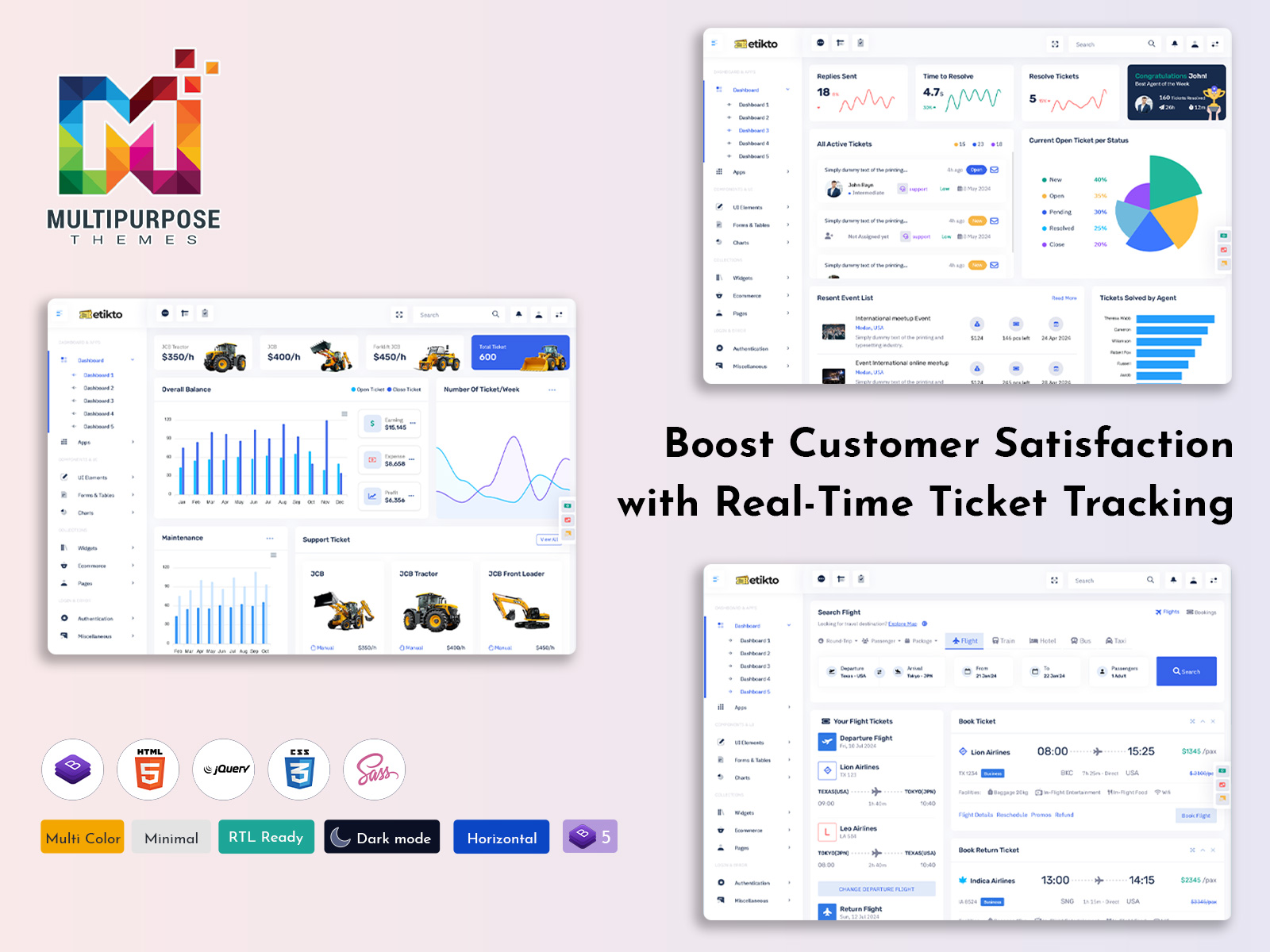
A Ticket Dashboard is an essential tool for businesses that handle customer queries, complaints, or…
Ticket Dashboard Explained: Features, Benefits, and Selection Tips
Reading Time: 6 minutes
Understanding the Need for a Modern Ticket Management System
In today’s digital world, customer support plays a major role in business success. Every company, whether small or large, receives customer queries, complaints, feedback, and service requests daily. Managing all of these manually is not practical anymore. That is why businesses rely on a Ticket Dashboard to organize, track, and resolve issues smoothly.
A well-designed Admin Dashboard UI helps support teams stay organized and focused. Instead of searching through emails or spreadsheets, agents can view all open and closed tickets in one place. This not only improves efficiency but also increases customer satisfaction. When businesses invest in the right UI Dashboard, they create a system where every support request is handled properly and on time.
Watch Full Video
What Is an Admin Template for Ticket Management?
An Admin Template for ticket management is a ready-made design structure that helps businesses build a professional support system quickly. Instead of developing everything from scratch, companies can use a Bootstrap Admin Panel that already includes charts, tables, widgets, and reporting tools.
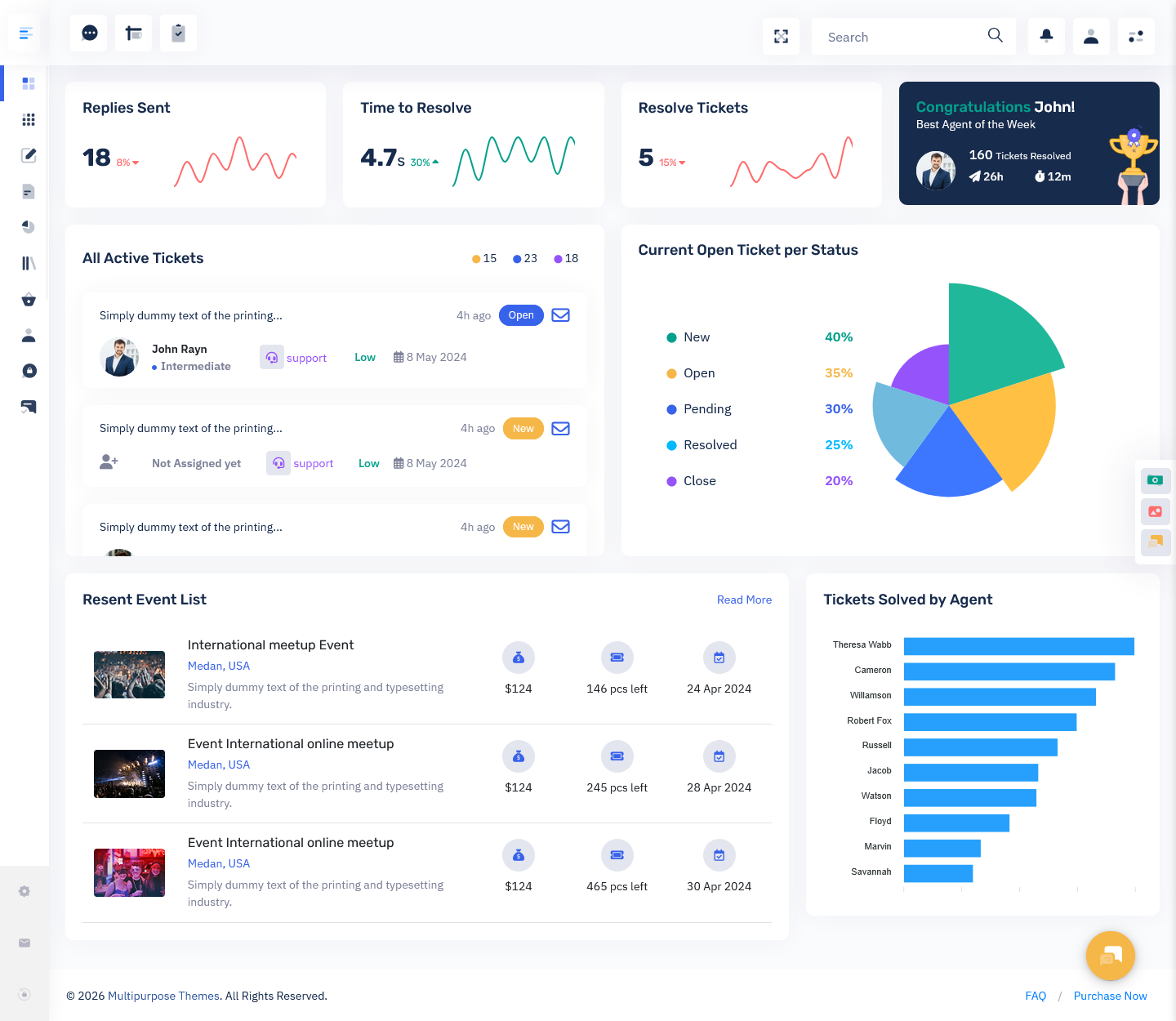
The core of this system is the Ticket Dashboard. It acts as a control center where managers and agents can see ticket activity in real time. From new tickets to resolved cases, everything is visible in one clean interface. A strong Admin Dashboard UI ensures that the layout is simple, easy to understand, and user-friendly.
A modern template also works as a Master Dashboard where different departments can monitor support data without confusion. It combines performance metrics, response times, and customer satisfaction data into one organized system.
Explore Dashboard Design
BUY NOW DEMO
Explore Other Dashboard
Dashboard: 1
BUY NOW DEMO
Dashboard: 2
BUY NOW DEMO
Dashboard: 4
BUY NOW DEMO
Dashboard: 5
BUY NOW DEMO
Dashboard: 6
BUY NOW DEMO
Dashboard: 7
BUY NOW DEMO
Why a Ticket Dashboard Is Essential for Businesses
Customer expectations are higher than ever. People want quick replies and fast solutions. Without a proper system, support teams can easily miss tickets or delay responses. This is where a Ticket Dashboard becomes extremely important.
It centralizes all support activities in one place. Agents can immediately see which tickets are new, which are pending, and which are resolved. Managers can monitor overall performance without switching between tools. The Ticket Dashboard reduces human error and improves response speed.
When combined with a Support Ticket Dashboard, the system becomes even more powerful. It provides deeper insights into agent productivity, average resolution time, and customer feedback scores. Businesses can use this information to improve service quality and internal processes.
How a Support Ticket Dashboard Improves Team Performance
A Support Ticket Dashboard is designed specifically for support teams. It highlights the most important metrics such as reply time, open cases, and satisfaction ratings. Instead of manually reviewing performance, managers can rely on visual reports and analytics.
For example, if one agent consistently resolves tickets faster than others, the data will clearly show it. If certain ticket categories take longer to close, the Support Ticket Dashboard helps identify those patterns. This makes training and resource planning much easier.
When businesses use a well-designed Admin Dashboard UI, they create a structured workflow. Each agent knows their responsibilities. Each ticket is tracked from creation to resolution. The Support Ticket Dashboard ensures that nothing falls through the cracks.
The Role of a UI Dashboard in Modern Support Systems
A UI Dashboard is not just about looks. It defines how users interact with the system. A cluttered interface can slow down productivity, while a clean design improves speed and clarity.
A modern UI Dashboard includes organized tables, easy filters, search options, and visual charts. Agents can quickly sort tickets by priority, status, or category. Managers can track performance without reading long reports.
When the Ticket Dashboard is built with thoughtful design principles, it reduces stress for support teams. Everything feels simple and manageable. This improves morale and overall efficiency.
How a Bootstrap Admin Panel Enhances Flexibility
Using a Bootstrap Admin Panel gives businesses flexibility and responsiveness. Since it is built on Bootstrap, the dashboard works smoothly on desktops, tablets, and smartphones.
This means managers can check the Ticket Dashboard even when they are not in the office. Agents can update ticket statuses from different devices. A responsive Admin Dashboard UI ensures a seamless experience across all screen sizes.
The Bootstrap Admin Panel also allows customization. Businesses can adjust layouts, change colors, and add features according to their needs. This makes it suitable for startups as well as large enterprises.
Features That Define a Powerful Ticket Dashboard
A high-quality Ticket Dashboard includes essential tracking features. It shows newly created tickets, unresolved issues, and completed requests in real time. Agents can view ticket details such as priority level, category, and customer history.
Another important element is reply time tracking. Businesses can monitor how quickly agents respond to customer queries. The Ticket Dashboard also displays average resolution time, helping teams improve efficiency.
Customer satisfaction tracking is equally important. Feedback collected after ticket resolution can be analyzed through the dashboard. This creates a data-driven approach to service improvement.
The Master Dashboard Concept in Ticket Management
A Master Dashboard combines multiple data views into one unified interface. Instead of separate systems for performance, reporting, and ticket tracking, everything appears in one place.
In large organizations, different departments may handle different types of tickets. A Master Dashboard allows top-level managers to monitor all support activities at once. It provides a bird’s-eye view of the entire operation.
When integrated with a Support Ticket Dashboard, this system becomes a complete support management solution. Leaders can make informed decisions based on real-time analytics.
Benefits of Using a Support Ticket Dashboard
The biggest advantage of a Support Ticket Dashboard is visibility. Teams no longer operate blindly. Every action is recorded and measurable.
It improves accountability because agent performance is clearly tracked. It boosts customer satisfaction by reducing response times. It also supports data-based decision-making, helping businesses identify trends and recurring issues.
When paired with a strong Admin Dashboard, businesses can forecast ticket volume, prepare for peak periods, and allocate resources effectively.
Industry Applications of Ticket Management Dashboards
Ticket management is not limited to IT companies. Healthcare providers use dashboards to manage patient service requests. E-commerce platforms use them to handle order issues. Travel companies use ticket systems to manage bookings and customer inquiries.
In each case, the Bootstrap Dashboard plays a central role. It organizes support requests and ensures that customers receive timely responses. A well-structured Admin Dashboard UI adapts to various industries easily.
Why Design Matters in Admin Dashboard UI
Good design increases productivity. An Admin Dashboard UI should feel intuitive. Agents should not need technical knowledge to navigate it.
Clear typography, logical layout, and responsive design make daily tasks easier. A visually balanced UI Dashboard reduces confusion and improves workflow speed.
When companies invest in a professional Bootstrap Admin Panel, they are investing in both functionality and user experience.
Choosing the Right Ticket Dashboard for Your Business
Not every template is suitable for every company. Businesses should choose a Ticket Dashboard that matches their support volume and operational complexity.
Small teams may need a simple layout with basic metrics. Large enterprises may require advanced analytics and a full Master Dashboard setup. The key is selecting a scalable system that grows with the business.
A good Support Ticket Dashboard should provide detailed reporting without overwhelming the user. It should be powerful yet easy to operate.
How MPT Provides Complete Dashboard Solutions
At MPT, we understand that every business has unique needs. That is why we offer a wide range of Admin Dashboard UI solutions. From crypto dashboards to medical systems and HR platforms, our templates are built with flexibility in mind.
Our Admin Dashboard solutions are designed with clarity, performance, and scalability as top priorities. Built using a modern Bootstrap Admin Panel, they provide responsive design and smooth functionality.
Whether you need a simple UI Dashboard or a full-featured Master Dashboard, we provide templates that adapt to your goals. Our Support Ticket Dashboard options help businesses manage customer interactions professionally and efficiently.
Conclusion
In the modern business environment, efficient customer support is no longer optional. It is essential. A well-designed Ticket Dashboard transforms how support teams operate. It centralizes information, improves response times, and increases customer satisfaction.
By implementing a professional Admin Dashboard UI built on a Bootstrap Admin Panel, businesses gain clarity and control. A Support Ticket Dashboard enhances team performance, while a Master Dashboard provides high-level insights for management.
Choosing the right UI Dashboard is not just about design. It is about creating a structured, scalable, and efficient support system that grows with your business.
With the right tools in place, companies can turn customer service into a strong competitive advantage and build long-term trust with their customers.
Frequently Asked Questions (FAQs)
What is a Ticket Dashboard?
A Ticket Dashboard is a centralized system that helps businesses track, manage, and resolve customer support requests efficiently. It provides real-time insights into ticket status, agent performance, and response times.
How does a Support Ticket Dashboard improve efficiency?
A Support Ticket Dashboard improves efficiency by organizing tickets in one place, tracking reply times, monitoring unresolved cases, and helping managers assign tasks properly for faster resolution.
What is the difference between a Ticket Dashboard and a Master Dashboard?
A Ticket Dashboard focuses mainly on ticket tracking and support performance, while a Master Dashboard provides a broader overview of multiple business metrics along with support operations.
Is a Bootstrap Admin Panel suitable for ticket management systems?
Yes, a Bootstrap Admin Panel is highly suitable because it offers responsive design, easy customization, and a professional Admin Dashboard UI that works smoothly across devices.
Can small businesses use a Support Ticket Dashboard?
Absolutely. A Support Ticket Dashboard is useful for businesses of all sizes. Even small teams can benefit from organized ticket tracking, better workflow management, and improved customer satisfaction.
Does a Ticket Dashboard help in tracking agent performance?
Yes, a Ticket Dashboard tracks metrics such as tickets solved, response time, and customer feedback. This helps managers evaluate performance and improve team productivity.
Is the Admin Dashboard UI customizable?
Yes, most modern Admin Dashboard UI templates allow customization of layouts, themes, widgets, and reports to match specific business needs and branding requirements.
Can a UI Dashboard work on mobile devices?
Yes, when built using a Bootstrap Admin Panel, the UI Dashboard is fully responsive and works seamlessly on desktops, tablets, and smartphones.

Related Posts




This Post Has 0 Comments